7 ND92F 70 en 15
5.5 Configuration parameters
When PAR is on the display you may enter the configura-
tion menu by pressing the ? key. In this menu the most
important configuration and signal modification parame-
ters are viewable. You may view the current value and edit
them by pressing the ? key at the relevant parameter.
The name of the parameter will appear on the upper row
of the display and the current value is on the lower row.
5.5.1 Performance level, PERF
If you want to change the tuning of the valve position
control, the PERF selection is available. The default fac-
tory value is C.
❑ Once PERF is displayed press the ? key to
enter the edit state and PERF starts to blink.
❑ Select between five values by pressing the + or
- key.
❑ After the desired value is displayed, press the
key ? to conclude the operation.
5.5.2 Low cut-off, CUTL
Low cut-off safety range CUTL ensures the valve closing
against mechanical travel stops. The factory default
value is 2 %.
❑ Once CUTL is displayed press the ? key to
enter the edit state and the CUTL will start to
blink. The currently selected value appears as a
percentage (%) on the display.
❑ Modify the parameter value by pressing + or -
keys alternately until the desired value appears
on the display.
❑ After the desired value is displayed, press the
key ? to conclude the operation.
5.5.3 Valve type, VTYP
To compensate for nonlinearity of the position feedback
caused by the actuator linkage mechanism of a linear
control valve, the appropriate selection must be made on
the VTYP display.
❑ After selecting VTYP on the display, press the ? key
to enter the edit state and the VTYP starts to blink.
❑ Select between four values rot, LIn, nCG or FLI
using the + and - keys. The value rot indi-
cates a rotary valve and LIn a linear valve. Use
nCG only for nelesCV Globe valves to accommo-
date special linkage geometry. Use FLI only for
linear valves when linkage geometry is not needed
to be corrected by valve controller firmware.
❑ To conclude press the ? key when the desired
value is shown on the display.
5.5.4 Actuator type, ATYP
In order to optimise the control performance the device
needs to be informed about the actuator type.
❑ After selecting ATYP on the display, press the ?
key to enter the edit state and ATYP starts to blink.
❑ Select between two values 2-A or 1-A using the +
and - keys. The value 2-A indicates a double
acting actuator and 1-A a single acting actuator.
❑ To conclude press the ? key when the desired
value is shown on the display.
5.5.5 Positioner fail action, PFA
Positioner fail action will take place in case of signal
failure or when the controller software discovers a fatal
device failure. For single acting actuators set value in
the spring direction. For double acting actuators see
Fig. 6 for correct settings.
❑ Once PFA is displayed, press the ? key to enter
the edit state and the PFA will start blinking.
❑ You may select between two values by pressing
the + or - key. The CLO value indicates that the
valve ought to be closed in fail action situations.
The OPE value indicates the valve to be opened in
fail action situations.
❑ After the desired value is displayed, press the
key ? to conclude the operation.
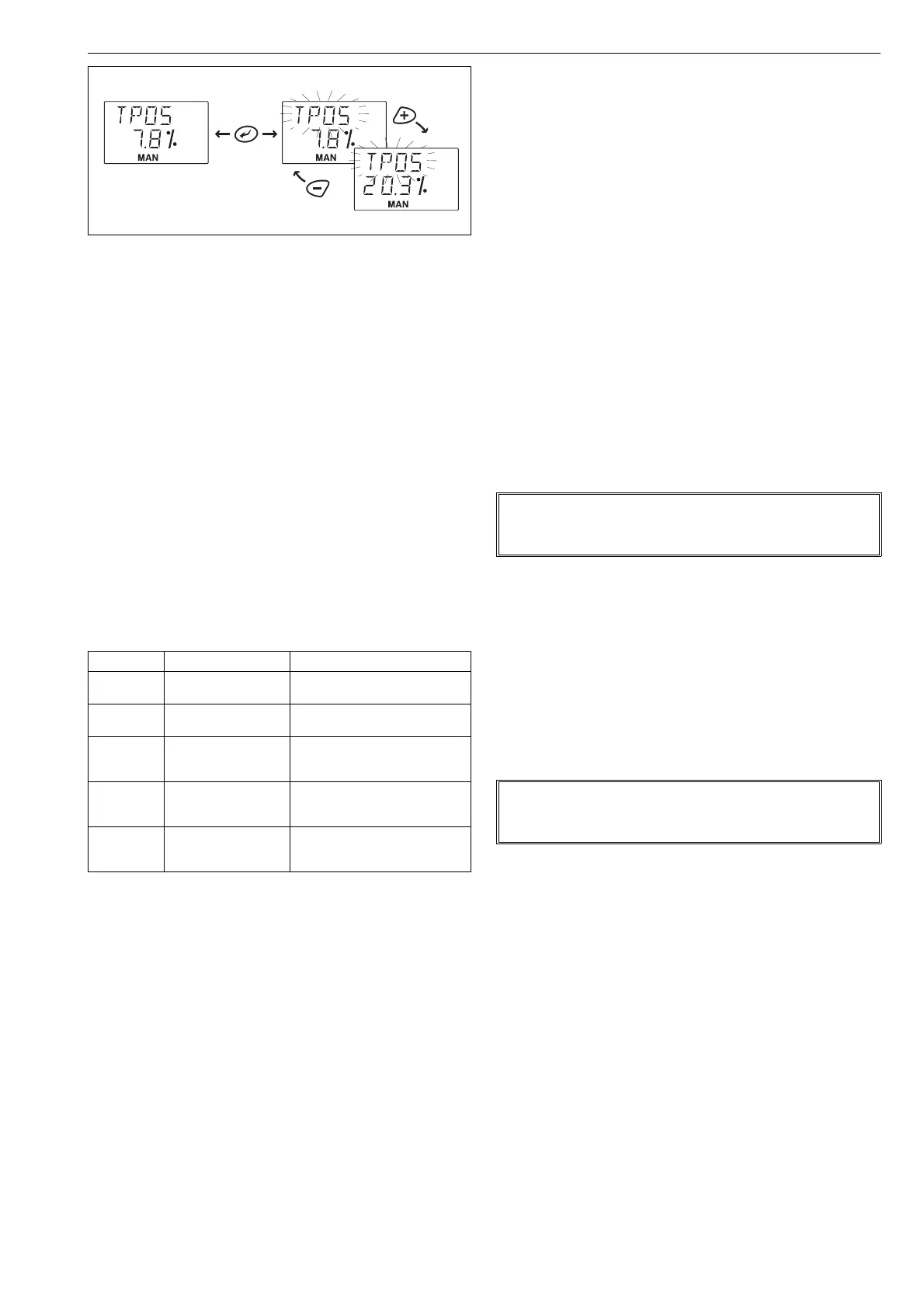
Fig. 13 Setpoint change in MAN mode
Table 4 Performance level
Selection Meaning Description
A
Aggressive Immediate response to
signal changes, overshoots
b
Fast Fast response to signal
changes, small overshooting
C
Optimum Very small overshoot with
minimum step response
time
d
Stable No overshooting, slow
response to input signal
changes
E
Maximum stability No overshooting, deadband
may increase, slow but
stable behaviour
For use with volume boosters and/or very fast actuators,
additional performance levels A1 to D1 can be used.
Characteristics of these extended levels are the same as
those in the table above. However, with performance level
settings A1 to D1, adaptive properties of the ND9000 control
algorithm are disabled.
NOTE:
Perform valve calibration and tuning always when
VTYP has been changed.
NOTE:
Perform valve calibration and tuning always when
ATYP has been changed.



 To Next Page