7 ND92F 70 en 17
❑ If the low cut-off > low limit, the low limit is not
active.
❑ If the low cut-off < low limit, both low cut-off and
limit are active.
❑ If the low cut-off is set to zero, the low cut-off is
not active.
❑ If the high cut-off < high limit, the high limit is not
active.
❑ If the high cut-off > high limit, both high cut-off
and limit are active.
❑ If the high cut-off is set to 100%, the high cut-off
is not active.
Only the low cut-off is adjustable using the LUI. Low
limit, high cut-off and high limit are configurable via
fieldbus.
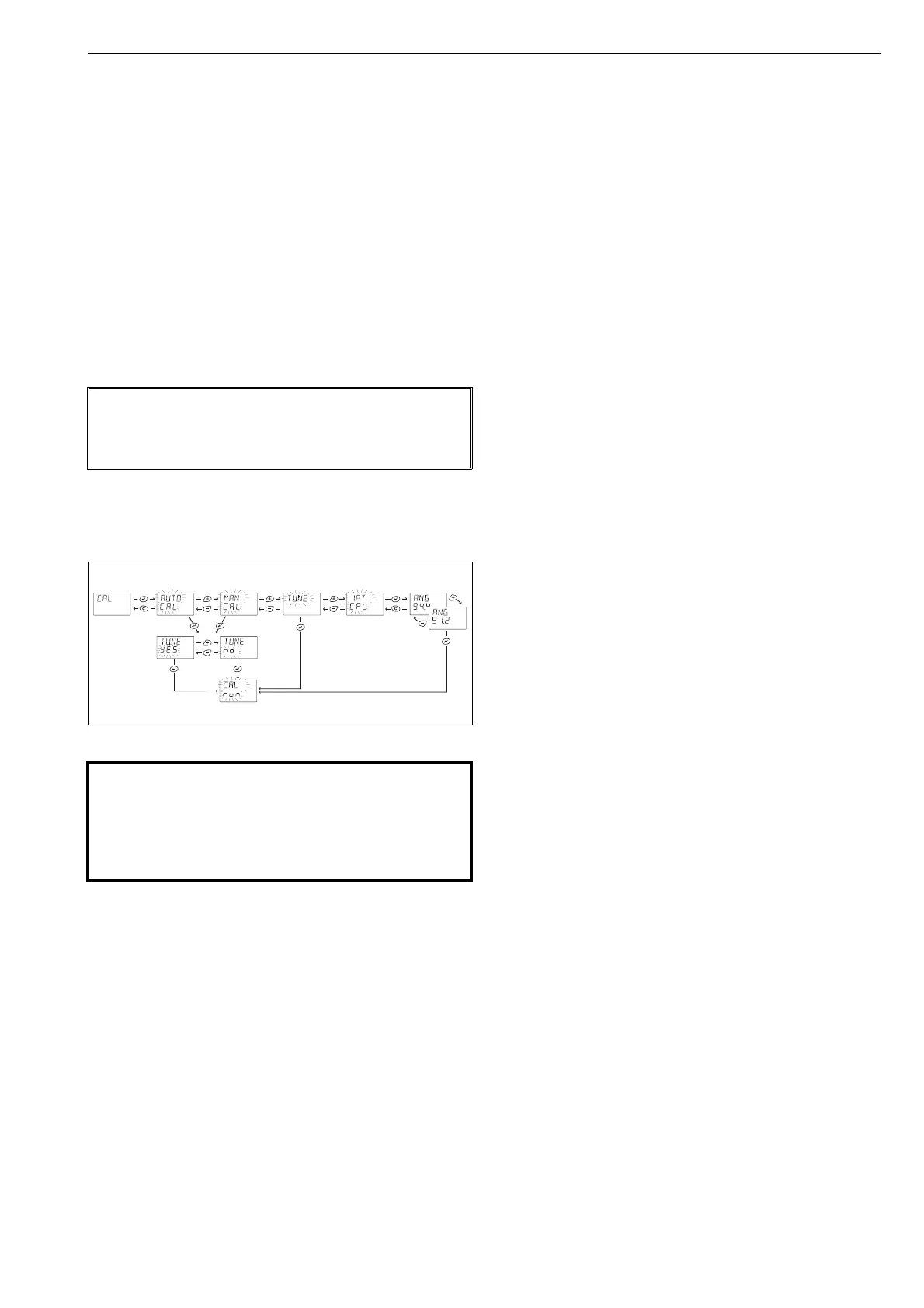
5.6 Valve travel calibration
Select CAL from the menu by using + or - keys and
press the ? key. Define the calibration type AUTO, MAN
or TUNE. You may also select TUNE after AUTO and MAN
calibration separately as seen in Fig.16.
5.6.1 AUTO calibration function
During the calibration process the display will show the
following text: CALrun. After calibration the ND9200F
scrolls CALIBRATION SUCCESSFUL text. You may inter-
rupt the calibration sequences at any time by pressing
the = key.
After the calibration sequence is finished, press the =
key twice to get back to the measurement view.
Please refer to Chapter 7 if this sequence has failed and
an error message is displayed.
If you cannot drive the valve into a fully open position or if
there is no mechanical limit stop, a manual calibration is
required.
5.6.2 MAN calibration function
After selecting the MAN calibration function from the
menu press the ? key to activate the procedure. With
the + or - keys drive the valve manually to the closed
(0 %) position and then press the ? key. If you cancel
the operation, the old values of the previous calibration
will be restored. Drive the valve into the desired maxi-
mum opening position (100 %) with the + and - keys
and press the ? key.
If this sequence has failed and an error message is
shown, see Chapter 7.
5.6.3 TUNE function
During the tuning the ND9200F controller searches for
optimum internal control parameters for the valve posi-
tion control. At any time you may interrupt the tuning
sequence by pressing the = key. The tuning will not
alter the PERF parameter.
If calibration and tuning are performed in sequence, the
cancelling of tuning does not restore the old calibration
values.
5.6.4 1-Point Calibration
1-point calibration is useful in cases in which the valve
controller needs to be changed but it is not possible to
run the normal calibration and the valve is not allowed
to change position (the valve is active, for example).
This procedure does not ensure the best possible
control performance, and it is always recommended
to run either AUTO or MAN calibration and tuning,
as soon as possible. The primary way to calibrate
valve position is to use either AUTO or MAN calibration.
Before starting 1-point calibration, read the warnings
and notes below and check that the valve is mechan-
ically locked. Before starting 1-point calibration,
adjust the TPOS value in the MAN mode (see sec-
tion 5.4.2) to correspond with the physical position
of the valve.
Once the 1-point calibration is started, the first view
shows ANG above and NN.N below (see Fig. 16). NN.N
presents the maximum turning angle (in degrees) that
the valve can perform.
To change the value:
❑ Press ?, NN.N begins blink
❑ Press + and - -buttons to change the value
After the correct valve operation angle is set, press ?
button.
During the calibration process the display will show the
following text: CALrun. After calibration the ND9200F
scrolls CALIBRATION SUCCESSFUL text. You may inter-
rupt the calibration sequences at any time by pressing
the = key.
After the calibration sequence is finished, press the =
key twice to get back to the measurement view.
Please refer to Chapter 7 if this sequence has failed
and an error message is displayed.
NOTE:
If AUTO CAL or MAN CAL is selected, the valve controller
must be in AUTO mode. 1-point calibration may run in
both AUTO and MAN mode.
Fig. 16 Calibration selection
WARNING:
Automatic calibration drives the valve against the
mechanical open and closed travel limits of the
valve-actuator assembly and a tuning procedure is
performed. Make sure that these procedures can
be safely executed.



 To Next Page