Mettler Electronics Corp.— Rev.J_09/13/17
10
Ent er
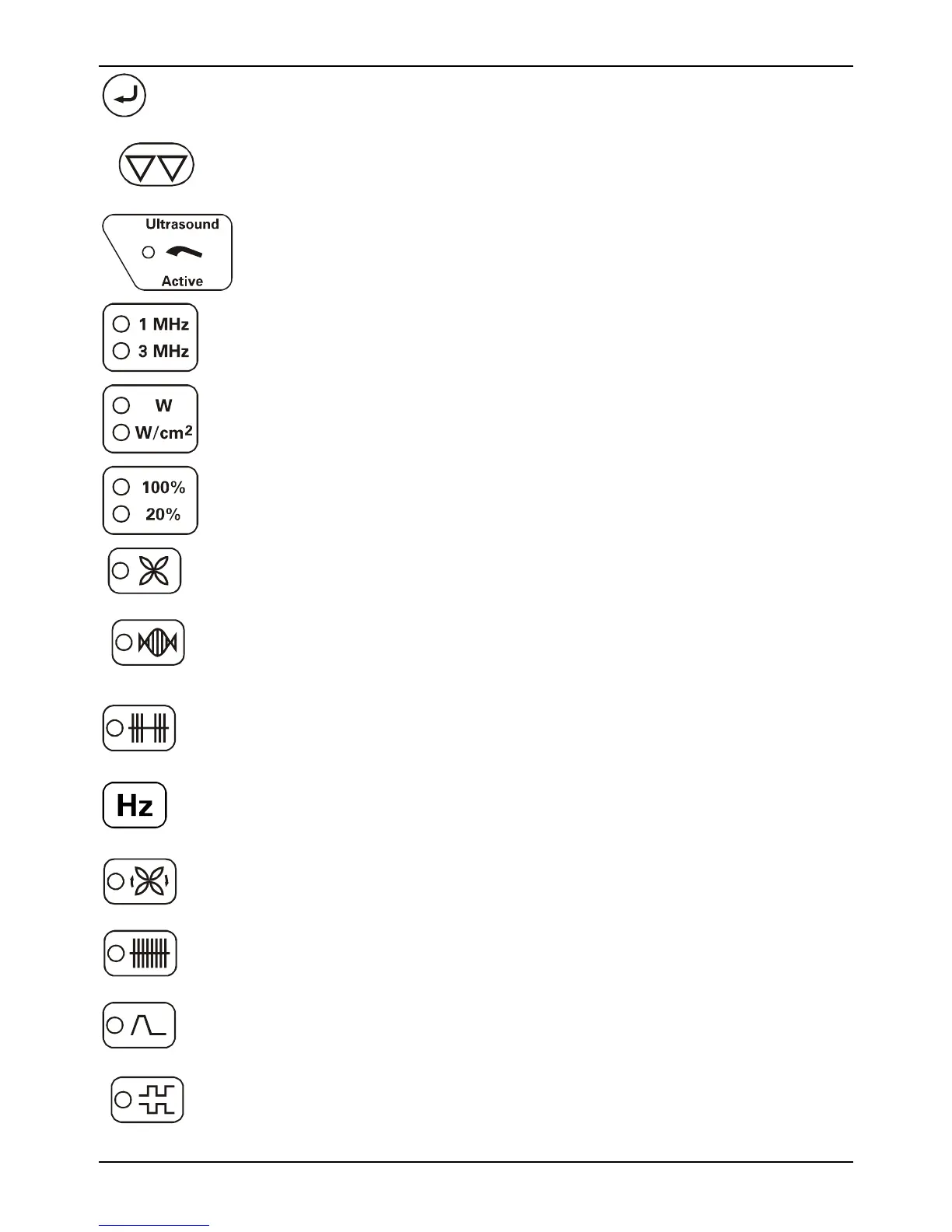
Acts as an “Enter” button during treatment setup.
Stop All Output
Stops all ultrasound and stimulation output.
Active ultrasound output indicator on solid when ultrasound output is
present, flashing when coupling is inadequate.
Frequency selector for 5 cm², 1 and 3 MHz applicator.
Ultrasound output display selector
Ultrasound duty cycle selector
Interferential
Interferential waveform selector—LED is illuminated when this function
is activated.
Premodulated
Premodulated waveform selector—LED is illuminated when this
function is activated.
Frequency
Mediu
Medium frequency waveform selector—LED is illuminated when this
function is activated.
Frequency control selector—Press this button during a stimulation
treatment to display frequency.
Amplitude
M odulation
Amplitude modulation (Vector rotation), used for interferential
waveform only. LED is illuminated when this function is activated.
Continuous
Continuous stimulation selector, default selection for any stimulation
treatment. LED is illuminated when this function is activated.
Surge
Surge selector to set on and off times. LED is illuminated when this
function is activated.
Reciprocation
Reciprocation selector, use for channel pair 1 & 2. LED is illuminated
when this function is activated.



 To Next Page