Sonicator Plus 930 Instruction Manual— Rev.J_09/13/17
9
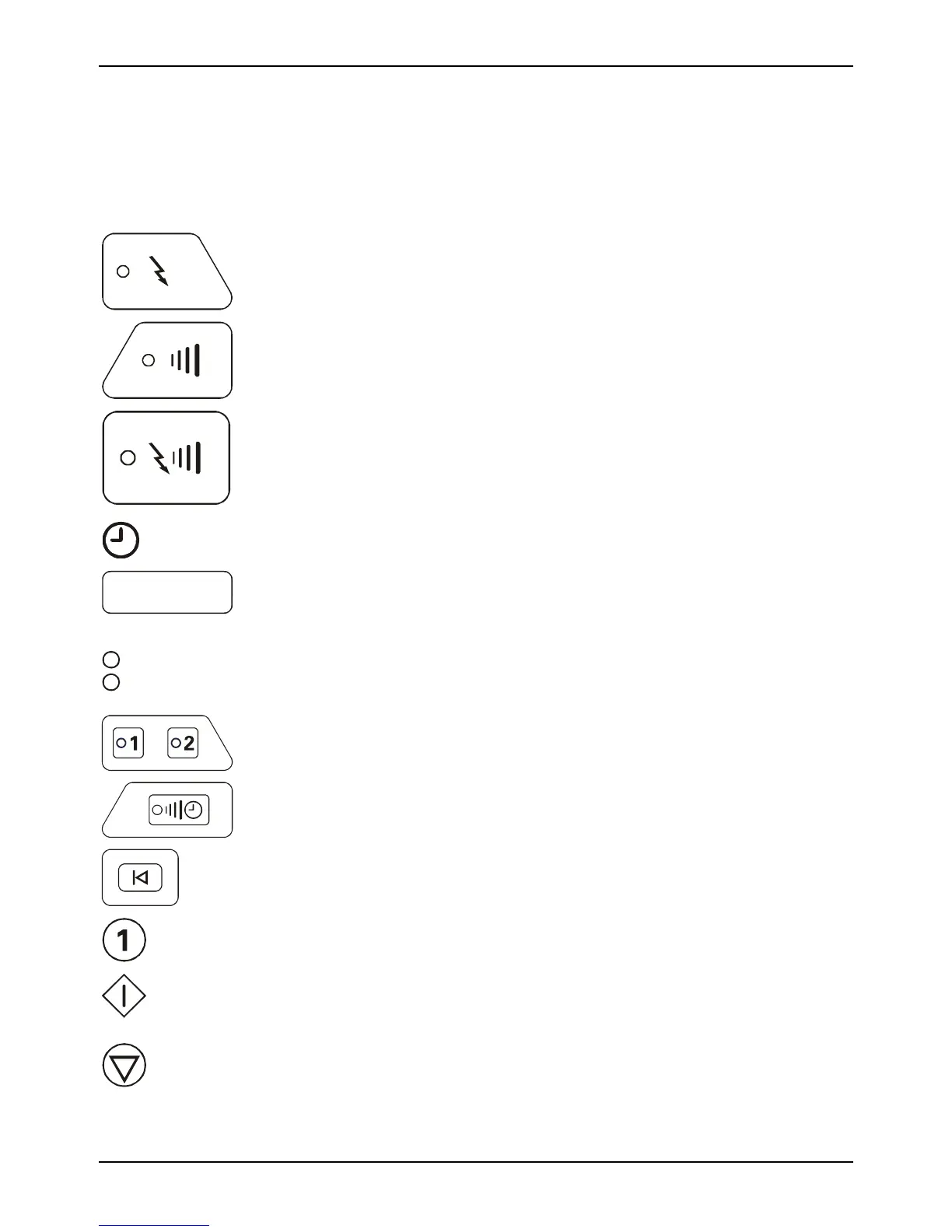
Section 2—Symbol Glossary
and List of Abbreviations
2.1 Symbol Glossary
Stimulation
Setup
Electrical Stimulation Selector
Ultrasound
Setup
Therapeutic Ultrasound Selector
Combination
Setup
Combination Therapy Selector
Time display
mi
00.0
Time display LED’s. Displays treatment time and numeric values for
frequency, on/off times and alphanumeric error codes.
Hz
s
These LED’s will illuminate to prompt the clinician to input either time
in seconds or frequency in Hz. The time or the frequency will be
displayed in the numeric time display.
Stimulation
Channels
Stimulation channel display indicator and selector
Ultrasound
Channel
Ultrasound channel display indicator and selector
Reset
Setup
Resets treatment parameters and clears treatment setup.
Numeric keypad for time, frequency or phase duration entry.
Start
Starts treatment and stimulation or ultrasound output.
Hold
Stops treatment for the treatment displayed in timer window.



 To Next Page