BRIEFINTRODUCTIONTOVEHICLEFUNCTIONS
WindowOperation
Theelectricwindowscanbeoperatedafterthevehicleis
poweredon(Doorsshouldbeclosedduringoperation).
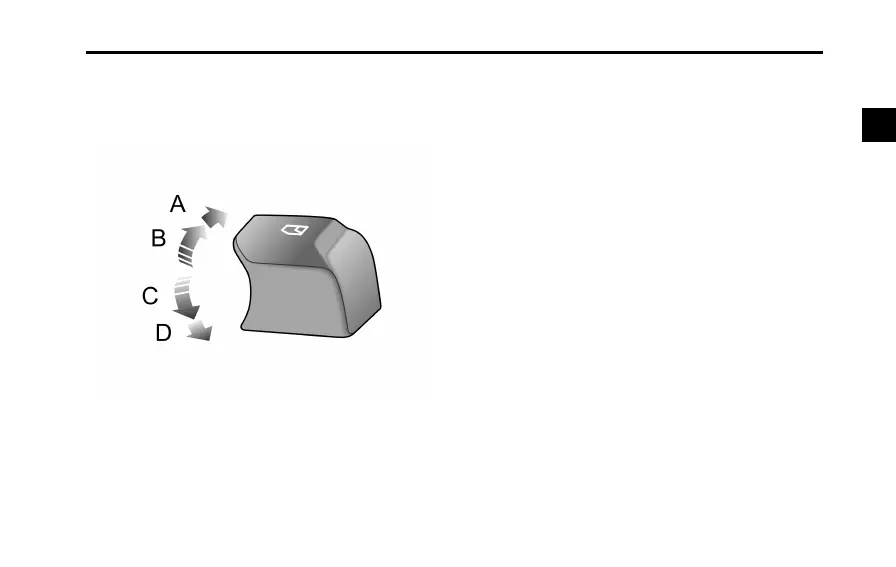
Pressthewindowcontrolswitch(1~2)downtothe1st
gear(PositionC)tolowerthewindow,andpulltheswitch
uptothe1stgear(PositionB)toraisethewindow.The
windowwillstopmovingassoonastheswitchisreleased.
One-touchDown
Pressthewindowcontrolswitch(1~2)downtothe
2ndgear(PositionD)andrelease.Thewindowwill
automaticallydescendtoopencompletely.Window
movementcanbestoppedatanytimebyoperatingthe
correspondingswitchagainduringdescent.
One-T ouchandAnti-Pinch
Liftthewindowcontrolswitch(1~2)tothe2ndgear
(PositionA)andreleaseit.Thewindowswillautomatically
risetoclosecompletely.Windowmovementcanbe
stoppedatanytimebybrieyoperatingtheswitchagain
duringascent.
The'Anti-pinch'functionisasafetyfeaturewhichprevents
thewindowfromascendingwhenanobstacleissensed
causingthewindowtodescend.
Note:Ifthevehicleispowered'OFF'whenthewindow
isrising,the'One-T ouch'upand'Anti-Pinch'modewill
bedisabled.Oncethevehicleis'Poweredon'again,
thewindowcanberaisedbyliftingtheswitchbriey
andcontinuouslyforaround5seconds.Thewindow
willthenallowthe'One-T ouch'upand'Anti-Pinch'to
continue.
63
2



 To Next Page