MCS-BMS-GATEWAY Startup Guide REVISION 4.5
36
• For Windows XP and Windows 7, select: Use the following IP Address
3.3. BMS Network Settings:
• Selecting Stored Configurations, Setting the MAC Address, Device Instance, and Baud Rate
• Selecting Conguration Files for Devices: “S” Bank DIP Switches S0 – S3
The S bank of DIP switches (S0 - S3) are used to select and load a conguration le from a group of
pretested/preloaded conguration les which are stored in the MCS-BMS-GATEWAY-NL FPC-ED4.
NOTE: S0 - S3 DIP Switches sets the Protocol: BACnet MS/TP, OR JOHNSON N2
NOTE: When setting DIP Switches, please ensure that power to the board is OFF.
3.3.1 BACnet MS/TP, N2 and Modbus IP to RTU
The following chart describes S0 - S3 DIP Switch conguration settings for MCS-BMS-GATEWAY-NL to
support BACnet® MS/TP, Metasys® N2 by JCI and Modbus IP to RTU.
Figure 5 Protocol Selection Switch Tables
192 . 168 . 18 . 201
255 . 255 . 255 . 0
192 . 168 . 18 . 1
*Customer ProtoCarrier Startup Guide
Page 24 of 38
x For Windows XP and Windows 7, select: Use the following IP Address
x Click twice
x Open a web browser and go to the following address: [IP Address of ProtoCarrier]/fserver.xif
o Example: 192.168.1.24/fserver.xif
x If the web browser prompts to save the file, save the file onto the PC. If the web browser displays
the xif file as a web page, save the file onto the local PC as fserver.xif
Figure 18: Sample of Fserver.XIF File Being Generated
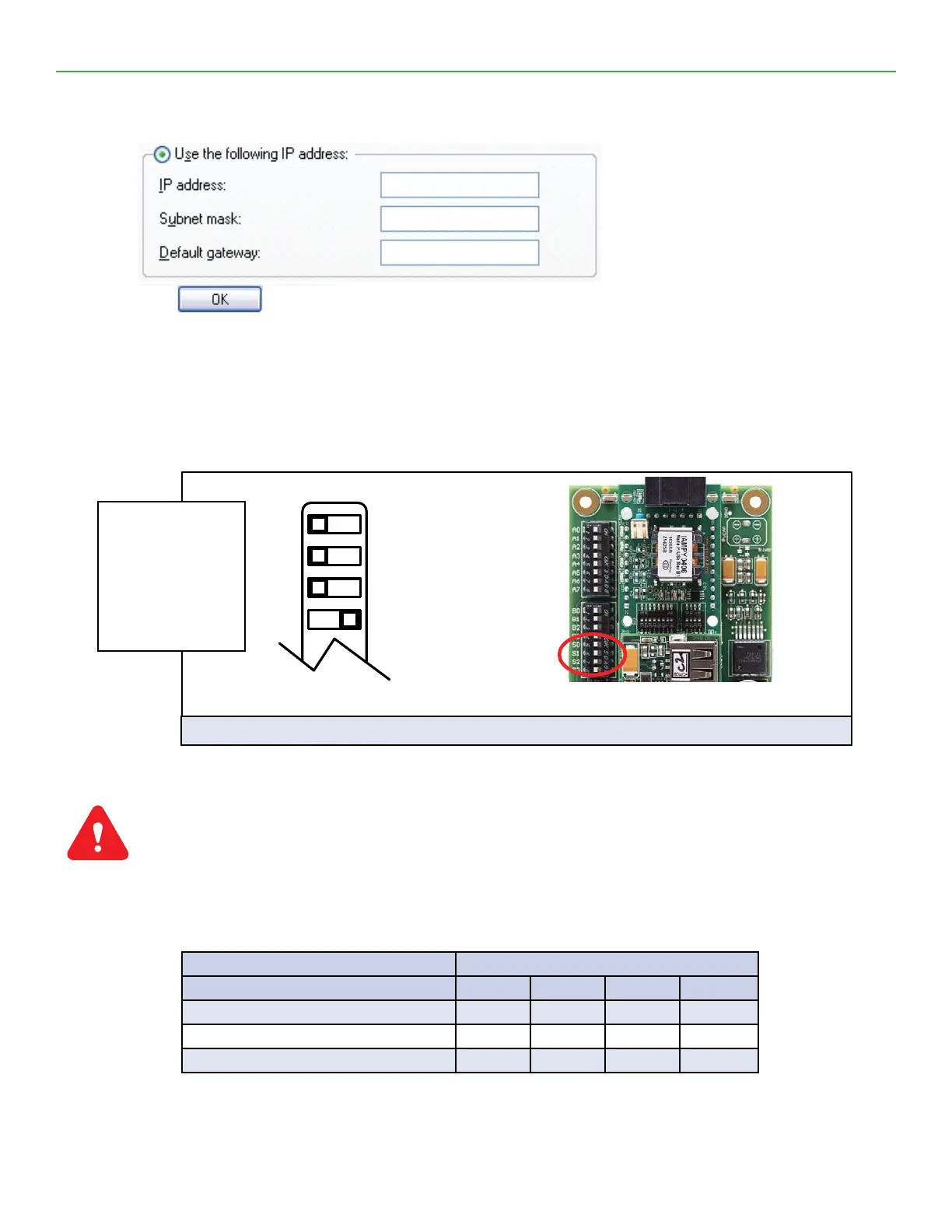
S0 – S3 DIP
Switches
S Bank DIP Switch Location
S0
S1
S2
S3
Off On
Figure 3: S Bank DIP Switches
Fig 3
Shows setting for
BACNet MS/TP
Dip switch S0 ‘ON’
as per the Figure 5
chart below
MCS-BMS-GATEWAY-NL MCS-BMS-GATEWAY-NL Bank DIP Switches
Prole – MCS-BMS-GATEWAY-NL RER S0 S1 S2 S3
Bacnet MS/TP On O O O
N2 O On O O
Modbus IP to RTU On On O O


 To Next Page