MCS-BMS-GATEWAY Startup Guide REVISION 4.5
43
4.4. MCS-MAGNUM Address Settings
The MCS-BMS-GATEWAY-NL is connected to the MCS-MAGNUM via Ethernet . The Bacnet Device ID and
the IP address of the MCS-MAGNUM must be setup properly to enable successful communications between
the MCS-BMS-GATEWAY-NL and the MCS-MAGNUM.
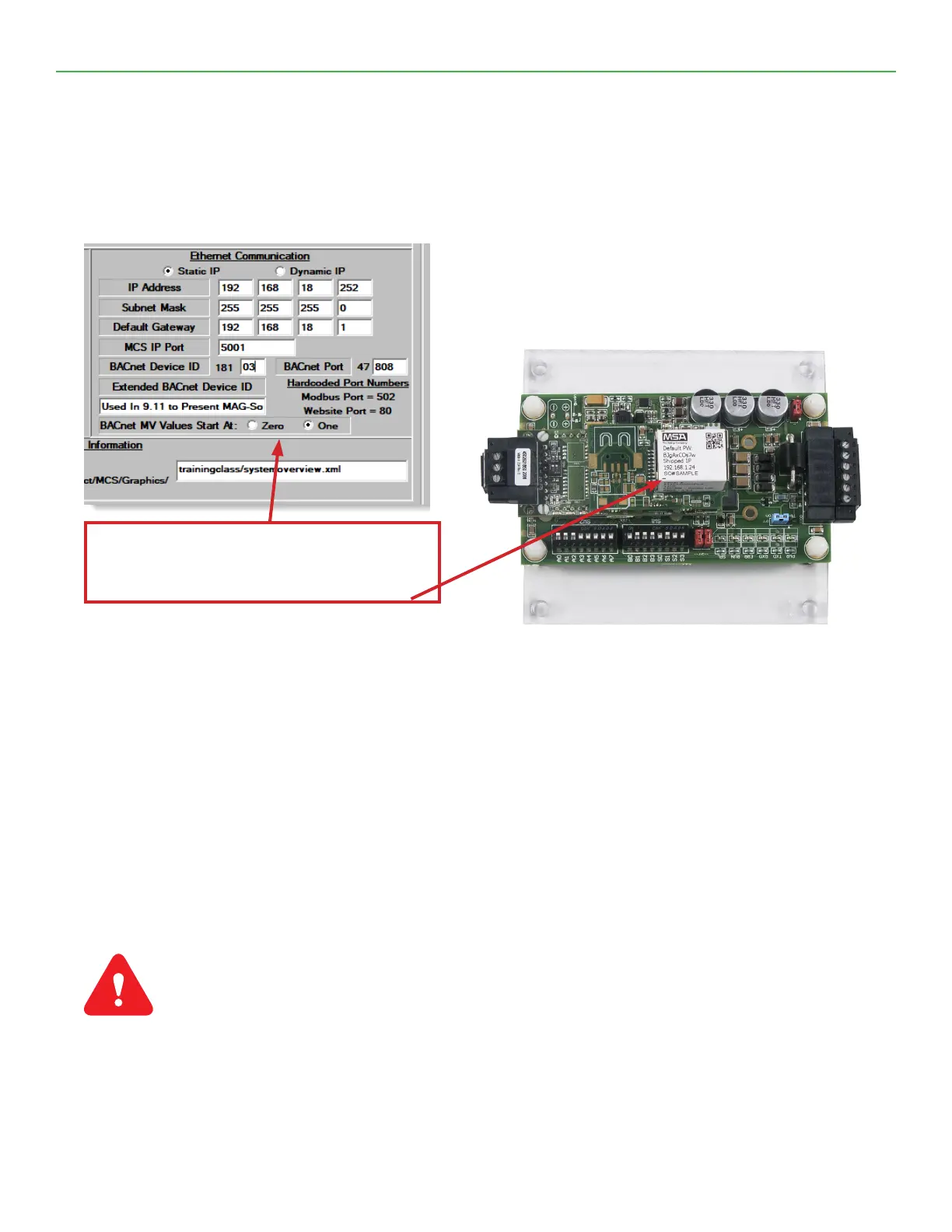
The MCS-MAGNUM BACNET DEVICE ID must be set to the address specied on the MCS-BMS-GATEWAY-NL’s
label (Example below shows - 18103).
The MCS-MAGNUM BACNET DEVICE ID can be veried and changed (with the proper authorization code)
from MCS-Magnum’s keypad the keypad/LCD of a live unit.
1. To get authorized on Magnum do the following:
2. Press ‘Menu’
3. Using , , , or position curser to ‘Passwords’
4. Press key.
5. Enter 4 digit password & press .
6. Press ‘Menu’ to make next selection.
The following steps will display the Bacnet Device ID:
(to change the address you rst must be authorized)
1. \Press the MENU key and then Using , , , or position curser to Serv Tools then press the ENTER key.
2. then Using , , , or position curser to Bacnet Setting then press Enter.
3. Use , , curser to change the Bacnet Device ID.
4. Set your desired address then press Enter.
5. Reset or cycle power to the magnum for the change to take effect.
Set the MCS MAGNUM to address as shown on label:
Example
BACNET DEVICE ID 18103
NOTE: This BACNet Device ID will change depending
on the address that will be set on the ‘A’ DIP Switches.


 To Next Page