MCS-BMS-GATEWAY Startup Guide REVISION 4.5
46
4.6. End of Line Termination Switch for the Modbus RS-485 Device Network
• On long RS-485 cabling runs, the RS-485 trunk must be properly terminated at each end.
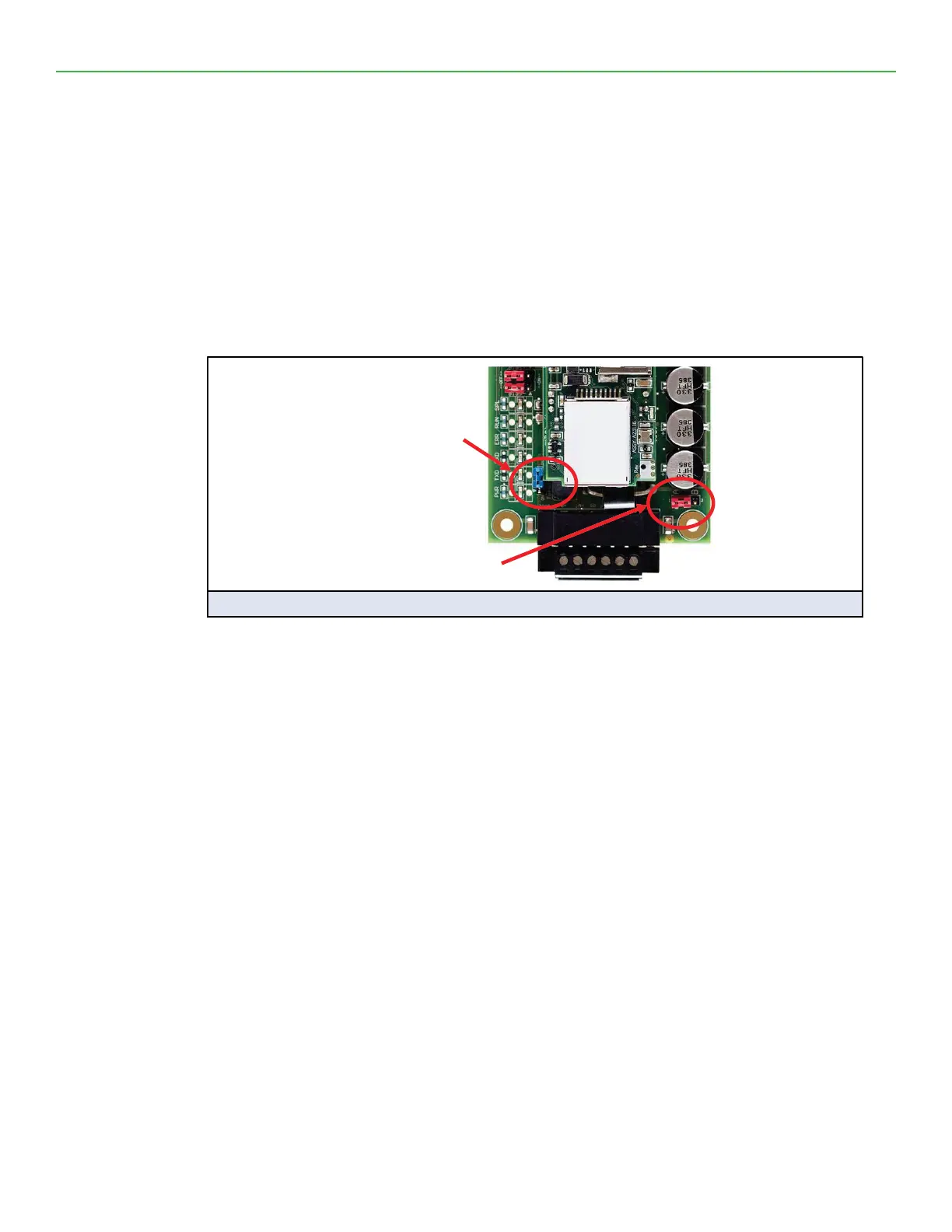
• The MCS-BMS-GATEWAY-NL has an End of Line (EOL) blue jumper. The default setting for this
Blue EOL switch is OFF with the jumper straddling the pins closest to the inside of the board of
the MCS-BMS-GATEWAY-NL.
• On short cabling runs the EOL switch does not to need to be turned ON
• If the MCS-BMS-GATEWAY-NL is placed at one of the ends of the trunk, set the blue EOL jumper
to the ON position straddling the pins closest to the outside of the board of the MCS-BMS-GATE-
WAY-NL.
• Always leave the single Red Jumper in the A position (default factory setting).
RS-485
EOL Switch
off
Leave in Position A
Figure 10: Rs-485 End-Of-Line Termination Switch on the MCS-BMS-GATEWAY


 To Next Page