MCS-BMS-GATEWAY Startup Guide REVISION 4.5
45
4.5. Biasing the RS-485 Device Network
• An RS-485 network with more than one device needs to have biasing to ensure proper communi-
cation. The biasing only needs to be done on one device.
• The MCS-BMS-GATEWAY-NL has 510 Ohm resistors that can be used to set the biasing.
• The MCS-BMS-GATEWAY-NL’s default positions from the factory for the Biasing jumpers are
OFF.
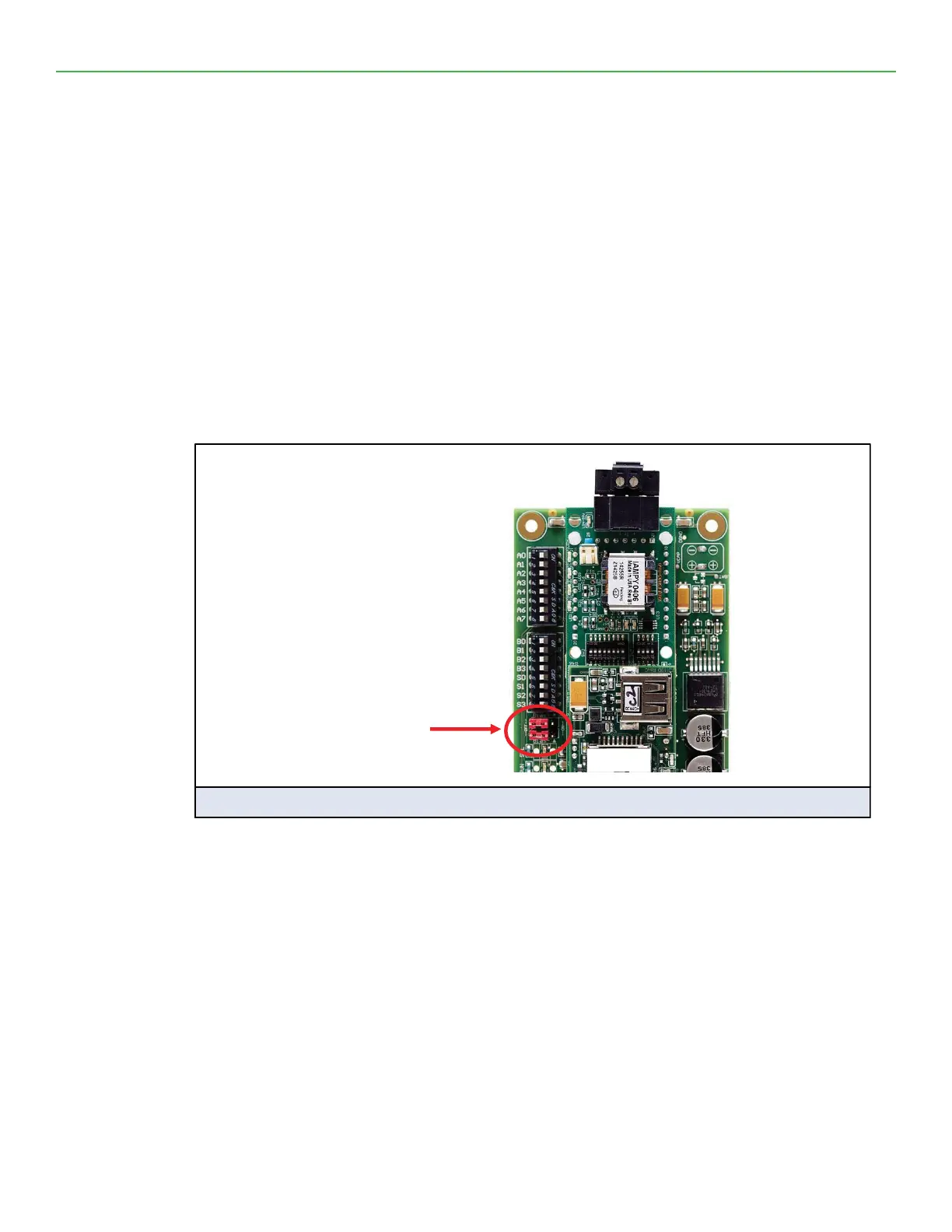
• The OFF position is when the 2 RED biasing jumpers straddle the 4 pins closest to the outside of
the board of the MCS-BMS-GATEWAY-NL. (Figure 9)
• Only turn biasing ON:
• IF the BMS cannot see more than one device connected to the MCS-BMS-GATEWAY-NL AND all
the settings (wiring, and DIP switches) have been checked.
• To turn biasing ON, move the 2 RED biasing jumpers to straddle the 4 pins closest to the inside
of the board of the MCS-BMS-GATEWAY-NL.
RS-485 Bias
Switch
off
Figure 9: RS-485 Biasing Switch on the MCS-BMS-GATEWAY


 To Next Page