© Microhard 50
4.0 Configuration
4.2.4 Network > USB
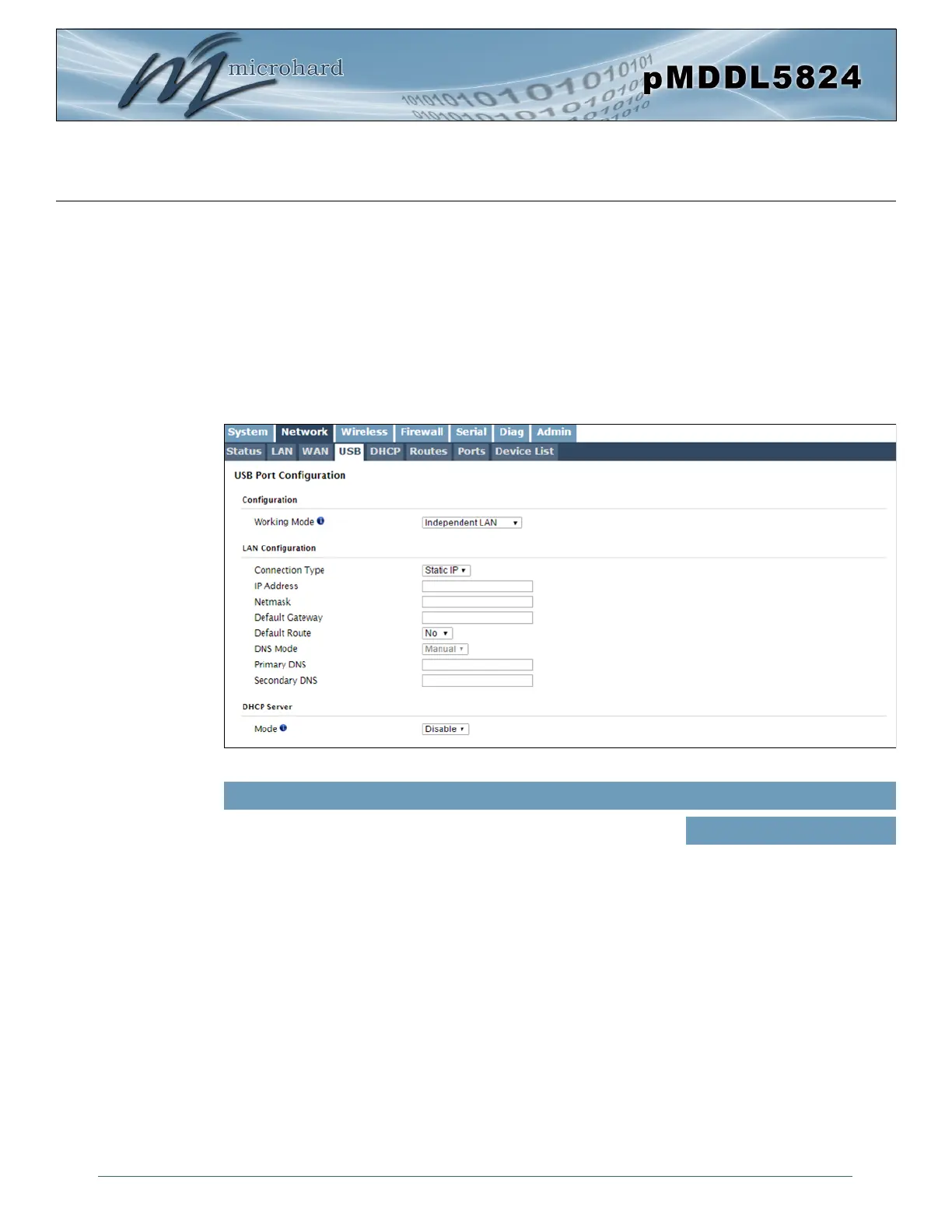
USB Port Configuration
Normally, the pMDDL5824 module is bootstrapped to USB host mode that allows select generic devices to
be used to extend Ethernet and serial functions (USB to Ethernet Adapters, USB to Serial Converters).
Alternatively, the pMDDL5824 can be set to Device mode by pulling PIN 72 (on OEM module) low through
an 1k resistor to switch the USB mode. In USB device mode, there are two functions supported, RNDIS/
CDC Ethernet and CDC Serial port, when connected a host machine (PC etc).
RDNIS Ethernet and CDC Serial composite drivers are available from Microhard Systems.
Image 4-2-7: Network > USB
The RNDIS Ethernet USB port can be configured to operate as an
additional LEN Ethernet Port with the current LAN (Bridged) or it can
be configured to operate as a independent LAN (Subnet).
Working Mode
Values (selection)
Independent LAN
Bridge with LAN Port
LAN Configuration
When bridged with LAN the network parameters are set from the Network > LAN menu. When set to
Independent the port can be configured as Statis or DHCP. Again refere to the LAN configuration for help
with the displayed fields and definitions.
DHCP Server
When in Independent mode the pMDDL5824 can run a DHCP service on the USB port to assign IP
addresses and lease information. Refer to Network > LAN > DHCP for help with parameters and
definitions.



 To Next Page