DX type water-cooled screw chiller (PCB Control) MCAC-CTSM-2014-03
58
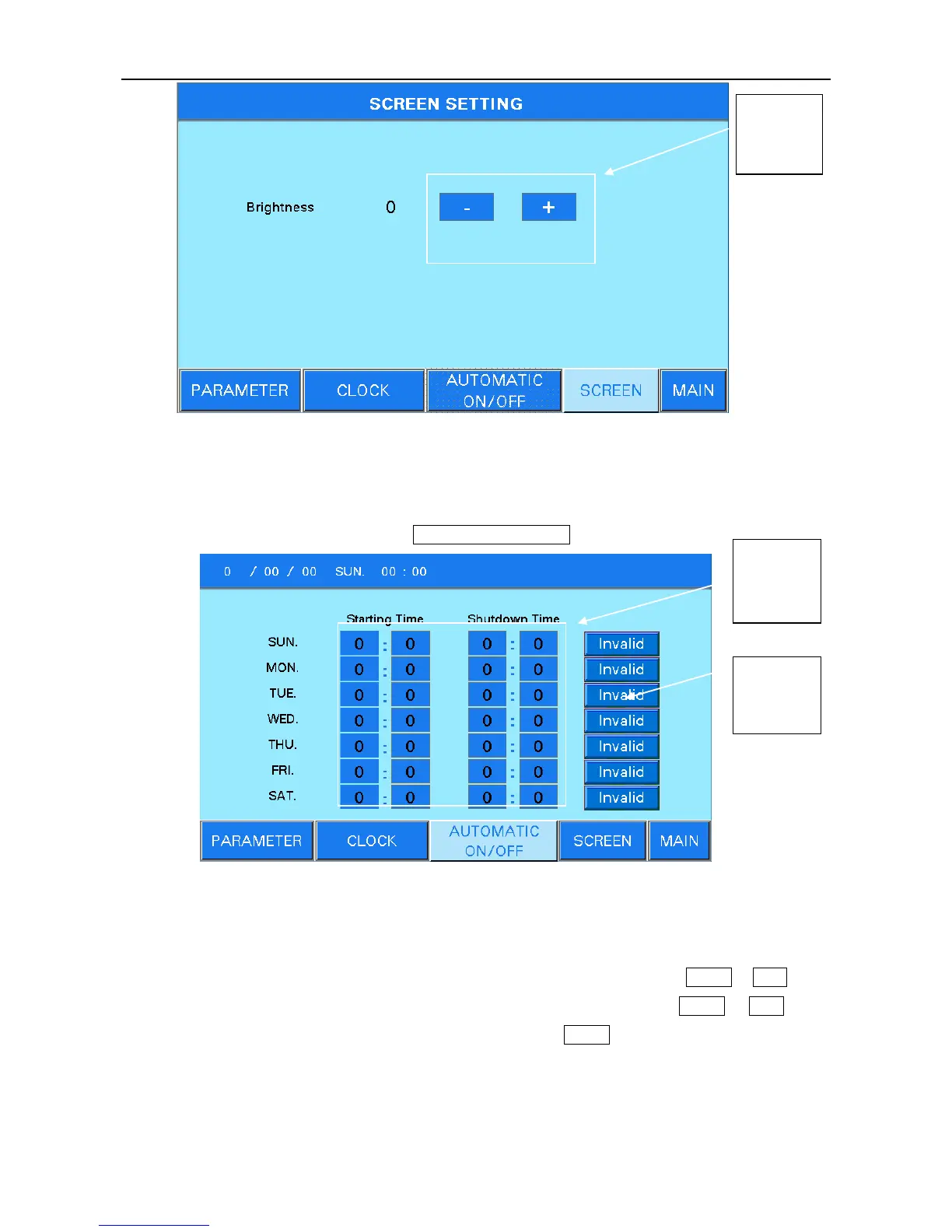
Figure 6.14
5.3 User parameter setting- Automatic On/Off
If user wants to use timer function of start or shutdown, it needs to choose “timer” in control mode of
the figure 2 and enters user setting. Press AUTOMATIC ON/OFF and enter figure 6.15 as below:
Figure 6.15
Timer of starting and shutdown in one week can be set, and unit will start or shutdown according to
the timer setting. If the unit needs to continue running for a period, for example: start from Tuesday 10:00
and shutdown at 16:00 Thursday, user can set as 10:00 and switch the button from Invalid to Valid in the
timer starting setting of Tuesday, then set as 16:00 and switch the button from Invalid to Valid in the
timer shutdown setting of Thursday, rest timer buttons are set as Invalid .
Please check the system time when using timer function because the timer starting and shutdown
is according to the system time.



 To Next Page