Control panel
84
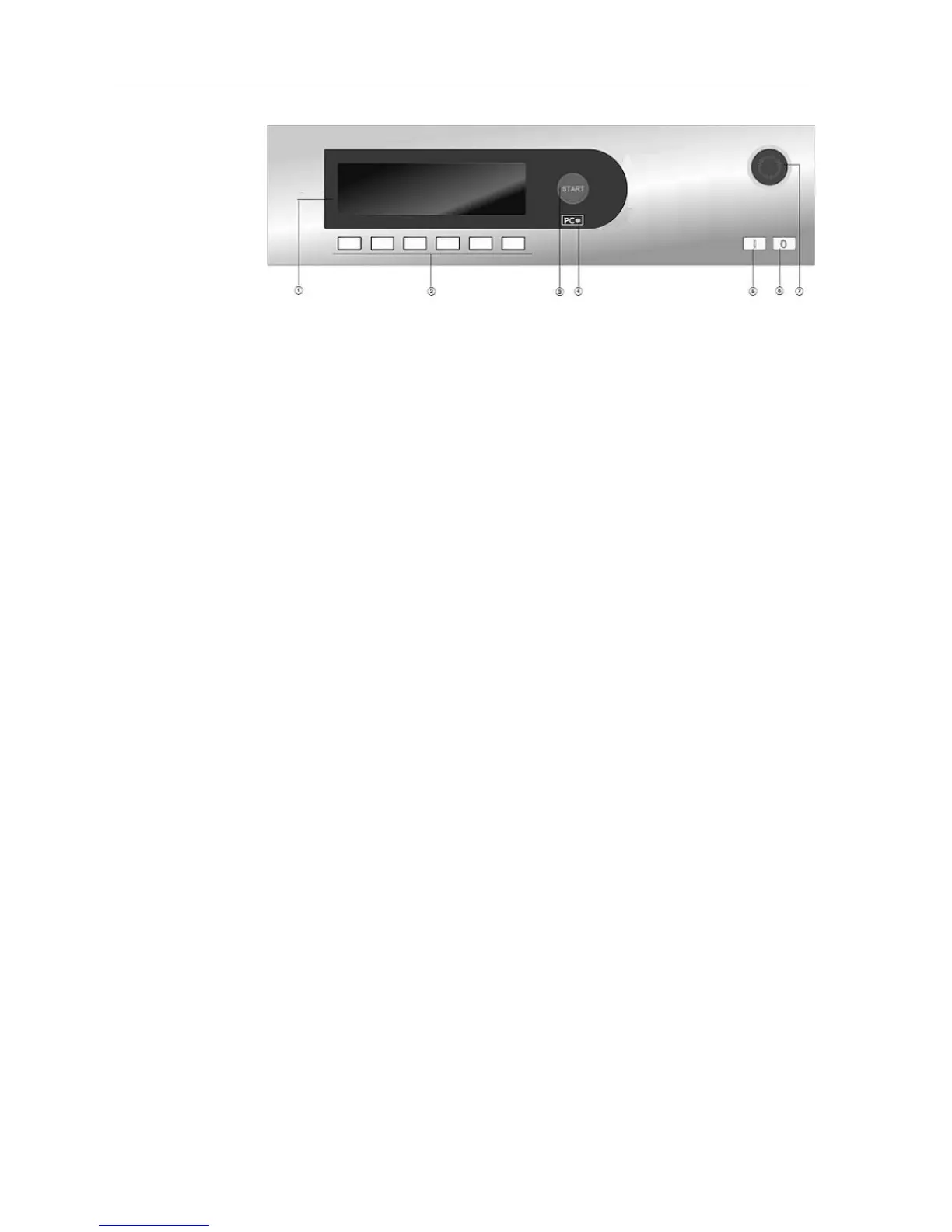
Control panel
a
Display
See the following pages for more information.
b
Short cut buttons
For selecting an individual wash programme quickly. These buttons
can be re-programmed to select your favourite wash programmes
instead of the pre-set ones.
c
Start button
d
Optical interface PC
This is used by Miele service technicians during servicing work for
testing purposes and for updating the machine.
e
Power On button
f
Power Off button
g
Emergency off switch
(Not part of all machine versions, see Availability of emergency
stop / emergency off devices)
Function buttons
Stop/Finish
The right-hand function button is used as a finish button after a pro-
gramme has been started.
After pressing the button the selected programme is stopped, if
pressed again the programme is cancelled.
Block plus.
The corresponding programme block (e.g. Pre-wash) is added to the
programme.
Starch stop
Press this button if the laundry is to be starched.
Without spin
Press this button if a final spin is not required after the final rinse.
Settings
Start time
When this button is pressed before starting the programme, informa-
tion about selecting a start time will appear on the display.


 To Next Page