OM-273473 Page 42
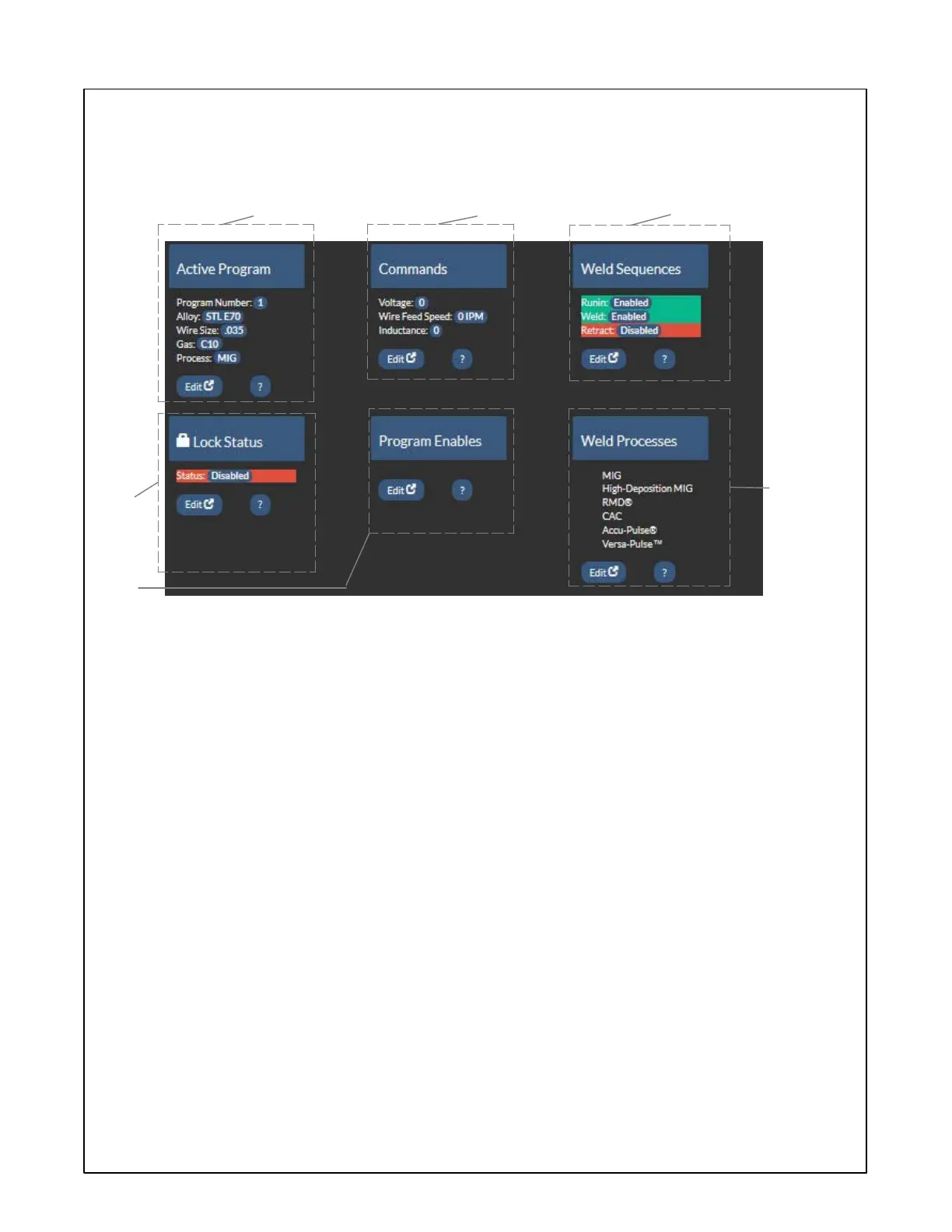
8-4. Arc Management Screen
1 Active Program
Displays the program number, process, wire
size and alloy, and gas. Edit button allows
these parameters to be changed.
2 Commands
Displays current user changeable commands.
Depending on the weld process being used
these commands will vary. Edit button allows
parameters to be changed.
3 Weld Sequence
Displays active weld sequence parameters.
Edit button allows changes to these parame-
ters.
4 Lock Status
Displays the current status of system locks.
Edit button allows the lock configuration to be
changed.
5 Program Enable
Edit button will allow user to select which pro-
grams are available for use.
6 Weld Processes
Displays available weld processes. Edit but-
ton allows processes to be enabled or dis-
abled.
1
4
2
3
5
6









 To Next Page