OM-273473 Page 43
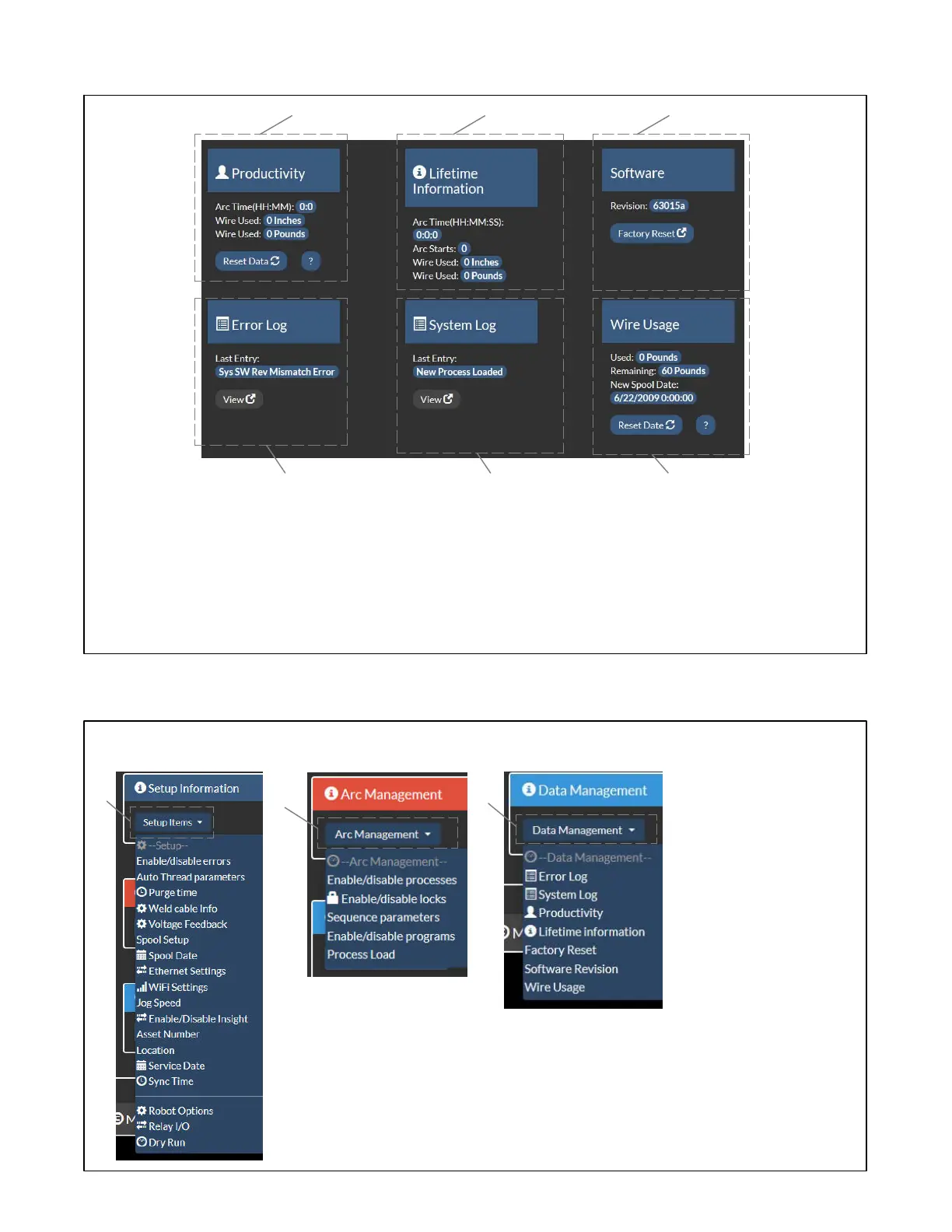
8-5. Data Management Screen
1 Productivity
Displays tarc time and wire used in inches and
pounds. Click Reset Data to reset productivity
data.
2 Lifetime Information
Displays total arc time, arc starts, and wire
used over lifetime of unit.
3 Software Information
Displays the software revision.
Factory Reset button will take user to a Facto-
ry Reset screen. Read and follow all instruc-
tions on Factory Reset screen to perform a
Factory Reset.
4 Error Log
Displays the last error experienced by the
system.
View button displays a list of previous errors
and the time at which they occurred.
5 System Log
Displays the last entry into the system log.
View button displays a list of the entries made
to the system log and the time at which they
occurred.
6 Wire Usage
Displays the amount of wire used, the amoun
remaining, and the date the spool was started
Click Reset Data when starting a new spool.
1
2
3
456
8-6. Help Screen
. The Help Screen contains
three drop down menus
which contain the features
on the Setup, Arc Manage-
ment and Data Management
screens.
1 Setup Information
Drop−Down Menu
2 Arc Management
Drop−Down Menu
3 Data Management
Drop−Down Menu
1
2
3









 To Next Page