OM-4436 Page 37
SECTION 12 − GENERATOR POWER GUIDELINES
The views in this section are intended to be representative of all engine-driven
welding generators. Your unit may differ from those shown.
NOTE
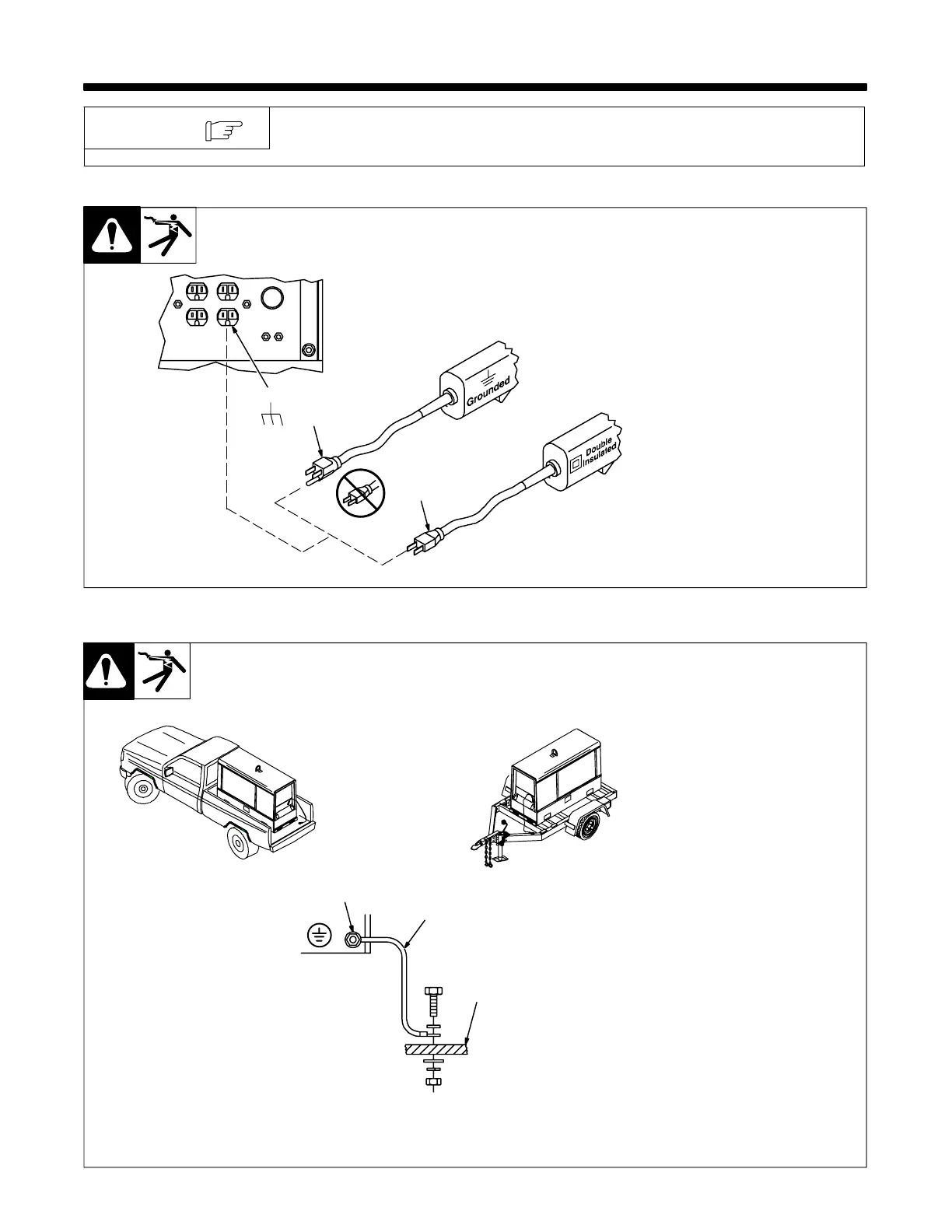
12-1. Selecting Equipment
gen_pwr 10/06 − Ref. ST-159 730 / ST-800 577
1 Generator Power Receptacles
− Neutral Bonded To Frame
2 3-Prong Plug From Case
Grounded Equipment
3 2-Prong Plug From Double
Insulated Equipment
Be sure equipment has double
insulated symbol and/or word-
ing on it.
Do not use 2-prong plug un-
less equipment is double in-
sulated.
OR
2
3
1
12-2. Grounding Generator To Truck Or Trailer Frame
S-0854
Always ground generator
frame to vehicle frame to pre-
vent electric shock and static
electricity hazards.
Also see AWS Safety &
Health Fact Sheet No. 29,
Grounding of Portable And
Vehicle Mounted Welding
Generators.
1 Equipment Grounding
Terminal (On Front Panel)
2 Grounding Cable (Not
Supplied)
3 Metal Vehicle Frame
Connect cable from equipment
ground terminal to metal vehicle
frame. Use #10 AWG or larger
insulated copper wire.
Electrically bond generator
frame to vehicle frame by met-
al-to-metal contact.
Bed liners, shipping skids,
and some running gear insu-
late the welding generator
from the vehicle frame. Al-
ways connect a ground wire
from the generator equip-
ment grounding terminal to
bare metal on the vehicle
frame as shown.
If unit does not have GFCI re-
ceptacles, use GFCI-pro-
tected extension cord.
GND/PE
3
1
2






 To Next Page