OM-286308 Page 22
7-4. Remote Amperage Or Voltage Control For Welding Power Source With Output
Contactor
OM-286308 Page 18
5-12. Remote Amperage Or Voltage Control For Welding Power Source With Output Always On
Wireless hand control operation for weld-
ing power sources with output contactor
always on (Stick, TIG, and voltage sensing
wire feed welding).
! Unexpected weld output can cause
electrical shock. Wireless remote con-
trols can turn weld output on from dis-
tant locations. Disconnect 14-pin
transceiver from remote 14 receptacle
and remove the batteries from wireless
foot control and/or wireless hand con-
trol before servicing equipment.
! Weld output is always on.
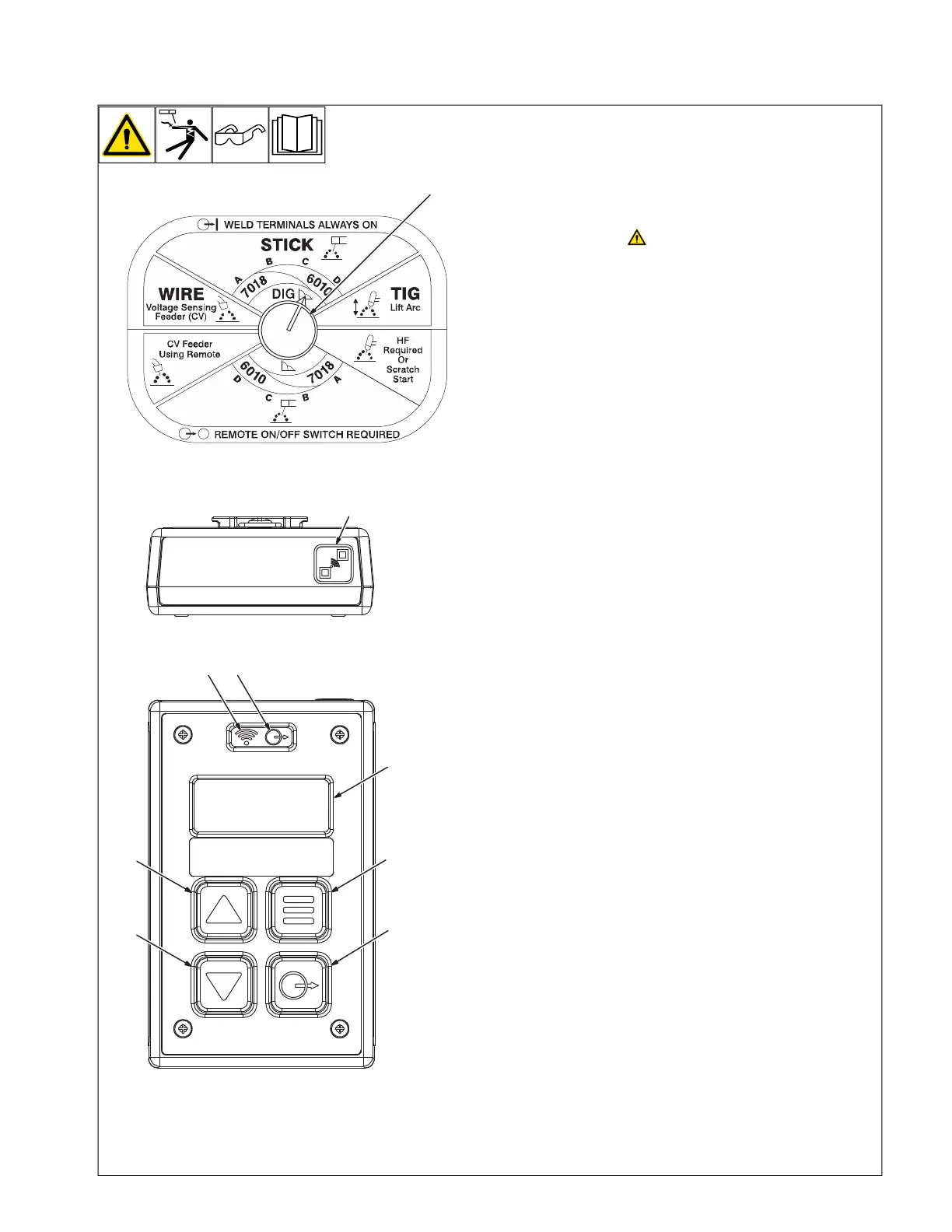
1 Welding Power Source Output Control
Switch
The shown setting only allows weld output to
be remotely increased or decreased.
2 Pairing Button
3 Wireless Status Light
4 Contact Output Control Button
5 Contactor Output Status Light
6 Increase Button
7 Decrease Button
8 Menu Button
9 Display Screen
Contact Output Control Button does not turn
on/off welding power source output contactor.
The Contact Output Control Button is used to
activate the display for viewing actual
amperage and voltage values if the welding
power source has these capabilities. To
activate, press and hold for 1 second. To
deactivate, press and release.
Press and release Increase or Decrease But-
ton to increase or decrease respectively in1
percent increments. Press and hold the same
buttons to increase and decrease respectively
in 5 percent increments.
Some welding power sources are not
equipped with voltage and amperage
feedback, and cannot display voltage and
amperage.
The display screen stays illuminated while the
contactor output status light is illuminated
solid blue. To extend battery life, the display
screen, wireless status light, and contactor
output status light turn off after 10 seconds of
inactivity.
1
Ref. 805626-A
4
7
6
5
9
8
2
3
Top
Front
Wireless hand control operation for weld-
ing power sources with output contactor
always on (Stick, TIG, and voltage sens-
ing wire feed welding).
Unexpected weld output can cause
electrical shock. Wireless remote
controls can turn on weld output
from distant locations. Disconnect
14-Pin Transceiver from remote 14
receptacle and remove the bat-
teries from wireless foot control
and/or wireless hand control be-
fore servicing equipment.
1 Welding Power Source Output Control
Switch
The shown setting only allows weld output to
be remotely increased or decreased.
2 Pairing Button
3 Wireless Status Light
4 Contact Output Control Button
5 Contactor Output Status Light
6 Increase Button
7 Decrease Button
8 Menu Button
9 Display Screen
To turn on the welding power source output
contactor, press and hold Contactor Output
Button (approximately 1 second) until Con-
tactor Output Status Light (blue LED) is
illuminated.
To turn off the welding power source output
contactor, press and release Contactor Out-
put Button, Contactor Output Status Light will
turn off. To extend battery life, the Display
Screen, Wireless Status Light, and Contac-
tor Output Status Light turn off after 10 sec-
onds of inactivity if the contactor is open.
Press the Menu Button to select percentage,
amperage, or voltage. The selected parame-
ter is shown on the Display Screen.
F
Press the Menu Button to select per-
centage, amperage, or voltage. The
selected parameter is shown on the
Display Screen.






 To Next Page