OM-258 035 Page 19
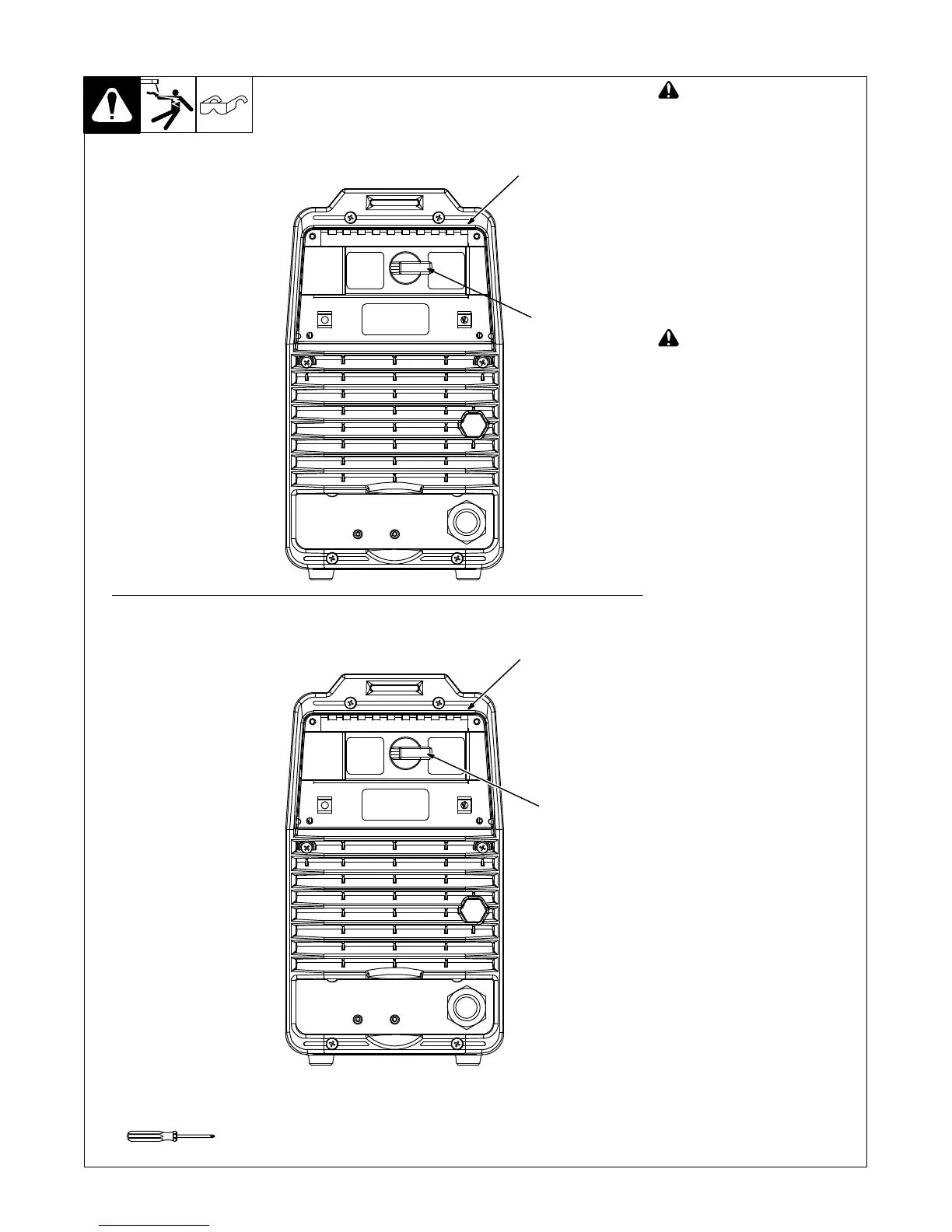
5-6. Selecting 208 - 230 Volts AC Single/Three Phase Input Voltage
Ref. 803 945-A / Ref. 803 946-A
! Turn Off welding power
source, and disconnect
input power before
proceeding.
Check input voltage available at
site.
1 Switch Cover
2 Voltage Selection Switch
The input voltage that the power
source is linked for is labeled next to
the switch.
Check voltage selected on unit.
Changing selection is only
necessary if selected value does
not match available input voltage.
! Do not switch under load.
To change selection switch
position, open switch cover and
turn switch to the required voltage
range.
The main power circuit board
is protected at power up from
voltage surges or over
voltage conditions that can
occur if plugged into improper
line voltages (such as when
linked for 220-230 or 208-230
and powered with 460-575 or
400-460). If this situation
does happen, turn off welding
power source, open rear
switch cover, and turn Voltage
Selection switch to the
correct input voltage. Wait 10
minutes before turning
welding power source back
on again to allow the
protection to reset.
The switch has an off position
at 905 straight up.
Be sure that switch is turned
completely to its detent position.
1
2
Tools Needed:
208− 230
VAC
400− 460
VAC
460− 575
VAC
220− 230
VAC
1
2
208-230/400-460 Volts Model
220-230/460-575 Volts Model



 To Next Page