EasyManua.ls Logo

Miller Spectrum 875 - User Manual

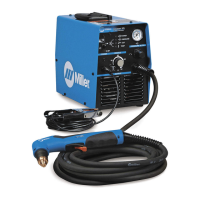
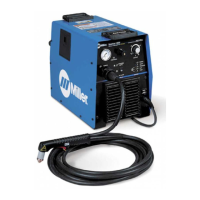
Miller Spectrum 875
56 pages
Print Icon
To Next Page IconTo Next Page
Loading...
Processes
Description
Air Plasma Cutting
and Gouging
Air Plasma Cutter
OM-264259C 201803
Spectrum 875
And XT60 Torch
R
File: Plasma Cutters
For product information,
Owner’s Manual translations,
and more, visit
www.MillerWelds.com

Table of Contents

Questions and Answers

  • M
    martinpatriciaSep 9, 2025
    Why does the arc go out while cutting with my Miller Welding System?
    • J
      Jason WhitakerSep 9, 2025
      The arc may go out while cutting due to several reasons: * Ensure the work clamp is securely attached to a clean, paint-free, rust-free workpiece. * Make sure the drag shield is on the workpiece or the extended tip is 1/8 in. (3.2 mm) from workpiece while cutting. * If working with thin metal, maintain a constant travel speed. * Verify that the compressed air is clean, dry, and oil-free, using filter kit 300491 or 228926 if necessary. * Check the retaining cup, ensuring it is hand-tightened only and not over-tightened. * Clean or replace worn consumables.
  • C
    Chelsey Woods DVMAug 23, 2025
    What does it mean when the cup status light is on for Miller Spectrum 875 Welding System?
    • J
      Jason KimAug 23, 2025
      If the Cup status light is on: * Check the torch shield cup. * Try resetting the power switch.
  • J
    James SmithAug 25, 2025
    Why is the temperature status light on for my Miller Welding System?
    • P
      prattrogerAug 25, 2025
      If the Temperature status light is on, the unit may be overheating. Allow the fan to run until the light turns off, indicating the unit has cooled down.
  • S
    smithlisaAug 26, 2025
    What does it mean if the pressure status light flashes at a rate of two quick flashes and then a one second pause for a duration of 15 seconds on my Miller Spectrum 875 Welding System?
    • M
      Mary RogersAug 26, 2025
      If the pressure status light flashes at a rate of two quick flashes followed by a one-second pause for 15 seconds, it indicates that the unit's regulated pressure is too high. Check for input pressure between 90-120 PSI and reset the power switch.
  • C
    Carolyn BerryAug 28, 2025
    What does it mean if the cup status light flashes at a rate of three quick cycles and then a one second pause for 15 seconds on my Miller Welding System?
    • S
      stephanie02Aug 28, 2025
      If the cup status light flashes at a rate of three quick cycles and then a one-second pause for 15 seconds, it means that the power source detected that the tip and electrode failed to separate when the gas valve turned on. Check that the cup is not too tight (finger tight only). Also, check for correct torch consumables and for gas flow through the torch head.
  • L
    Lisa RushAug 29, 2025
    What does it mean if the temperature status light stays on indefinitely on my Miller Welding System?
    • C
      Cynthia SuttonAug 29, 2025
      If the Temperature status light remains on indefinitely, the power source temperature sensors may have failed, or the ambient temperature is below -22° F (-30° C). Try operating the unit in a warmer environment.
  • A
    Alison PetersonSep 18, 2025
    What to do if pilot arc is working but there's no cutting output on my Miller Spectrum 875 Welding System?
    • Z
      zwernerSep 18, 2025
      If the pilot arc is working but there is no cutting output: * Ensure the work clamp is connected to a clean, rust-free workpiece. * Clean or replace any worn consumables.
  • H
    hutchinsontinaSep 18, 2025
    What to do if there is no cutting output and the power light is off on my Miller Spectrum 875 Welding System?
    • R
      Robert FernandezSep 19, 2025
      If there is no cutting output, the power light is off, and the fan motor isn't running: * Ensure the Power switch is in the On position. * Confirm the line disconnect device is in the On position. * Inspect the line fuse(s), replacing if needed, or reset the circuit breakers.
  • D
    danielmartinezSep 7, 2025
    What does it mean if the power light flashes steadily for 15 seconds on my Miller Spectrum 875?
    • B
      Brent BerrySep 8, 2025
      If the Power light flashes steadily for 15 seconds, it indicates that the input power was above 300 volts AC or below 156 volts AC but has returned to normal.
  • S
    Sarah WashingtonSep 4, 2025
    What does it mean if the cup status light flashes steadily for 15 seconds on my Miller Spectrum 875 Welding System?
    • I
      irobertsSep 4, 2025
      If the Cup status light flashes steadily for 15 seconds, the system failed to strike an arc, and the power source failed to deliver current to the output. Check the continuity of torch connections (pilot lead and electrode lead).

Summary

Safety Precautions

Symbol Usage

Explains the meaning of safety symbols used throughout the manual.

Plasma Arc Cutting Hazards

Identifies and explains potential hazards associated with plasma arc cutting.

Additional Safety Symbols

Details additional safety symbols for installation, operation, and maintenance.

California Proposition 65 Warnings

Provides warnings regarding chemicals listed by the state of California.

Principal Safety Standards

Lists key safety standards and references relevant to the equipment.

EMF Information

Explains electromagnetic fields and their potential effects on medical implants.

Definitions

Additional Safety Symbols and Definitions

Defines additional safety symbols and related terms used in the manual.

Miscellaneous Symbols and Definitions

Provides definitions for various miscellaneous symbols and abbreviations.

Specifications

Serial Number and Rating Label Location

Indicates where to find the serial number and rating information on the unit.

Unit Specifications

Details power supply, torch, and general specifications for the unit.

Environmental Specifications

Specifies the IP rating and temperature ranges for operation and storage.

Duty Cycle and Overheating

Explains duty cycle percentages and the unit's response to overheating.

Torch Dimensions

Provides dimensional details for the hand-held and machine torches.

Power Source Dimensions and Weight

Details the dimensions and weight of the power source and its accessories.

Installation

Selecting a Location

Guidance on choosing a suitable location for the unit, considering airflow.

Connecting Work Clamp and Gas;Air Supply

Instructions for connecting the work clamp and gas/air supply to the unit.

Connecting and Disconnecting Torch

Procedures for connecting and disconnecting the plasma torch.

Connecting and Disconnecting Work Cable

Procedures for connecting and disconnecting the work cable.

Electrical Service Guide

Recommendations for electrical service requirements and circuit protection.

Extension Cord Data

Information on selecting appropriate extension cords and maximum lengths.

Connecting Input Power

Steps for selecting a location and connecting the unit to input power.

Connecting 1-Phase Input Power

Detailed instructions for connecting 1-phase input power, including plug types.

Connecting to Generator with Full KVA Receptacle

Using an adapter cord to connect to generators with NEMA 14-50R receptacles.

Wiring Optional 240 Volt Plug

Instructions for wiring an optional 240V plug for specific generator connections.

Generator Settings for Plasma Cutter Operation

Guidance on setting generator controls for optimal plasma cutter operation.

Installing Alternative Plug

Procedure for installing a different plug if the supplied one is incompatible.

Operation

Controls Overview

Description and function of the unit's main controls and switches.

Consumables Storage Compartment

Information on the compartment for storing consumables and parts.

Trigger Safety Lock

How to engage and disengage the torch trigger safety lock.

Plasma Cutting System Practices

Best practices for setting up and using the plasma cutting system.

Sequence of Cutting Operation

Step-by-step guide for performing plasma cutting operations.

Sequence of Gouging Operation

Step-by-step guide for performing plasma gouging operations.

Sequence of Piercing Operation

Step-by-step guide for performing plasma piercing operations.

Cutting Speed

Recommended cutting speeds for different materials and thicknesses.

Mechanized Operation

XT60 M Mounting Position

Guidance on properly mounting the XT60M machine torch.

Remote Control Receptacle

Details the remote control receptacle and its use with machine torches.

Remote Control Cable Functions

Explains the functions of leads and sockets for remote control cables.

Remote Voltage Sense Connection

Instructions for connecting the remote voltage sense for torch height adjustment.

Shield Sense Tab

Describes the shield sense tab and its feedback function for height control.

Cut Charts

Provides charts with recommended settings for cutting various materials.

Maintenance and Troubleshooting

Routine Maintenance

Schedule and procedures for routine maintenance tasks.

Checking Shield Cup Shutdown System

Procedure to check the functionality of the shield cup shutdown system.

Checking;Replacing Torch Consumables

Guide for inspecting and replacing torch retaining cup, tip, and electrode.

Wrapper Removal and Installation

Steps for safely removing and reinstalling the unit's outer wrapper.

Checking or Replacing Filter Element

Procedure for checking and replacing the air filter element.

Status;Trouble Lights

Explanation of status and trouble lights and their possible causes.

Troubleshooting Power Source

Common power source issues and their remedies.

Troubleshooting Torch

Common torch issues and their remedies for optimal performance.

Electrical Diagrams

Circuit Diagram for Hand-Held Torch Applications

Electrical schematic for hand-held torch operations.

Circuit Diagram for Machine Torch Applications

Electrical schematic for machine torch applications.

Parts List

Recommended Spare Parts

List of recommended spare parts for the equipment.

Consumable Parts for XT60

Identifies consumable parts for the XT60 torch.

Torch XT60 Components

Diagram and list of components for the XT60 torch.

Torch XT60 M Components

Diagram and list of components for the XT60M torch.

Warranty Information

Miller Spectrum 875 Specifications

General IconGeneral
Amperage Output20-60 A
CNC InterfaceOptional
Gas SupplyClean, dry, oil-free air or nitrogen
Input Frequency50/60 Hz
Output Current Range20-60 A
Welding ProcessPlasma cutting
TIG StartNot applicable
Rated Output60 A
Cutting Capability3/4 in (19 mm)
Cutting Capacity1 in (25 mm)
Severance Capacity1-1/4 in (32 mm)
Input Phase1- or 3-Phase
Duty Cycle60%

Related product manuals