6 Click Save calibration. The closed green circle indicates that the calibration is completed. Click Test to
confirm that the correct coordinates are saved. The MACSQuant Instrument will automatically test selected
vial positions.
4.2 Calibrating the rack detection
4.2.1 Single tube rack detection
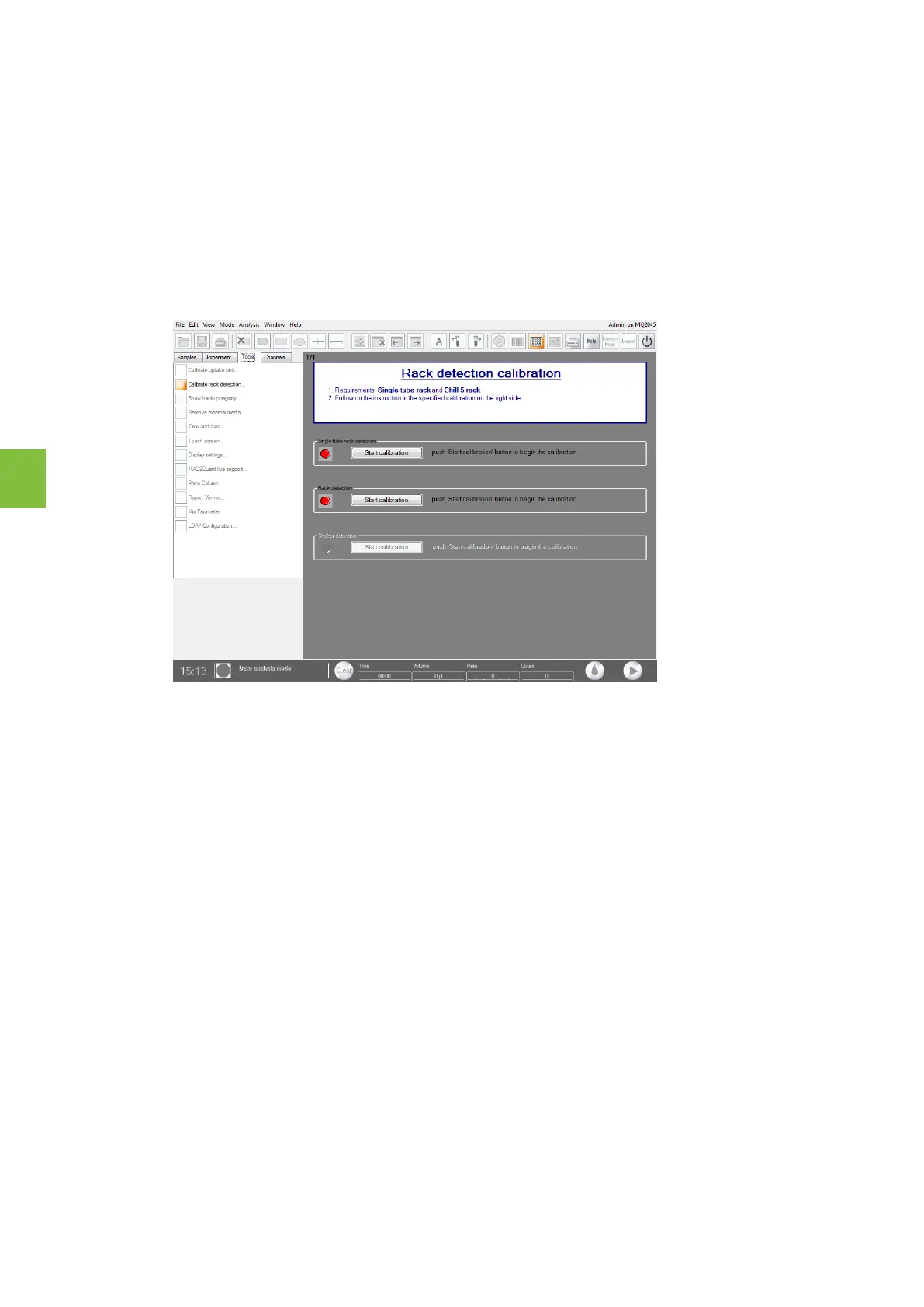
1 Click on the Tools tab on the side pane of the MACSQuantify Software and check the Calibrate rack
detection box. Red closed circles indicate that the components are not calibrated.
2 Click Start calibration under the heading Single tube rack detection.
3 The closed green circle indicates that the calibration is completed. After all calibrations are completed, the
instrument can be switched into acquisition mode.
4.3 Volume calibration
After exchange of the sample tubing, the system must be calibrated to this specific tubing in order to correctly
set the tube-volume and flow rate. This process is automated as an express mode Volume Calibration. Repeat
once a month.
1 Install either the single tube rack or the MACSQuant X 5 Rack. If using the MACSQuant X 5 Rack, select a
single position.
2 Select the Express Mode of type Setup and mode VolumeCalibration.
4
CALIBRATION
66


 To Next Page