Controls and Indicators General Product Description
1 - 4 0070-10-0603-01 Duo™ Operating Instructions
LED Indicators
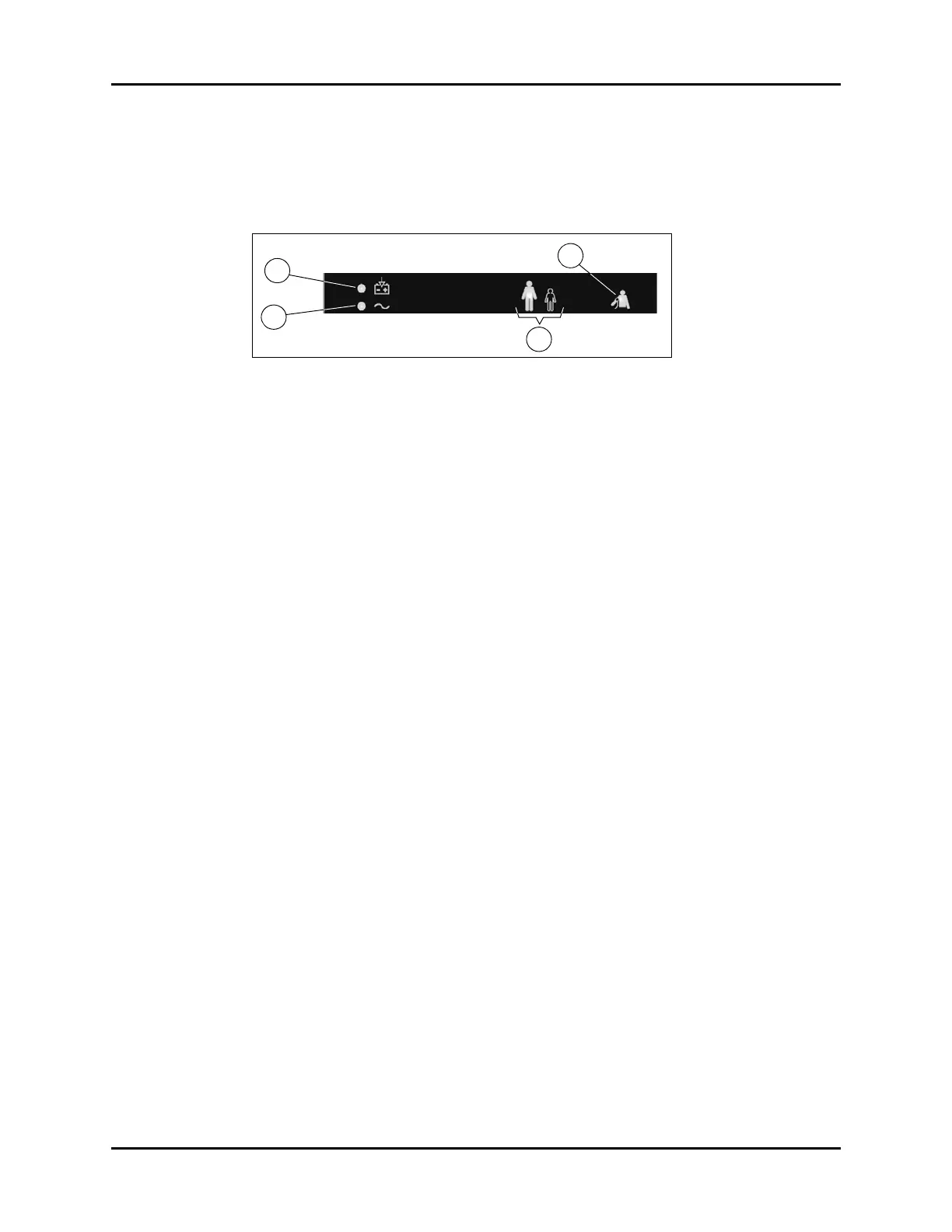
LED indicators (shown in FIGURE 1-3) illuminate green and are used to indicate the current
status of the following: Battery Charging, AC Power, Patient Size and the NIBP function.
FIGURE 1-3 LED Indicators
a. Battery Charging
• If a battery is installed and AC power is being supplied to the monitor, the
battery charging LED will illuminate to indicate that the battery is charging. The
battery charging LED will illuminate regardless of whether the Duo is OFF or in
normal monitoring mode.
• If a low battery condition exists, the battery charging LED will flash. When the
LED begins flashing, the approximate remaining battery runtime is 10 – 20
minutes for the maximum load configuration of NIBP/SpO
2
.
b. AC Power
• If AC power is being supplied to the monitor, the AC power LED will illuminate.
The AC power LED will illuminate regardless of whether the Duo is OFF or in
normal monitoring mode.
c. Patient Size
• The selected patient size LED will illuminate when the Duo is in normal
monitoring mode. (In FIGURE 1-3, the Adult patient size LED is illuminated.)
d. NIBP Start/Stop
•If the Duo is in normal monitoring mode, and an NIBP measurement is in
progress, the NIBP start/stop LED will illuminate. The NIBP start/stop LED will not
be illuminated when the NIBP measurement is complete or has been stopped. A
measurement can be manually stopped by the user or it can stop due to an error.
NIBP error codes are displayed in the Sys. area of the NIBP parameter tile as
described in section 2.4, “Information Codes and Error Codes”.


 To Next Page