Duo™ Operating Instructions 0070-10-0603-01 1 - 5
General Product Description Controls and Indicators
2. Keypad
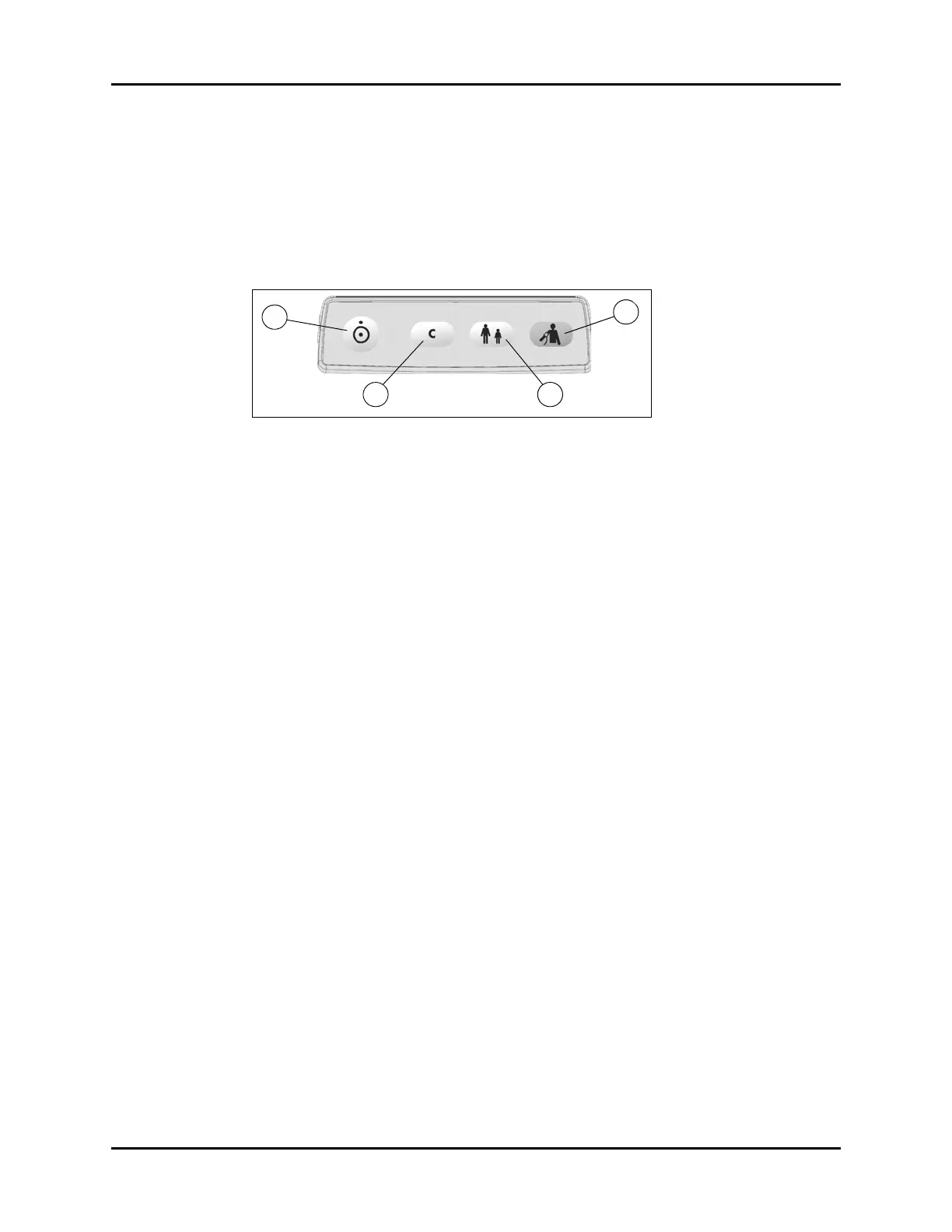
The Duo keypad (shown in FIGURE 1-4) is used to initiate all functions. To confirm that a key
has been successfully activated, two forms of feedback are provided. Manual feedback is
provided in the form of a “click” that can be felt under the fingertip. Audible feedback is
provided in the form of a single beep tone when the operation associated with that key is
executed.
FIGURE 1-4 Keypad
a. Power ON/OFF
• This key is used to power the Duo ON or OFF. It is also used to exit standby
mode and return to normal monitoring mode. The power OFF function features a
time delay of two (2) seconds (minimum). When powering the Duo OFF, the user
must depress the key for a minimum of 2 seconds.
NOTE: If the Power ON/OFF key is depressed for less than two (2)
seconds, the monitor will not power OFF.
• When the Duo is powered OFF, all parameter data is permanently deleted.
b. Clear/Next Patient
• While in normal monitoring mode, this key is used to delete all data (including
an NIBP E13 one-time information code) from the current display of the
parameter tiles. When the data is deleted, the NIBP cuff inflation pressure is
returned to the default value for the selected patient size.
• When a measurement for NIBP is currently in progress, this key is not active.
c. Patient Size
• This key is used to set the patient size to either Adult or Pediatric. While in
normal monitoring mode, each press of this key toggles between the two sizes.
When the Duo is powered OFF, the current patient size setting is maintained.
• When a measurement for NIBP is in progress, this key is not active.
d. NIBP Start/Stop
• This key is used to start an NIBP measurement and to stop an NIBP measurement
that is already in progress.


 To Next Page