Setup 12-3
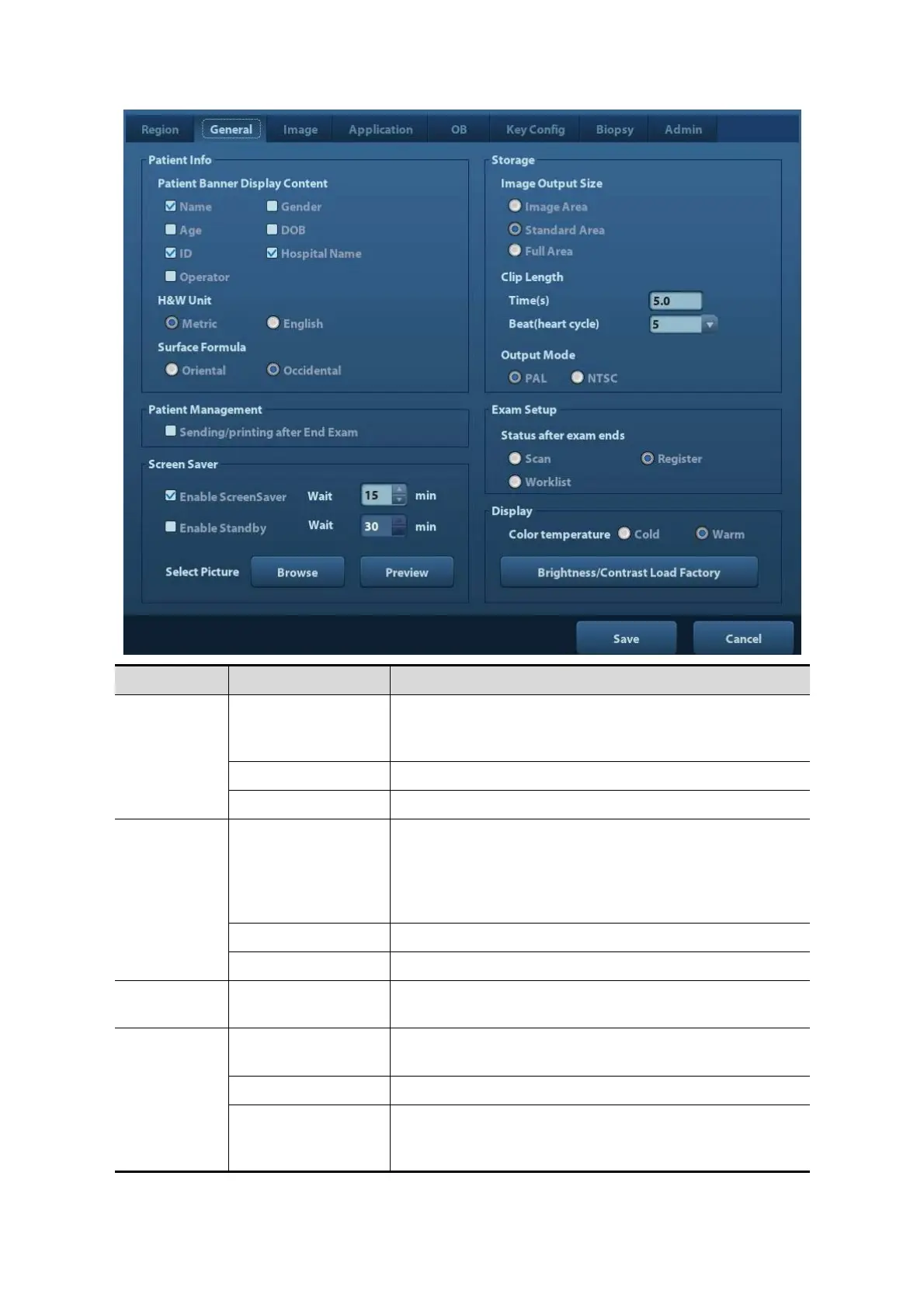
Patient Info
Info displays in
image banner
To select if to display the following patient information
on the image banner: Gender, Age, Operator, ID,
Name, Hospital
H&W Unit To set the unit for patient height and weight.
Surface Formula To set the surface formula.
Storage
Image Output Size
To set the size for a stored image:
Image Area
Standard Area
Full Screen
Clip length To set the cine length and heart cycle.
Patient
Management
Sending/printing
after End Exam
Select if to automatically archive the exam data to
DICOM server for storage/print.
Screen
Saver
Enable
ScreenSaver
To enable screen saver function, and select the waiting
time until screen saver.
Enable Standby Available after “Enable ScreenSaver” is selected.
Select Picture
After screen saver function is enabled, click [Browse] to
select the figure used for screen saver, and click
[Preview] to see the effect.



 To Next Page