Mitel IP Phone User Reference Guide Release 4.1
7
• Message Waiting Lamp
• Dedicated headset jack
• Wall mountable
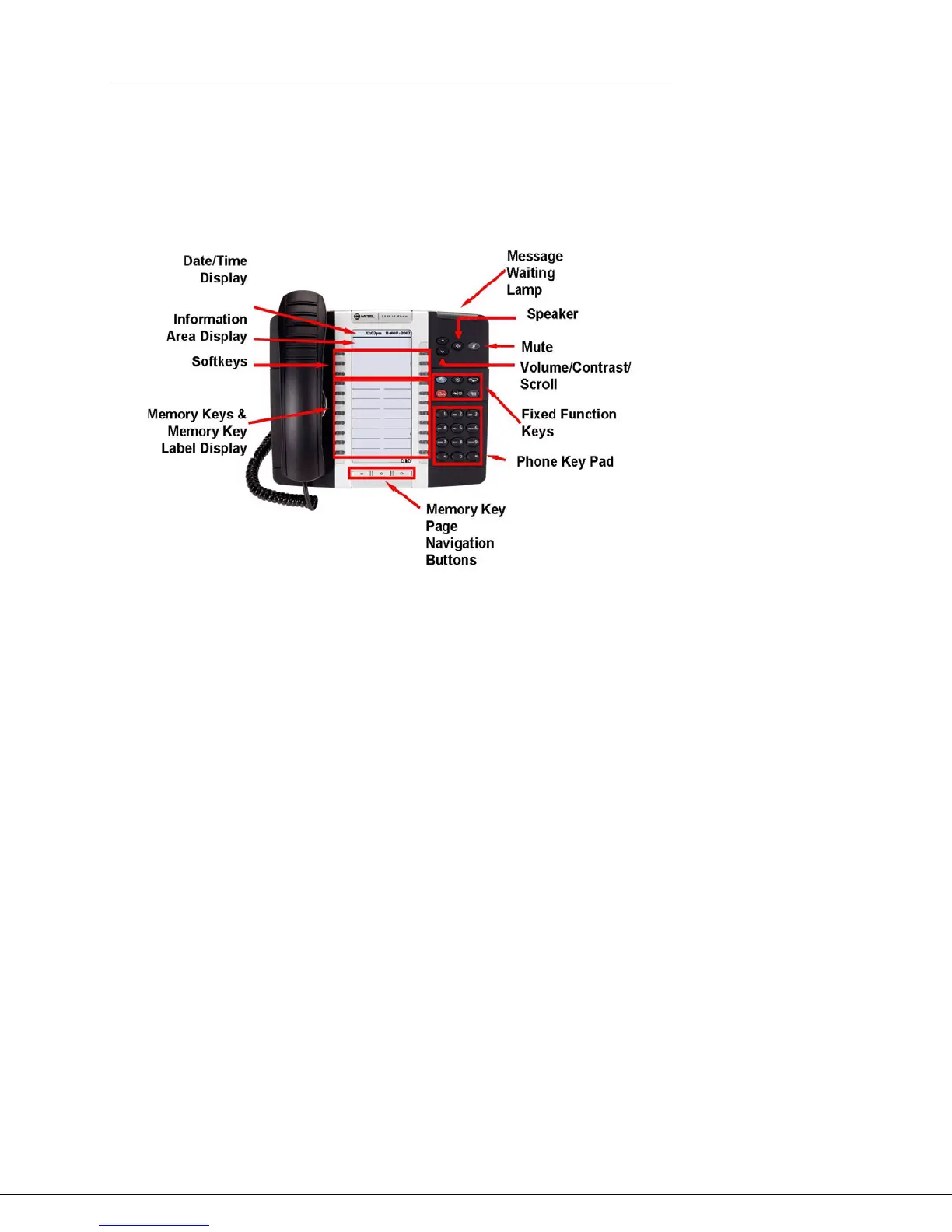
Figure 2: Mitel 5340 IP Phone
The Information Area Display shows information about the current telephone call
(such as name and number).
There are six softkeys (the three on the right are currently not used). The
meaning of each softkey is displayed directly beside the key.
There are three pages of 16 memory keys. The icons at the bottom of the phone
indicate which page is current. The page navigation buttons can be used to
switch pages. The memory key labels are also displayed beside each one
Initial setup for 5340 phone service
To set up your new phone service, follow these steps:
1. Activate your phone. See “Activating a 5340 phone” on page 7.
2. Perform a Quick Set-up. See “Quick set-up” on page 100.
Activating a 5340 phone
To activate a phone you need (1) an extension, (2) a phone, and (3) a PIN. The
administrator can provide you with an extension and an initial PIN.
To activate your phone, follow these steps:
1. Disconnect your computer from the network.
2. Plug the phone into the network.





 To Next Page