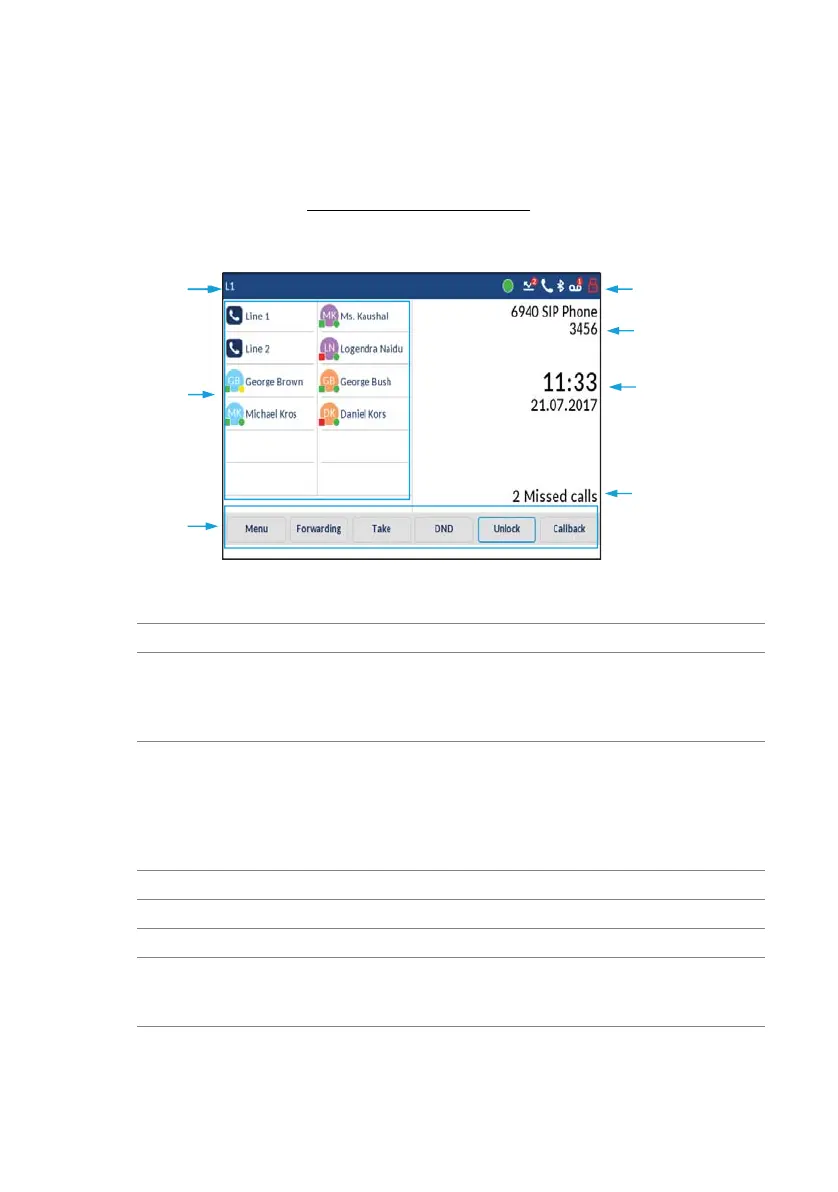
18 Mitel 6940 SIP
eud-1765/2.0 – R6.0 – 06.2018
Keys, display, and menu guidance
• Move your finger up and down a list to view the full selection.
• Move your finger to the right or left on the touch screen to display all
levels.
Note: See the chapter "Safety information", page 4 for information about how to
care for your touch screen.
4
5
1
2
7
3
1
6
No
.
Description
1Line Display of the current line.
2 Top softkeys T1-T48 Twelve freely configurable keys that can be set to
a total of 48 functions, call numbers, operator
keys, room keys, or busy lamp fields. The color of
the keys indicates the functional state.
3 Bottom softkeys S1-S30 Six freely configurable keys that can be set to a
total of 30 functions or call numbers, or which are
automatically set by the MiVoice Office 400 com-
munication system to context-dependent func-
tions. The color of the key indicates the functional
state.
4Status line Displays information about phone status.
5 Phone number/name Displays phone number and name.
6 Date/time Displays date and time.
7 Status notifications Displays information about the state of the phone;
for example, call forwarding, missed calls, voice
mail, and much more.



 To Next Page