2
SYSTEM CONFIGURATION
2.1 System Configuration
2.1.1 System Configuration for Single CPU System
2 - 10
1
OVERVIEW
2
SYSTEM
CONFIGURATION
3
GENERAL
SPECIFICATIONS
4
HARDWARE
SPECIFICATIONS OF
THE CPU MODULE
5
POWER SUPPLY
MODULE
6
BASE UNIT AND
EXTENSION CABLE
7
MEMORY CARD AND
BATTERY
8
CPU MODULE START-
UP PROCEDURES
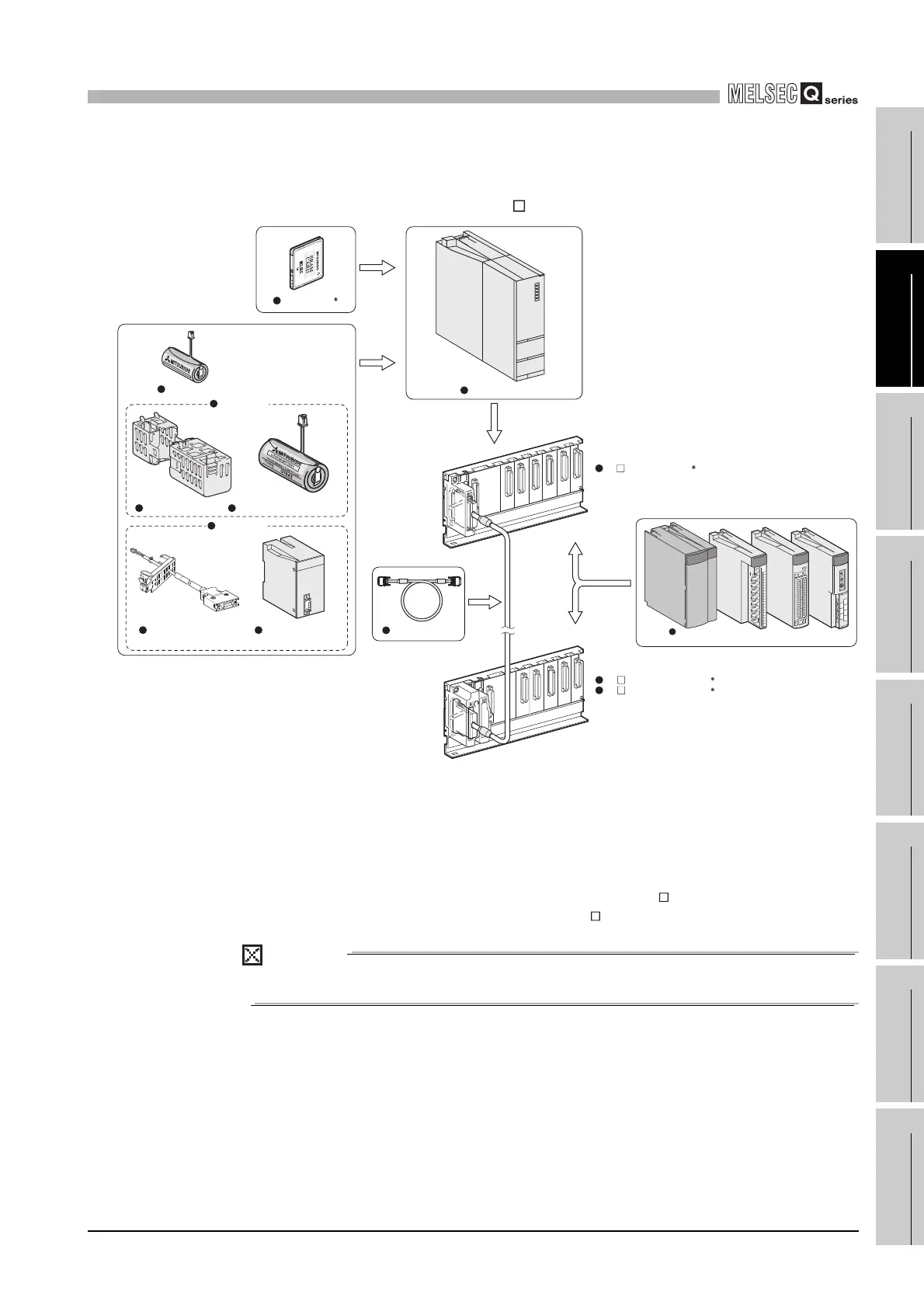
(3) System configuration using the Process CPU
(a) When the main base unit (Q3 B) is used
* 1: One memory card can be installed.
Select a memory card from SRAM card, Flash card, and ATA card according to the application
and capacity.
With commercial memory cards, the operation is not assured.
* 2: As a power supply module, use the Q series power supply module.
The slim type power supply module and the redundant power supply module are not available for
the power supply module.
* 3: The Q series power supply module is not required for the Q5 B extension base unit.
POINT
The Process CPU cannot be mounted on the slim type main base unit.
Diagram 2.9 System configuration when Q3 B is used
Process CPU
Extension cable
Battery holder Battery for QCPU (Q7BAT)
Battery for QCPU (Q6BAT)
Q7BAT-SET
Memory card
1
Q3 B main base unit
2
Q6 B extension base unit
Q5 B extension base unit
2
3
Power supply module/I/O module/
Intelligent function module
Battery for QCPU
(Q8BAT)
Q8BAT-SET
Q8BAT connection cable


 To Next Page
 Loading...