41
No. 99MAH057A
5 Setting Parameters
(Short press) / (Long press)
5.3
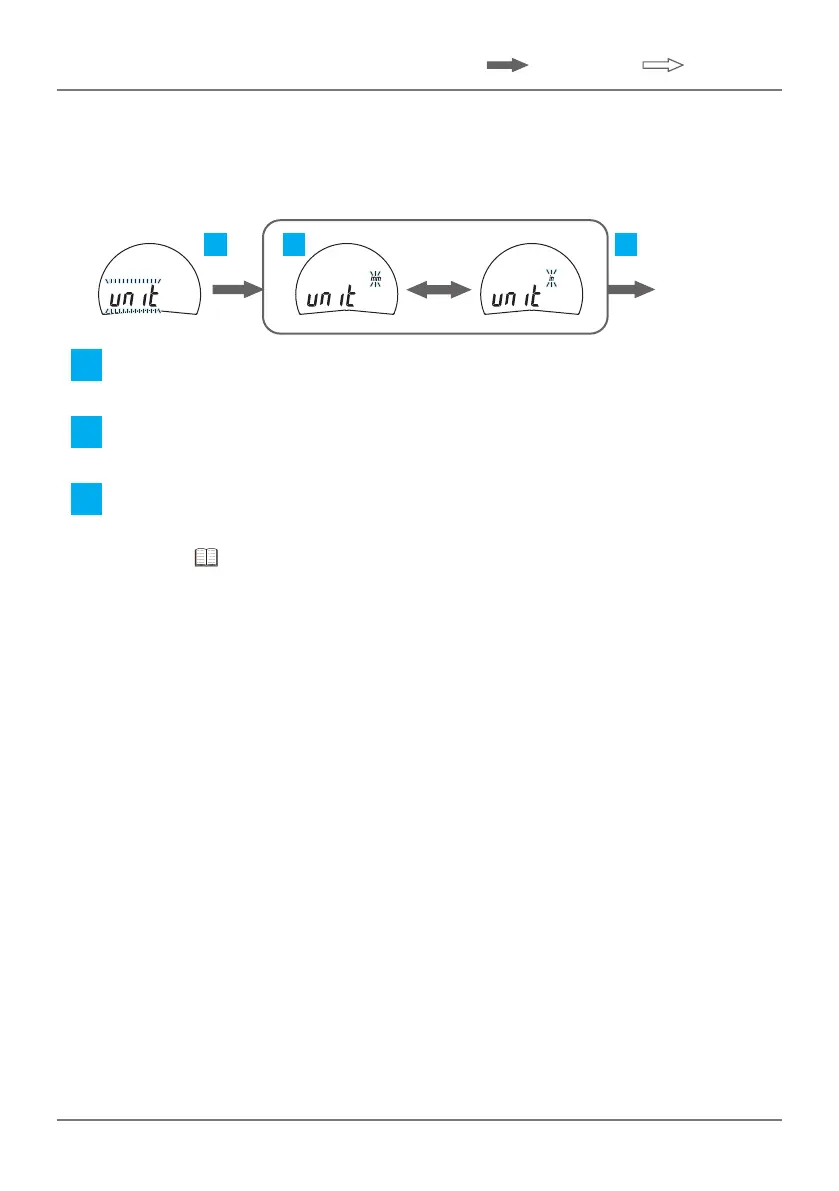
Selecting Unit System
Theunitsystem(in↔mm)canbeset(excludingID-C0525NXB,
ID-C0550NXB, ID-C1025NXB, ID-C1050NXB).
2 31
F2 F2
F1/F3
Go to the
next item
1 Pressthe[F2]key.
» Unit system can be set.
2 Pressthe[F1]keyor[F3]keytosettheunitsystem.
» Each time the key is pressed, it will switch between [in] and [mm].
3 Pressthe[F2]key.
» Settingsareconrmed;shiftstothenextparameteritem.
(Go to "5.4 Selecting Counting Direction" on page 42.)




 To Next Page