Operating Instructions MG3 Digital
How to …?
76609409EN-BA-MG3D-V1_6.docx 45/82 2010-08-02
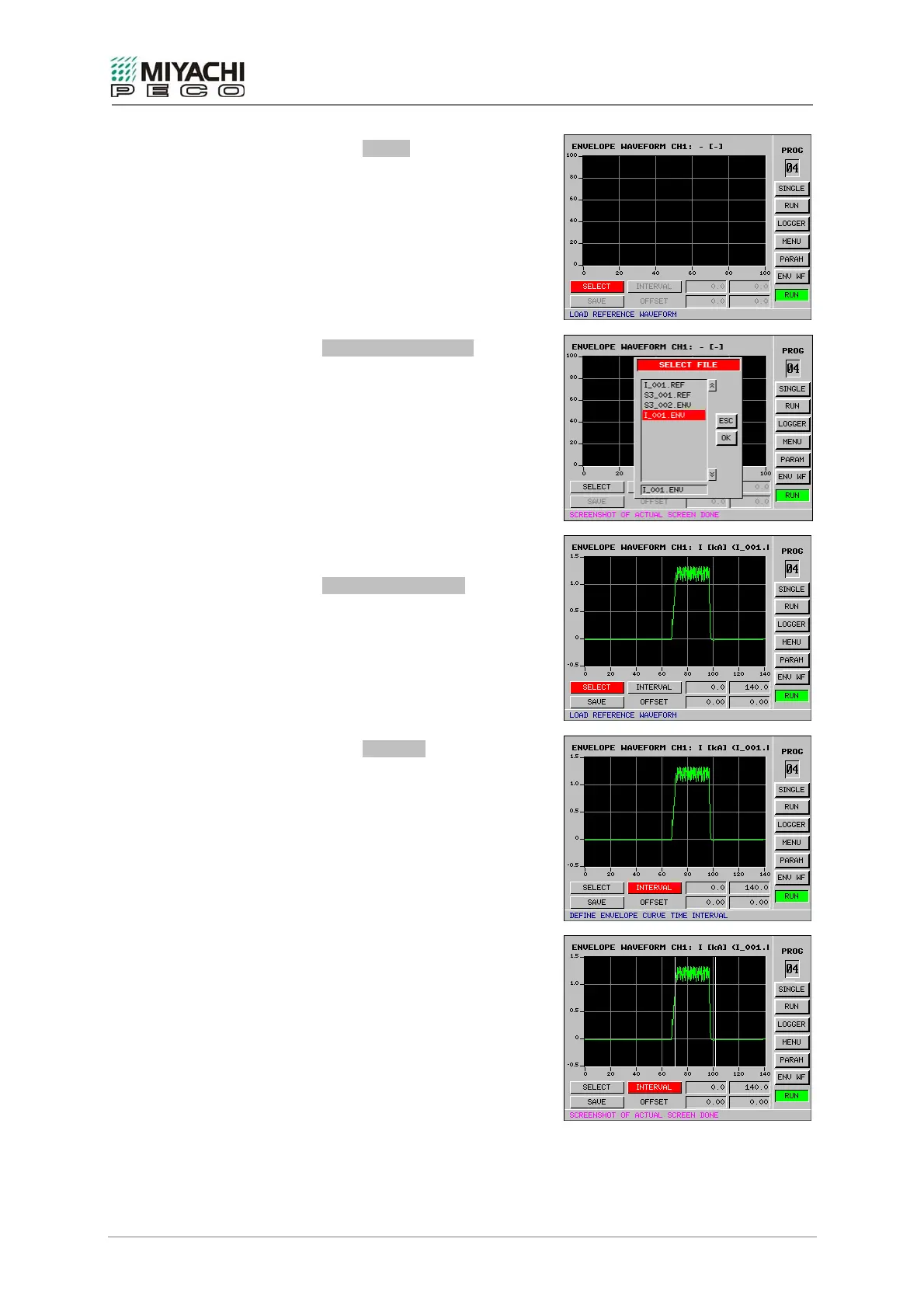
• Select button SELECT with the
knob/pushbutton combination and depress
button.
• Screen ENVELOPE WAVEFORMS opens, and
now you can:
- open and edit an existing envelope
waveform (*.ENV), or
- open a reference waveform (*.REF)
and determine the envelope waveform
by yourself.
• Open file, e.g.
I_001.REF
• Screen ENVELOPE WAVEFORM opens, and
now you can generate an envelope
waveform with the reference waveform
loaded.
• Select button INTERVAL with the
knob/pushbutton combination and depress
button.
• You will now see a white vertical line that
you can move by rotating the
knob/pushbutton combination.
• Select the position at which the monitoring
interval or time slot should commence and
press the button.
• You will now see a second white vertical
line that you can move by rotating the
knob/pushbutton combination.
• Pressing the button again allows you to
determine the time slot at which the
envelope waveform should end.


 To Next Page