Operating Instructions MG3 Digital
How to …?
76609409EN-BA-MG3D-V1_6.docx 47/82 2010-08-02
Loading an envelope waveform
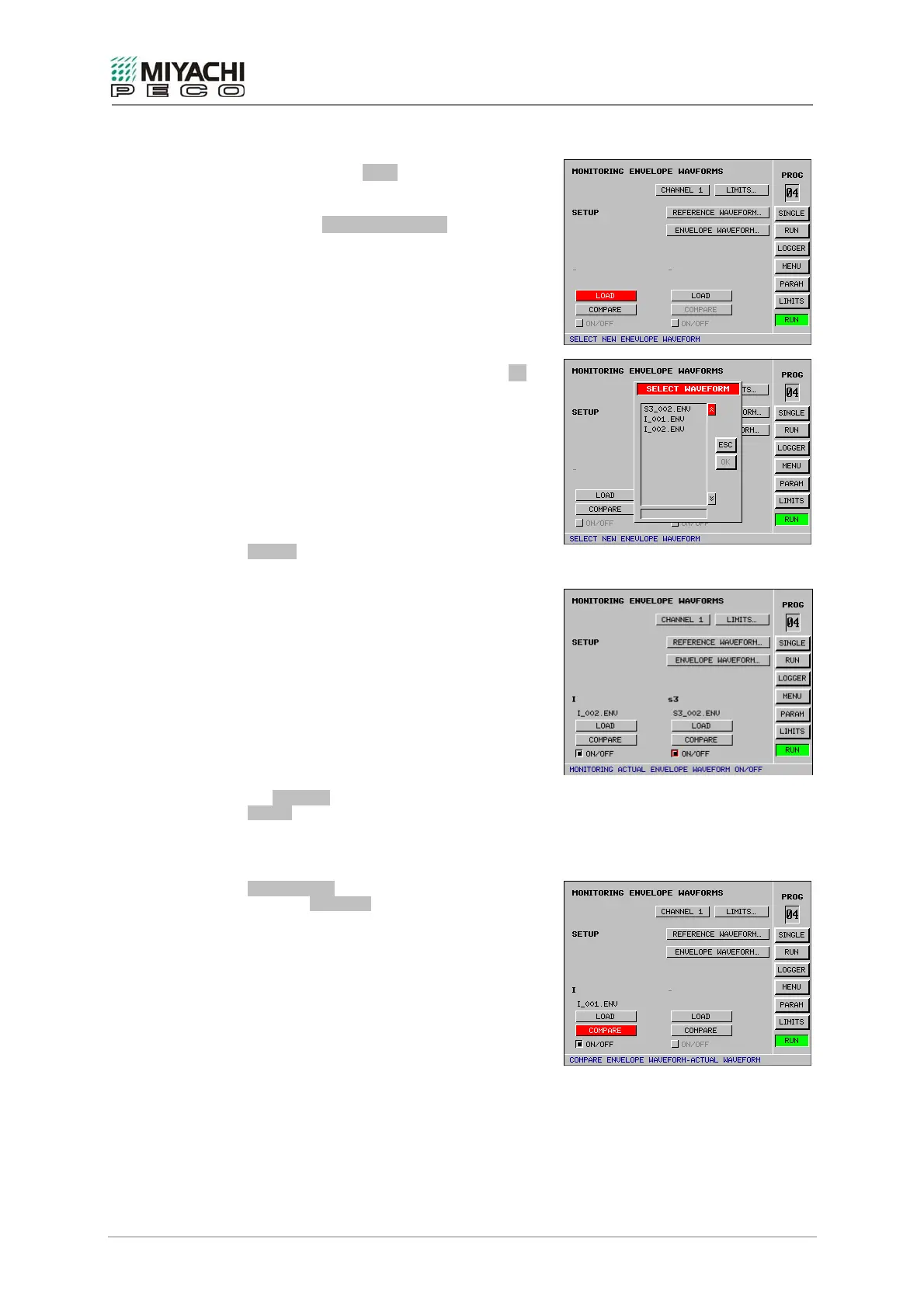
• Select button LOAD with the
knob/pushbutton combination and depress
button.
• Screen SELECT WAVEFORM opens.
• From the files list, select an envelope
waveform.
• Exit screen SELECT WAVEFORM with OK.
• The envelope waveform selected is loaded
now.
Remark:
An inquiry is generated as to whether you wish
to load the envelope waveform last processed if
no CompactFlash card is plugged in. Simply
acknowledge with OK if you wish to do this.
ON/OFF
Envelope waveform monitoring is activated by
pressing the button.
2
nd
envelope waveform
A maximum of two envelope waveforms can be
loaded. These independently monitor a signal
sequence.
You can return to the limit value setting with
the LIMITS... or
LIMITS button.
Comparison of measuring waveforms and
envelope waveforms.
COMPARISON
Press the COMPARE button to compare the
loaded envelope waveform with the currently
measured waveform.


 To Next Page