HTP-1 Installation and User Guide Release 1.8.1
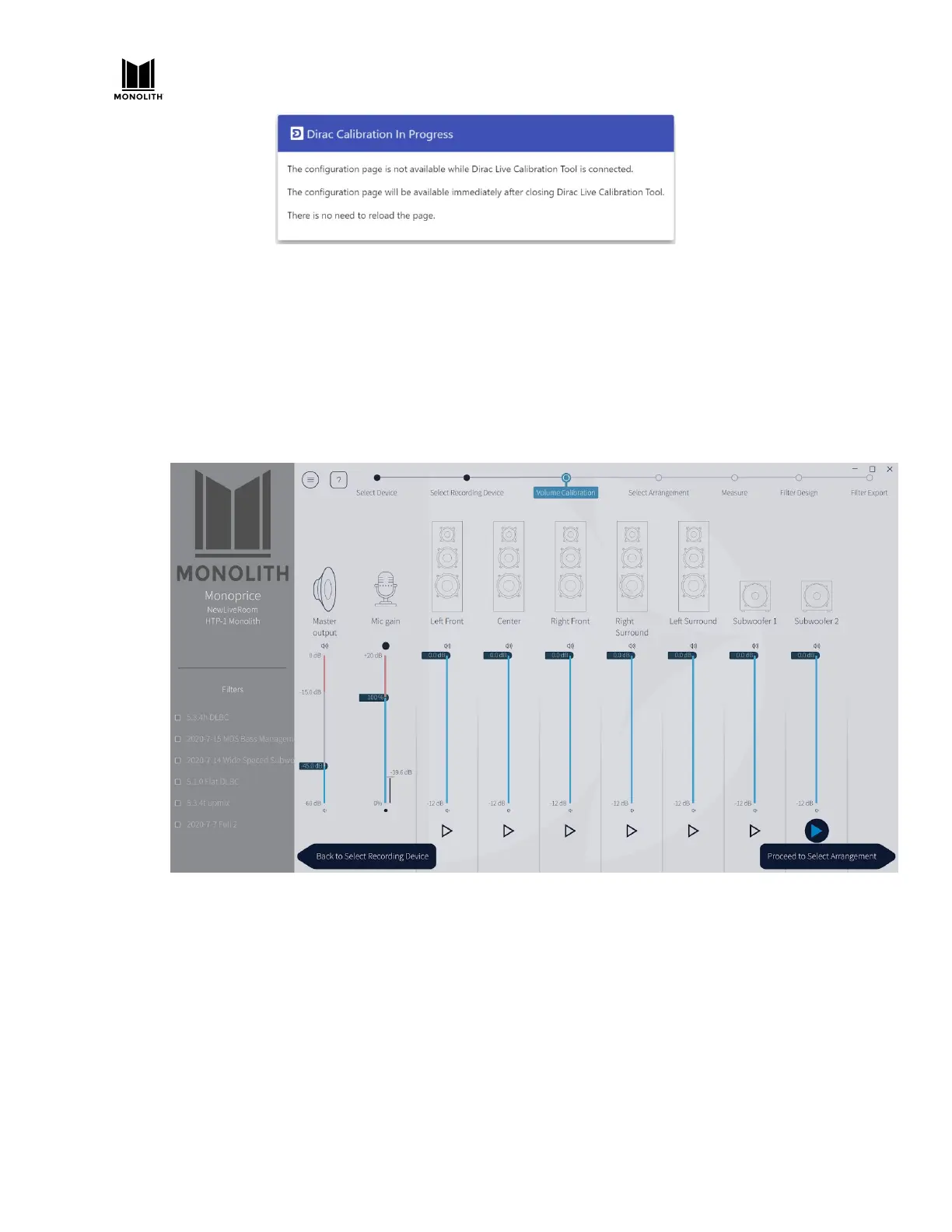
7) Set the volumes for calibration. The volume control on the left side of the Dirac screen exactly
matches that used by the remote control. You can adjust it with the remote control. The Dirac
program sets the volume initially to -30dB.
8) Press the play arrow under the left front speaker and adjust the master volume to reach
approximately -20dB on the scale for the channel. Note that the noise plays for about 30
seconds. Press play again if you need to. Repeat this for each channel. The volumes don’t have
to be all the same, but they should be close. If several amps are involved, like with a powered
subwoofer, it’s better to get the volumes about even using the amp volumes.
Note that Dolby Enabled speakers are labeled with “Atmos” in the speaker name. Dirac uses a
sweep tailored to preserve the frequency response of Dolby Enabled speakers.
HTP-1 User Manual Page 50 V1.8.1


 To Next Page