HTP-1 Installation and User Guide Release 1.8.1
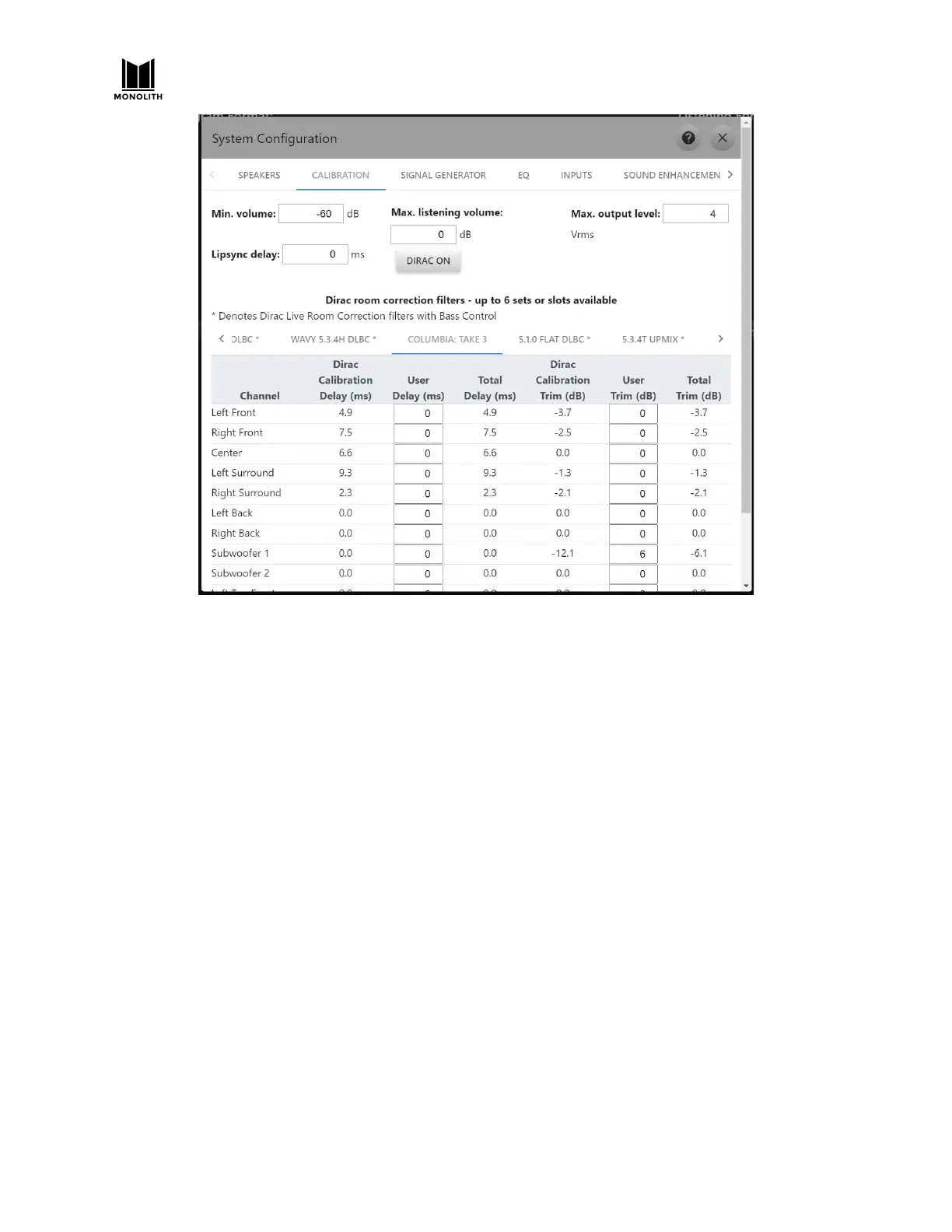
You can modify the Dirac calibration values with user values. You can also supply User Delay and User
Trim values that are applied even when Dirac calibrations are not enabled. The User Delay and User
Trim values add with the Dirac delays and trims. Total Delay cannot go below zero. Setting the Trim to
high values can work but it sacrifices the headroom that you may want for other filters.
Dirac Bypass
Clicking on the Dirac button, whether on the GUI or on the remote control, toggles the Dirac filter
through three states:
Dirac On
The Dirac filter is fully engaged. The measured trim and delay values are applied. The user trims and
delays are also applied. Critically, the detailed room correction filter is applied. If a Dirac Live Bass
Control filter is selected, the buttons in the GUI will show “Dirac On BC” and the HTP-1 bass manager is
disabled so that Dirac can handle the bass management.
Dirac Bypass
The detailed room correction filter is disabled. The associated delay and trim values are applied. The
HTP-1 bass manager is used. The buttons in the GUI display “Dirac Bypass”. This setting is designed to
allow you to hear your system with the delays and trims set optimally but with no spectral modification
applied by filtering. Note that the crossover frequencies of the HTP-1 bass manager are NOT
automatically aligned with the crossover frequencies used by the Dirac bass manager.
HTP-1 User Manual Page 54 V1.8.1


 To Next Page