OPI-PulseNGKit-en-141106
Version: 2.01
Page 20 of 31
021,725,1*62/87,216
Operating Manual
PulseNG Kit
DSP
t (s)
a (m/s²)
20
10
0
-10
-20
0246
0
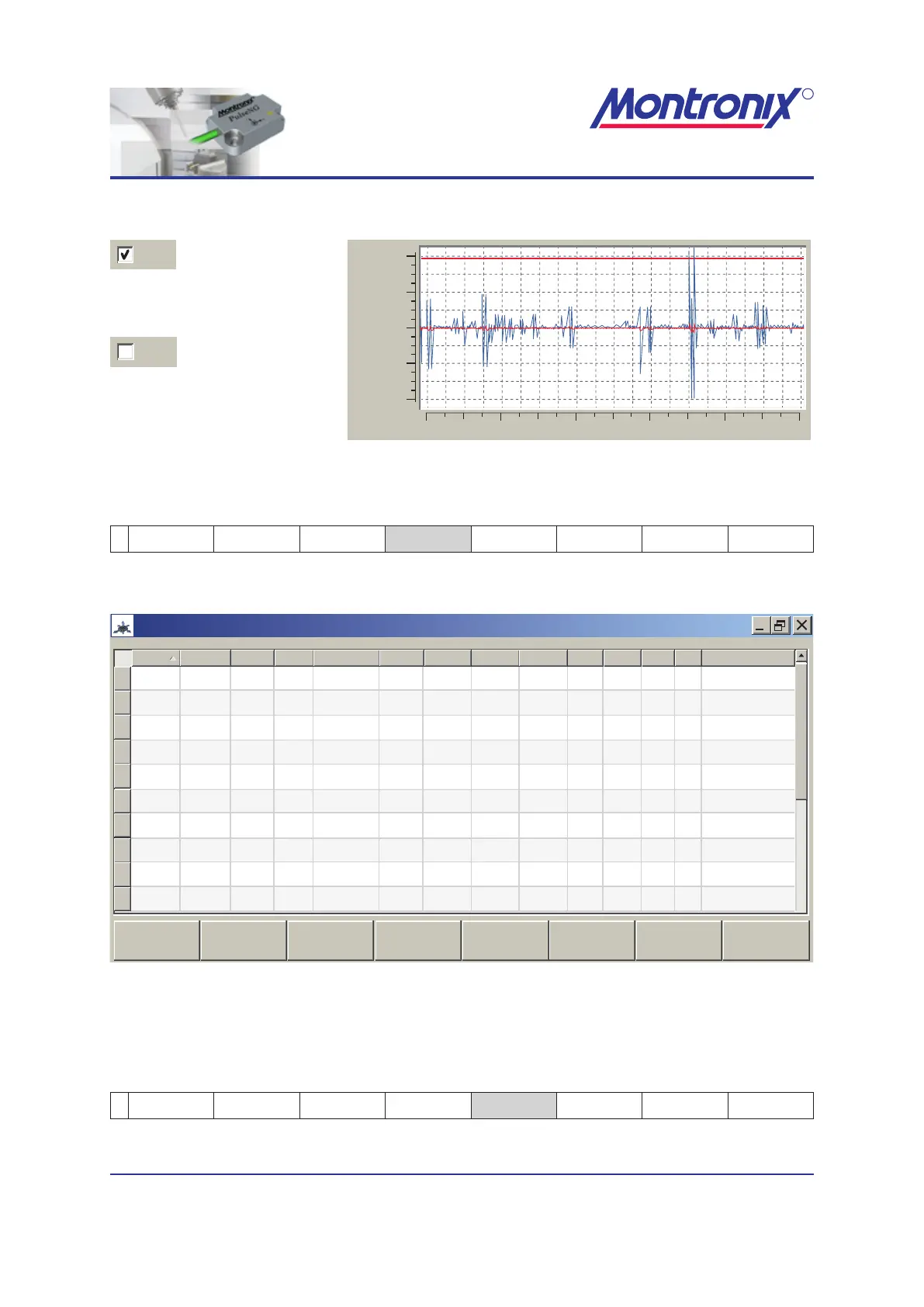
Graphic shown with DSP
(blue).
Graphic shown without DSP.
Figure 13: Graphic shown with DSP
Text EL full view / Text EL partial view
2 Text EL Graphics EL
Text EL
full view
Export
csv le
Back
Activates the full view of the log book.
021,725,1*62/87,216
R
PulseNG-hmi
pulseNG
1 255
1
2
3
4
5
6
7
8
9
10
1
1
1
1
1
1
1
1
1
1
1
1
1
1
1
1
1
1
1
1
11.0 mm/s
1.0 mm/s
1.0 mm/s
1.1 mm/s
25.0 m/s²
0.9 m/s²
27.4 °C
0.7 °C
0.7 °C
0.7 °C
1.3 mm/s
1.4 mm/s
1.3 mm/s
25.9 mm/s
0.8 m/s²
0.0 m/s²
0.0 °C
0.0 °C
0.0 °C
0.0 °C
1
1
1
1
1
1
2
1
1
200
200
200
80
0
80
80
1
80
0
200 2014/03/17 19:42:13
2014/03/17 19:41:48
2014/03/17 19:41:12
2014/03/17 19:41:08
2014/03/18 09:07:33
2014/03/18 09:07:04
2014/03/18 09:06:51
2014/03/18 08:47:03
2014/03/18 08:45:38
2014/03/18 00:06:41
200
200
90
4
90
90
1600
90
0
Monitoring: Teaching: Scenario #:
Text EL Graphics EL
Text EL
partial view
Export
csv file
Sensor
Event Log
Back
Type
Scenario #
Sensor #Limit # Limit type Limit Max HP (Hz)LP (Hz)Alarm StopTime/dateDSP
Axis (X,Y,Z,M)
Alarm
Alarm
Alarm
Alarm
Alarm
Alarm
Alarm
Alarm
Alarm
Alarm
Velocity
Velocity
Velocity
Temperature
Velocity
Temperature
Temperature
Z-Axis
Temperature
X-Axis
Average
Average
Average
Average
Average
Average
Average
Average
Average
P2P
Lower
Lower
Lower
Lower
Lower
Upper
Upper
Upper
Upper
Lower
Off
Off
Off
Off
On
On
On
On
On
On
On
On
On
On
On
On
On
On
On
On
Figure 14: Text EL full view
When the full view is active, you can switch back to a partial view using the soft key
“Text EL partial view”.
Export csv le
2 Text EL Graphics EL
Text EL
full view
Export
csv le
Back
Save a text event log le in csv format to the hard drive using this soft key.


 To Next Page