OPI-PulseNGKit-en-141106
Version: 2.01
Page 27 of 31
021,725,1*62/87,216
Operating Manual
PulseNG Kit
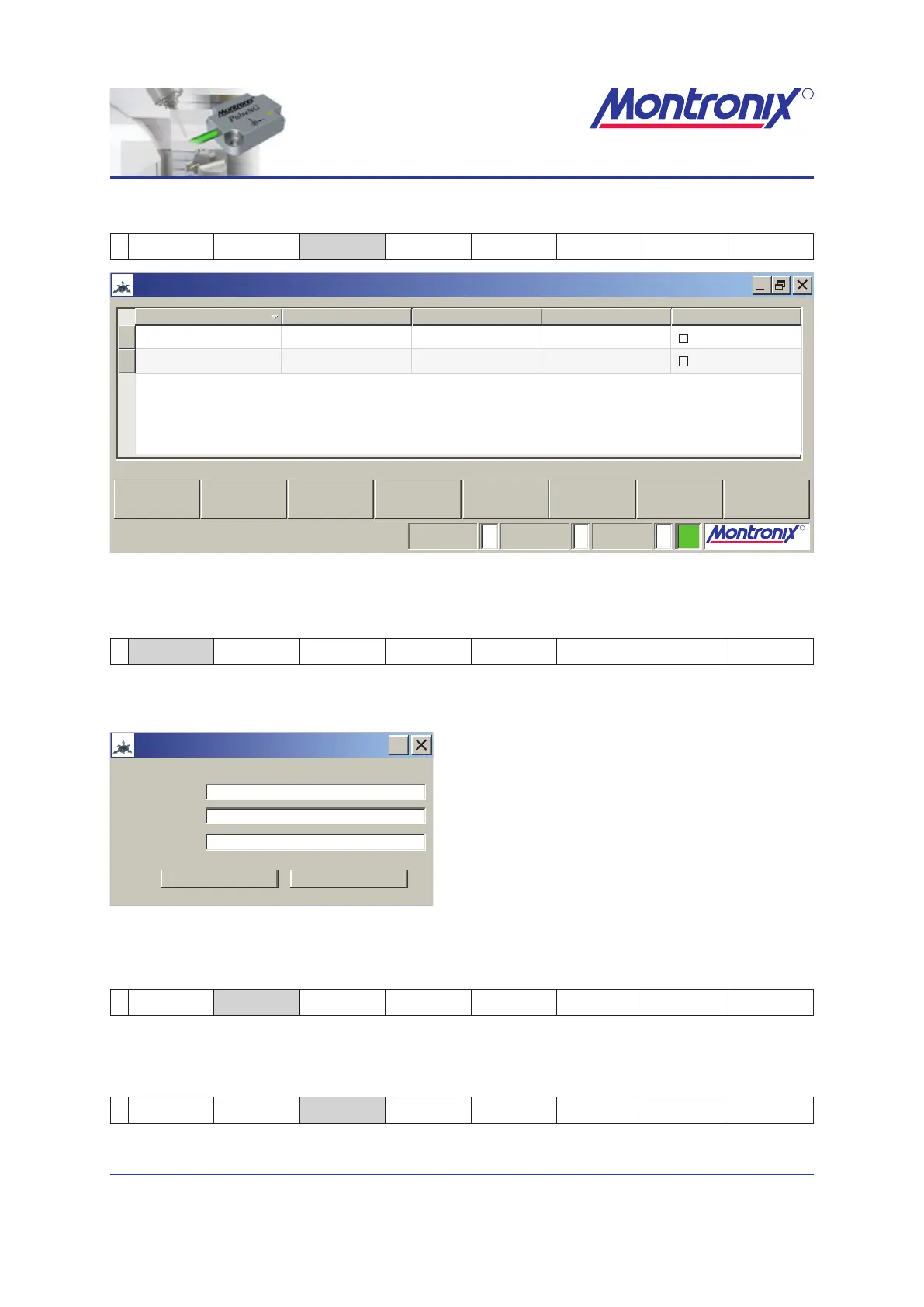
Select sensor
2 Help Scenario
Select
sensor
Service Default OK Cancel
PulseNG-hmi
pulseNG
R
021,725,1*62/87,216
R
021,725,1*62/87,216
Montronix_0011
2Montronix_002
TCP/IP
TCP/IP
192.168.1.241
192.168.1.246
3000
3001
1 255
Add
DeleteEdit
OK Cancel
Serial number
Actif
Actif
Interface IP address Port Connection
Monitoring: Teaching: Scenario #:
Figure 20: Sensor selection
Add
3 Add Delete Edit OK Cancel
Add a new IP address to the list
pulseNG
192.168.1.241
3000
Communication settings
?
OK Cancel
Description: Your text here
IP address:
Server port:
Description:
Enter description or name
IP address:
Enter desired address
Server port:
Enter desired port number
Figure 21: Pop-up window for Add
Delete
3 Add Delete Edit OK Cancel
To delete an entry, highlight it and select soft key „Delete”.
Edit
3 Add Delete Edit OK Cancel
Using this soft key, you can edit the highlighted entry.


 To Next Page