www.miinet.com Moore Industries-International, Inc.
- 48 -
User’s Manual
225-748-00P
August 2024
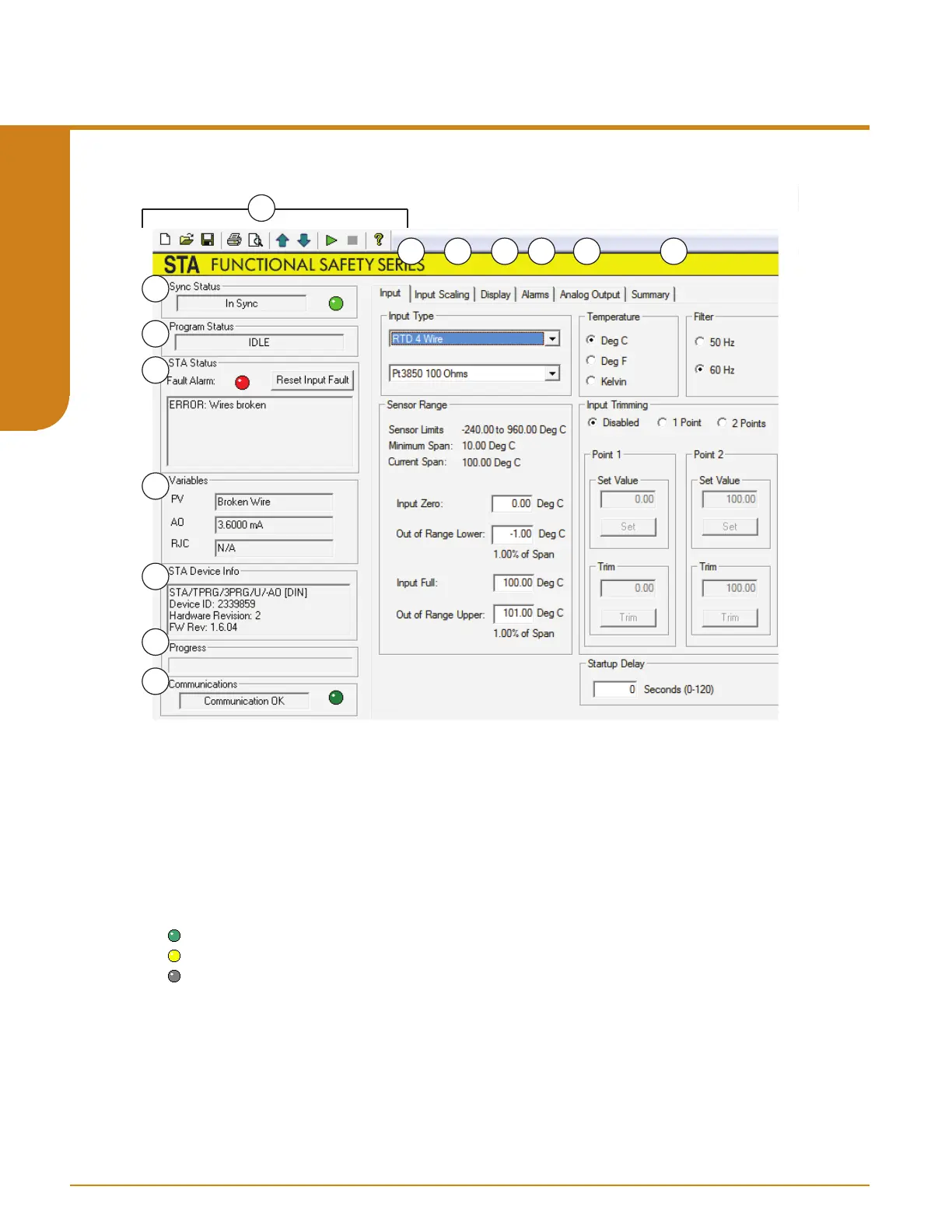
The PC Software is made up of these sections:
1. Menu and Tool Bar Dropdown menus and corresponding icons allow you to perform various
functions throughout the PC Configuration Program. Refer to the Menu and Tool Bar Legend for
a complete description.
2. Sync Status– This displays whether or not unit configuration and software configuration are
currently in Sync (match). It will display the following messages:
In Sync (green light)
Out of Sync (yellow light)
No Device (grey light).
3. Program Status– This portion of the program displays the activity of the connected unit. It will
display such messages as: Reading STA Info, Idle, Monitoring Variables and Monitor Fail.
Programmable RTD, T/C, Ohms, mV and Potentiometer Safety Trip Alarm
STA
TPRG
SECTION 5



 To Next Page