2 - 20 MC55A0/MC55N0 Enterprise Digital Assistant User Guide
Performing a Warm Boot
Hold down the red Power button for approximately five seconds. As soon as the MC55 starts to boot (splash
screen displays) release the Power button.
Performing a Cold Boot
To perform a cold boot:
•
On a numeric keypad, simultaneously press the red Power button and the and keys.
•
On an alphanumeric keypad, simultaneously press the red Power button and the and keys.
•
On an PIM keypad, simultaneously press the red Power button and the and keys.
Waking the MC55
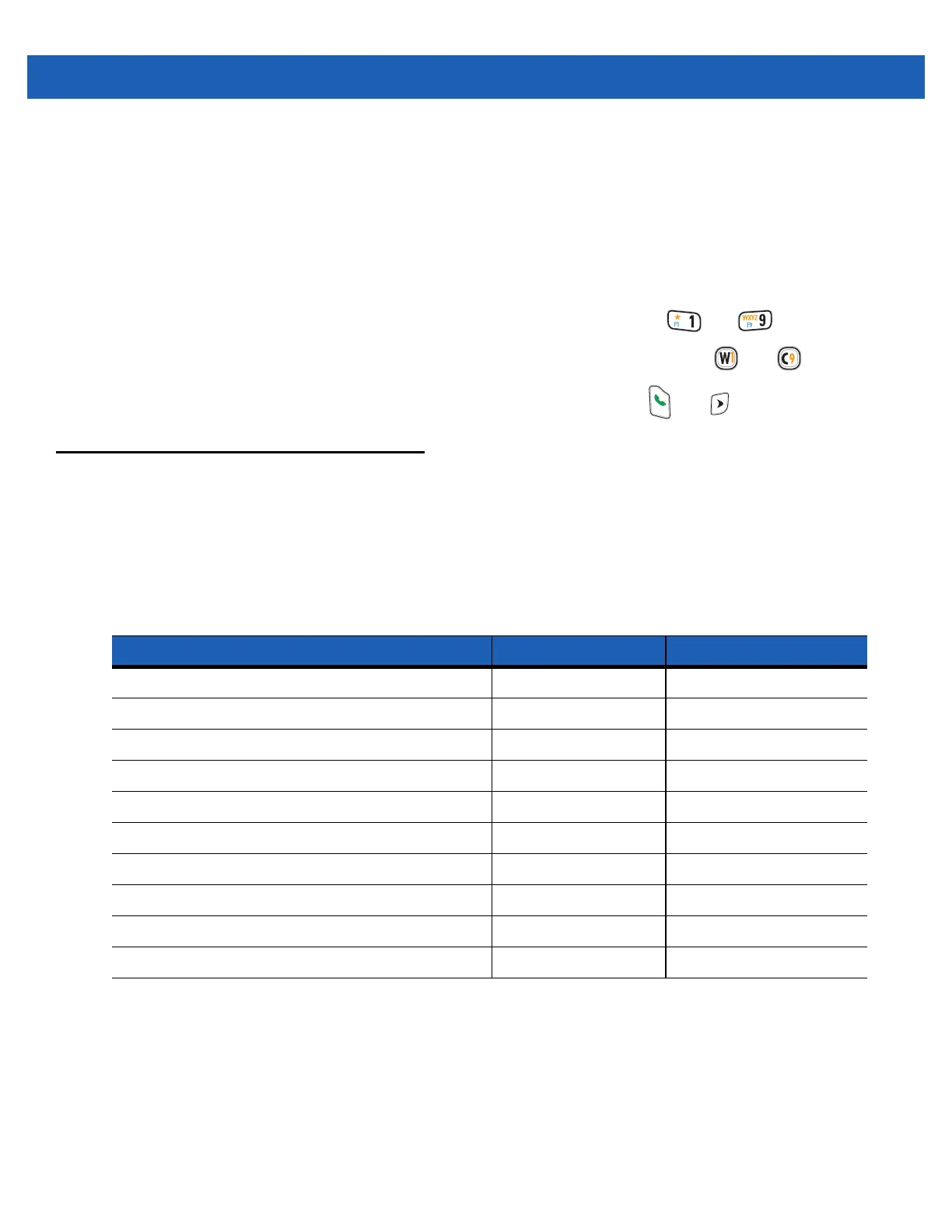
The wake-up conditions define what actions wake up the mobile computer after it has gone into suspend
mode. The mobile computer can go into suspend mode by either pressing the Power button or automatically by
Control Panel time-out settings. These settings are configurable and the factory default settings are shown in
Table 2-8 are subject to change/update.
Table 2-8
Wake-up Default Settings
Condition for Wake-up Power Button Automatic Time-out
AC power is applied. No Yes
Mobile computer is inserted into a cradle. No Yes
Mobile computer is removed from a cradle. No Yes
Mobile computer is connected to a USB device. Yes Yes
A key is pressed. No Yes
The scan triggered is pressed. No Yes
The screen is touched. No No
Bluetooth communication Yes Yes
IST activity No Yes
USB Host connected No No



 To Next Page
 Loading...