EasyManua.ls Logo

Movincool CMW30 - Page 28

Movincool CMW30
88 pages
Print Icon
To Next Page IconTo Next Page
To Previous Page IconTo Previous Page
Loading...
Operation Section
28
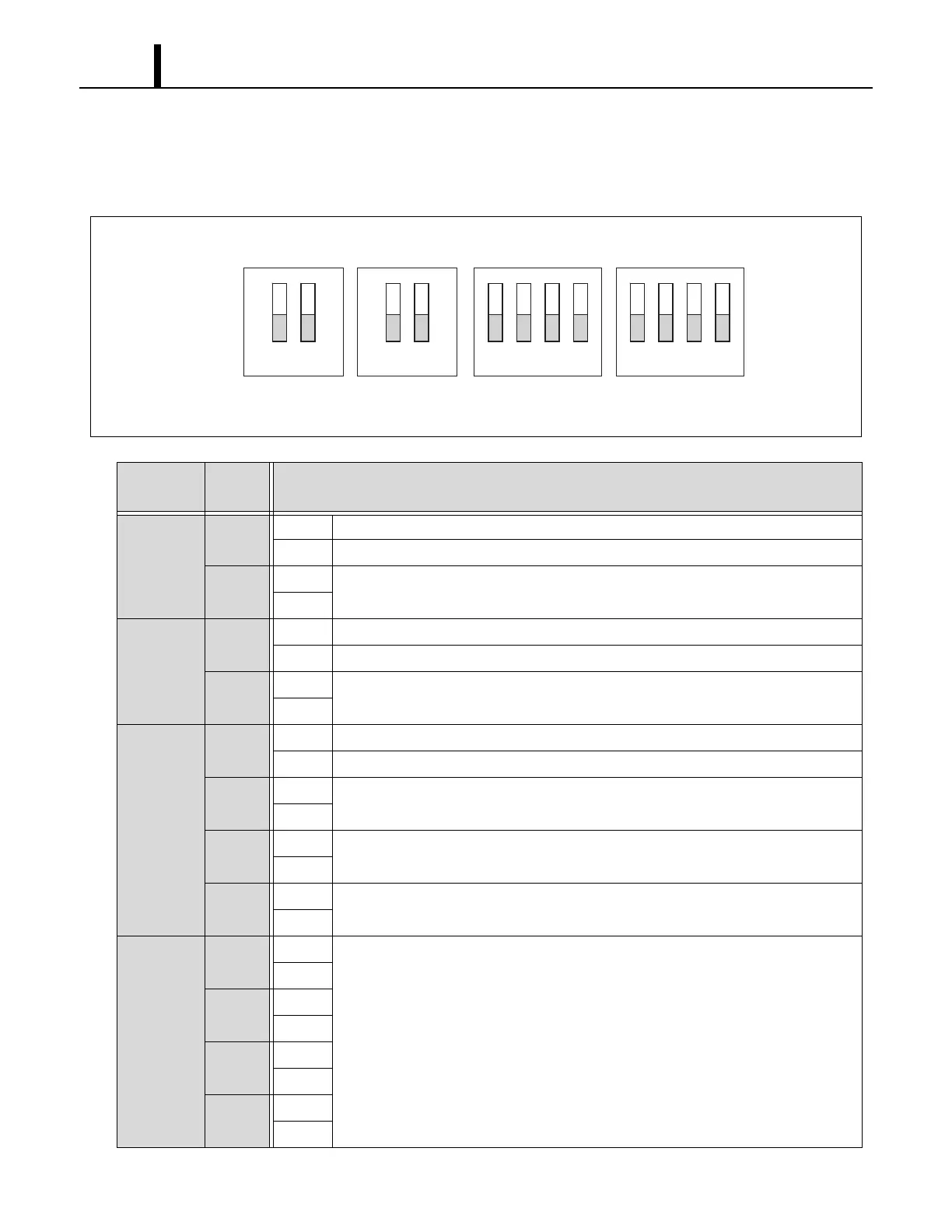
(2) DIP switch configuration and setting
The controller of the unit is equipped with DIP switches that default in the OFF position. The DIP
switch can be set to configure the following functions.
Switch
Name
Switch
Number
Function
DSW1
1
ON Enables the MWT.
OFF Enables the WMC.
2
ON
No function.
OFF
DSW2
1
ON Initializes setting of the evaporator fan motor after replacing the fan motor.
OFF Set to OFF when the motor replacement is completed.
2
ON
No function.
OFF
DSW3
1
ON Enters the test mode.
OFF Exits the test mode.
2
ON
No function.
OFF
3
ON
No function.
OFF
4
ON
No function.
OFF
DSW4
1
ON
No function.
OFF
2
ON
OFF
3
ON
OFF
4
ON
OFF
I003192
ON
OFF
12
12 12341234
DSW1 DSW2 DSW3 DSW4

Table of Contents

Related product manuals