Repair Section
53
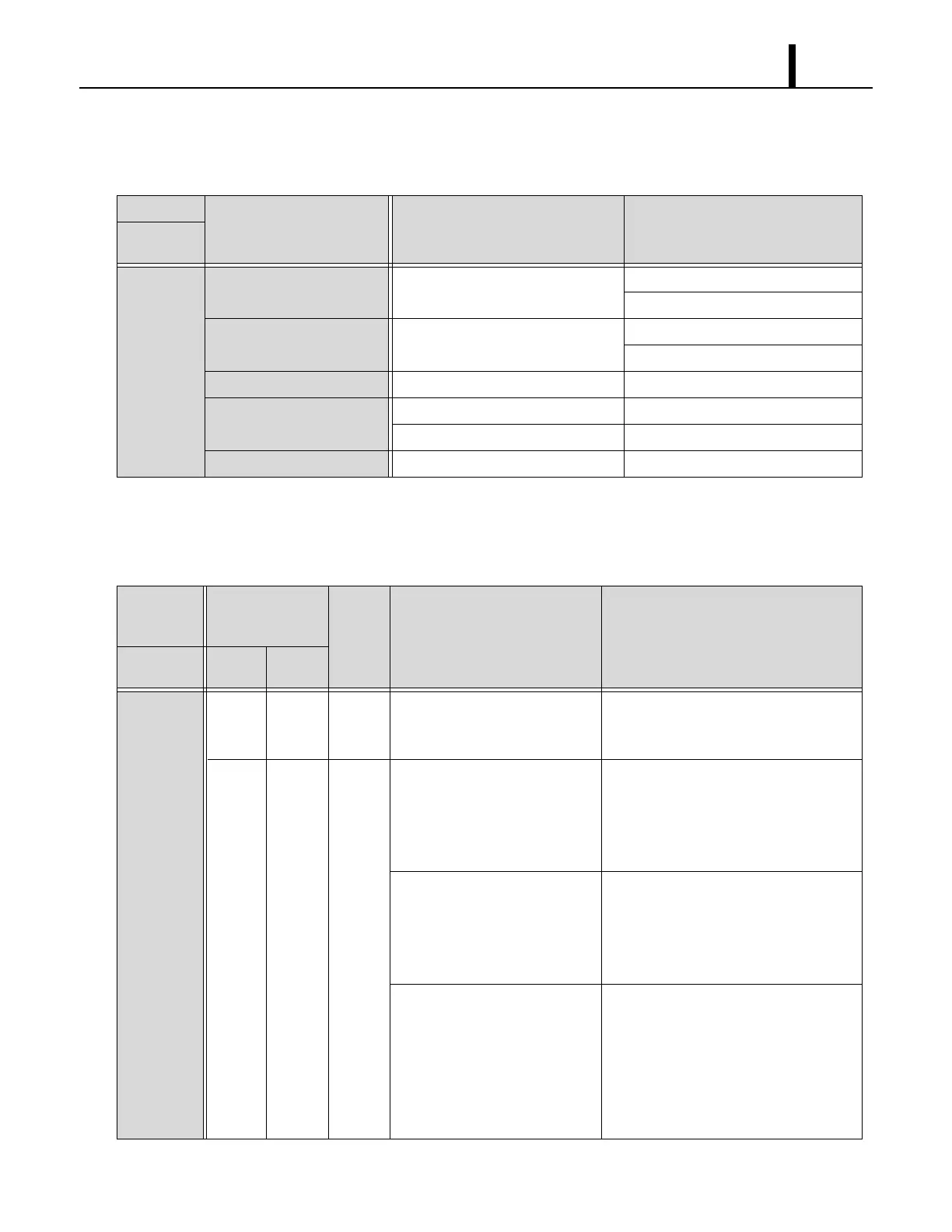
8.3 Troubleshooting Chart
• To accurately troubleshoot the problem, it is important to carefully confirm the nature of the problem.
• Self-diagnostic codes are not displayed for the MWT. To identify the cause, check the LED on
the relay board and refer to the charts on page 48 to 50.
• To clear LED on the relay board for the MWT, reset the power from the circuit breaker.
Condition
Check Area Possible Cause Remedy
Unit does
not operate.
LCD display
turns off.
1. Voltage Power failure. Repair power supply.
Turn the circuit breaker on.
2. Ground fault breaker trip Ground fault or defective ground
fault.
Repair ground fault section.
Reset or repair circuit breaker.
3. Fuse Fuse is blown. Replace fuse on the relay board.
4. WMC/MWT Incorrect connection. Connect the wires correctly.
DIP switch setting is incorrect. Correct DIP switch setting.
5. Stop switch Stop switch is in the STOP position. Turn the stop switch to OPERATE.
Condition
Self-Diagnostic
Codes
(WMC)
Buzzer
Pattern
Possible Cause Remedy
Unit does
not operate.
User
Mode
Service
Mode
LCD
displays
self-
diagnostic
codes.
AL AL 1 Signal is input from the fire
alarm.
Check the fire alarm system and
confirm there is no signal input to the
unit, then RESET the controller
*1
.
PU PU 3 Drain hose clogged
(for internal drain pump).
Remove any blockage or excessive
kinks preventing water flow.
Drain water through the gravitational
drain pipe.
RESET the controller
*1
.
Drain hose trap position is too
high to pump up condensation
water
(for internal drain pump).
Improve hose installation.
(Refer to the operation manual of this unit.)
Drain water through the gravitational
drain pipe.
RESET the controller
*1
.
Internal drain pump is not
working.
Reconnect the internal drain pump and
check connection.
Drain water through the gravitational
drain pipe.
RESET the controller
*1
.
If the internal drain pump still does not
work, replace it.
*1 : To RESET the controller, press RESET button, then press ON/OFF button.









 To Next Page