Repair Section
54
LCD
displays
self-
diagnostic
codes.
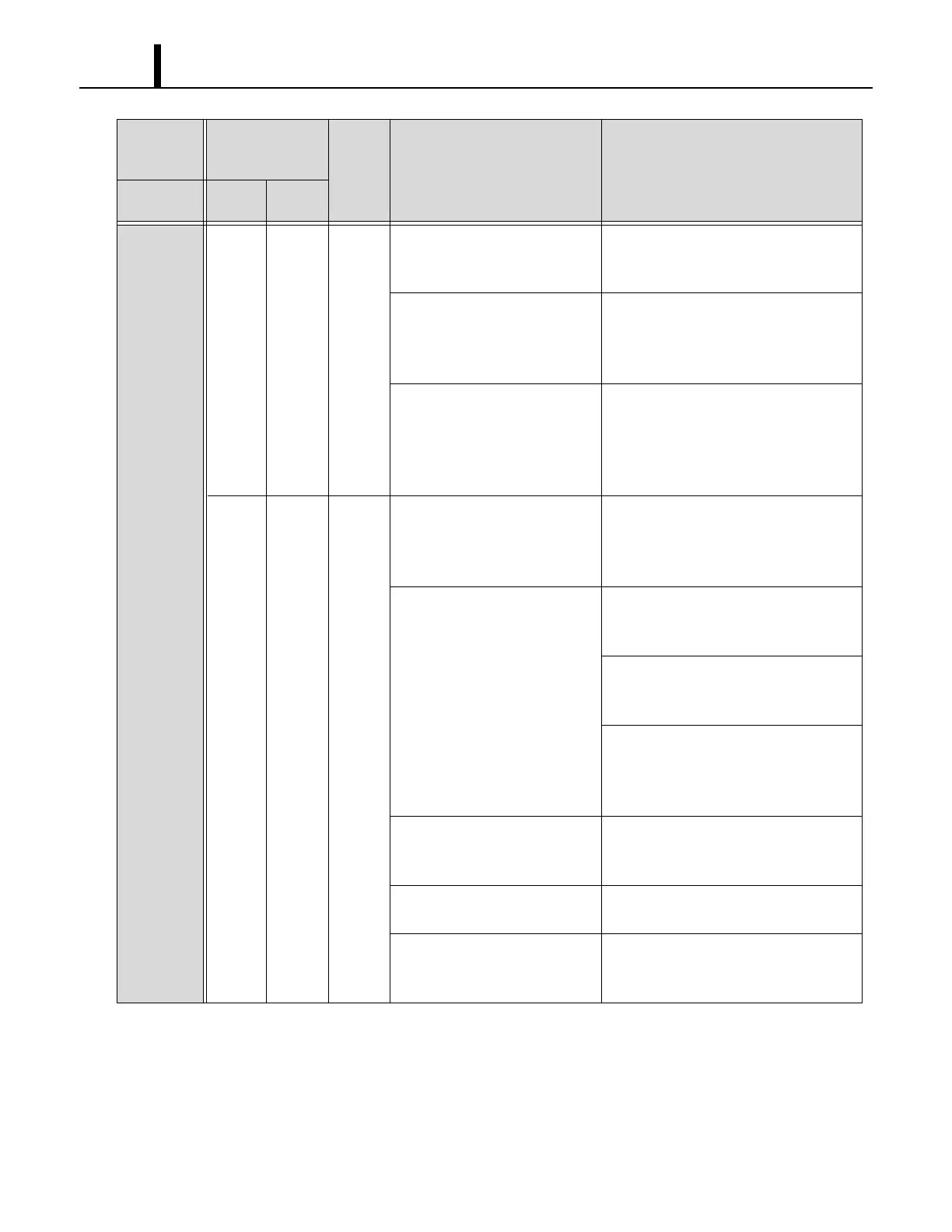
E07 E07 3 Drain hose is clogged
(for optional condensate pump).
Remove any blockage or excessive
kinks preventing air flow.
RESET the controller
*1
.
Drain hose trap position is too
high to pump up condensation
water
(for optional condensate pump).
Improve hose installation.
(Refer to the installation manual of the
optional condensate pump.)
RESET the controller
*1
.
Optional condensate pump is
not working.
Reconnect the condensate pump and
check the connection.
RESET the controller
*1
.
If the optional condensate pump still
does not work, replace it.
HP HP 4 Operating outside of the
operating temperature range.
Check environmental condition. Do not
operate the unit outside the operating
condition range. (See page 9.)
RESET the controller
*1
.
Insufficient water flow. Connect water inlet and outlet of the unit
and water source correctly.
RESET the controller
*1
.
Adjust flow of the supplied water
source. (See page 65.)
RESET the controller
*1
.
Clean water system to remove
accumulated sediment.
(See page 65 to 66.)
RESET the controller
*1
.
Loose high-pressure switch
connection.
Reconnect the high-pressure switch
and check the connection.
RESET the controller
*1
.
Defective high-pressure switch
(short or open).
Replace high-pressure switch.
RESET the controller
*1
.
Refrigerant is over charged. Charge correct amount of refrigerant.
(See page 85.)
RESET the controller
*1
.
Condition
Self-Diagnostic
Codes
(WMC)
Buzzer
Pattern
Possible Cause Remedy
Unit does
not operate.
User
Mode
Service
Mode
*1 : To RESET the controller, press RESET button, then press ON/OFF button.









 To Next Page