Operation Section
40
7.3 Self-Diagnostic Code Display Operation and Control
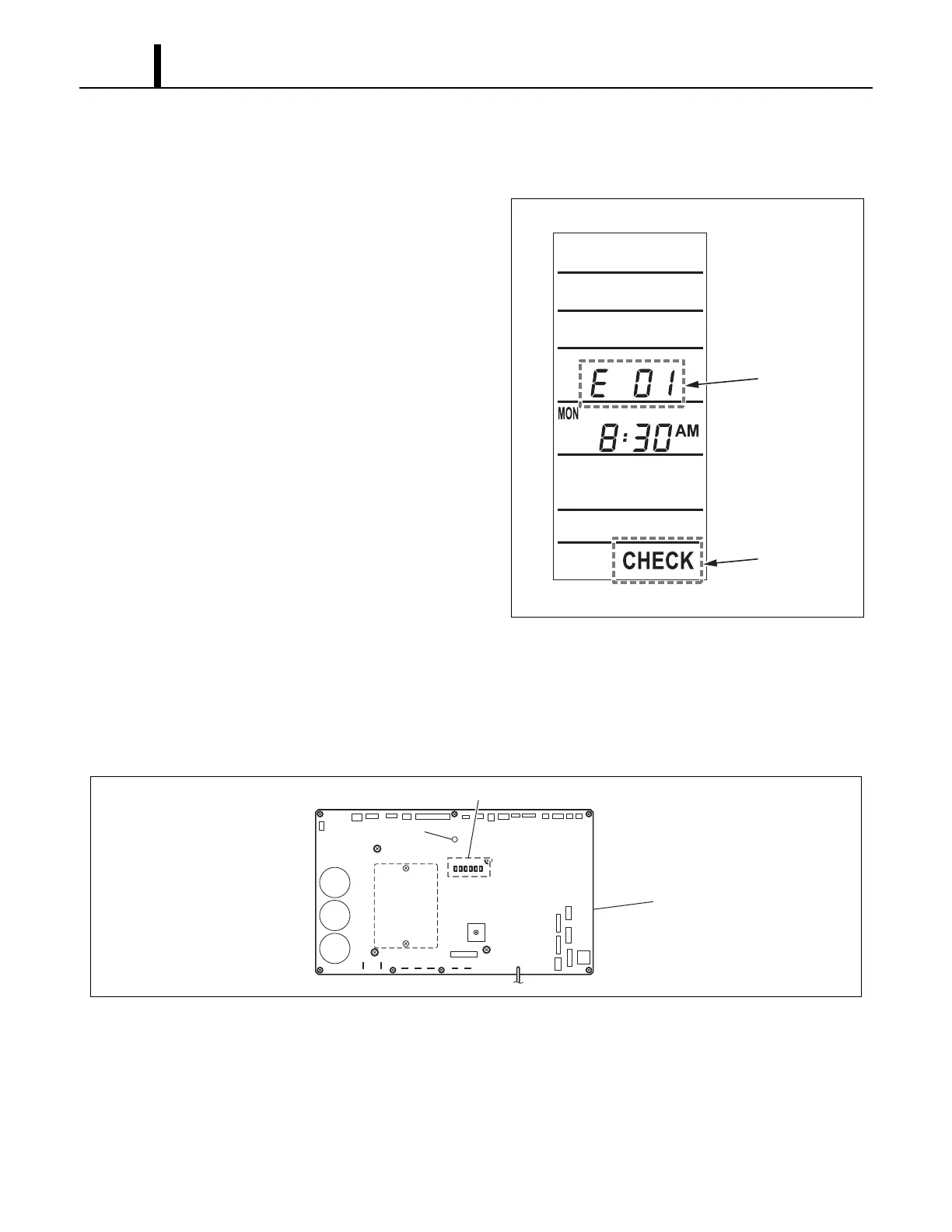
(1) When connected with WMC
• Self-diagnostic codes and “CHECK” are
displayed on the LCD display of the WMC.
Switching the self-diagnostic code display
mode
• The self-diagnostic code display can be
switched between user mode and service
mode.
- Press and hold the “
” and “” buttons
simultaneously for 3 seconds.
- When in the service mode, self-diagnostic
codes flash.
Self-diagnostic code reset
- While the self-diagnostic code is displayed,
press the “RESET” button.
The self-diagnostic code and “CHECK”
displays will turn off, and the system will
switch to standby mode.
(2) When connected with MWT
• Self-diagnostic codes are indicated by illuminated LEDs on the relay board. Self-diagnostic
codes are reset by opening and then closing the circuit breaker.
I003174
Self-Diagnostic
Code
"CHECK"
Turn On
ILL00686-00
LED 7
16
LED 1~6
Relay Board









 To Next Page