ALTAIR 5X PID
37
Operation
US
(3) Set values for Sensor Alarm by pressing the T or S button.
(4) Press the q button to confirm set value.
(5) Repeat setting for all other sensors.
(6) Press the S button to return to the Alarm Options menu.
(7) Repeat setting for all other alarm types.
Instrument Options
The Instrument Options menu allows modification of different device options:
- Sensor Setup (enable/disable the channel)
- Language Setup
- Time Date Setup
- Datalog Intervals
- Stealth Mode
- Operating Beep
- Backlight Options
- VOC Gas Setup
- Bluetooth
Press
- the T button go to next page
the S button to go previous page
the q button to enter setup.
Setting Sensor Options
(1) Press the q button to enter setup.
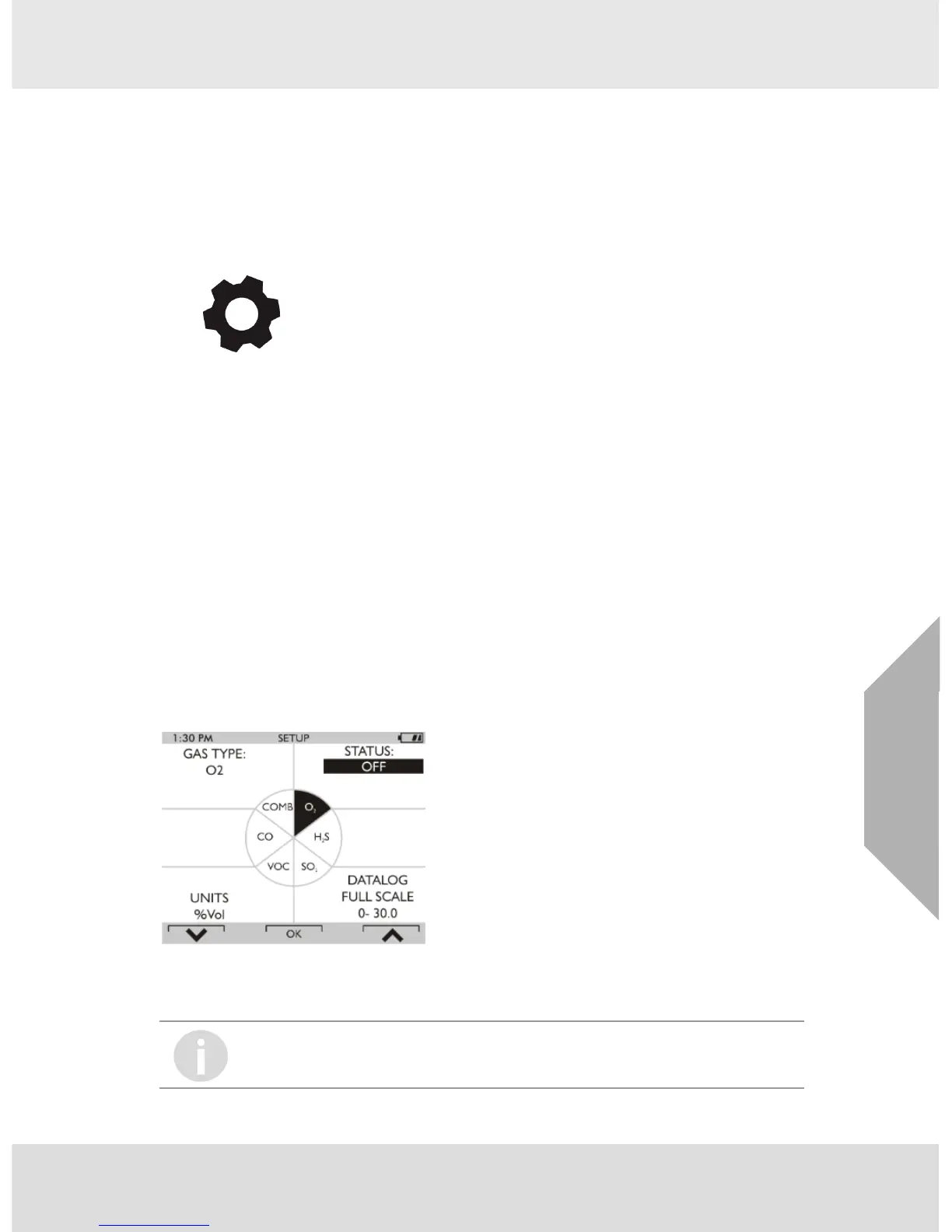
Z Following screen displays:
Fig. 10 Sensor Options Setup
(2) Press the T button to select sensor, press the q button to make changes.
Z The sensor information is displayed and the sensor can be enabled or disabled.
(3) Change status by pressing the T or S button.
SETTINGS
Other operations such as changing the combustible gas type (Methane, Butane,
Propane etc.) and units (ppm to mg/m3) are only possible using the MSA Link software.



 To Next Page