ALTAIR 5X PID
36
Operation
US
Setting MotionAlert Access
Setting this parameter allows access to the MOTIONALERT page from the MEASURE page.
If access is denied here:
- the user cannot access the MOTIONALERT page to enable or disable that feature
- the InstantAlert feature (chapter 3.3) cannot be activated.
(1) To grant or deny user access to the MOTIONALERT page, use the button to change the indi-
cated selection.
User access is:
Z permitted when the setting indicates ON.
Z denied when the setting indicates OFF.
(2) The selection is confirmed by pressing either the T or S button.
Setting Sensor Alarms
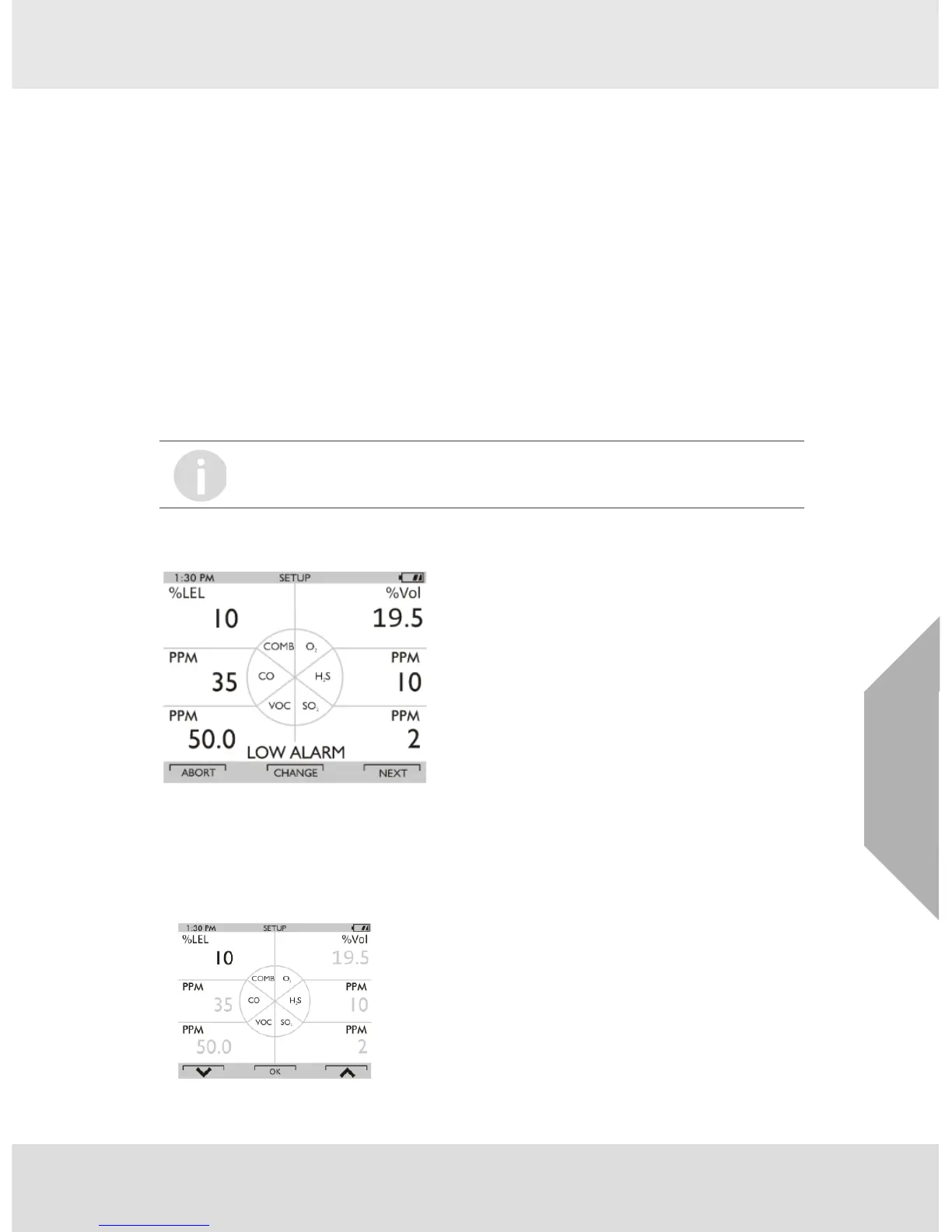
This page allows modifying the preset alarm values of:
- LOW Alarm
- HIGH Alarm
- STEL Alarm
- TWA Alarm.
(1) Press the q button to enter Sensor Alarm setup.
Z LOW Alarm Setup screen displays.
Fig. 8 Sensor Alarm Setup
(2) Press
the T button to abort the operation or
the S button to go to next alarm setup or
the q button to change the alarm setpoints.
Z Alarm Value for the first Sensor displays.
Fig. 9 Sensor Alarm Setup
Factory set alarm levels are shown in chapter 6.1.



 To Next Page