Description
Control terminal
03.06.2014 23
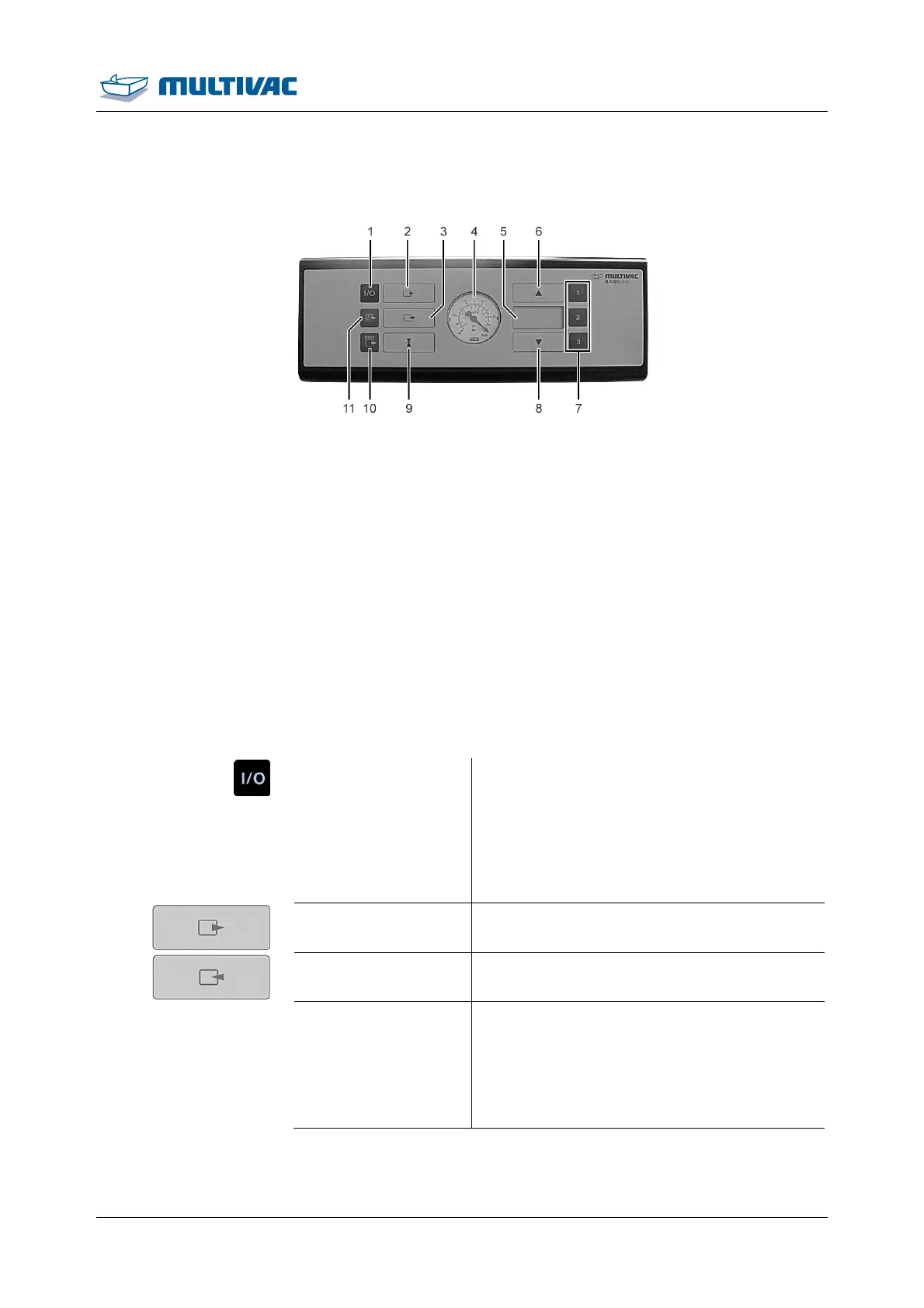
2.3 Control terminal
Fig. 9: Control terminal
1
<Machine control On/Off> key
2
<Evacuation> key
3
<Gas flushing> key
4
Pressure display
5
Display
6
<Arrow> key
7
Keys <1> to <3>
8
<Arrow> key
9
<Sealing> key
10
<Stop> key.
11
<Pump protection> key
<Machine control
On/Off>
• Switch machine control on and off
• Abort the packaging procedure at any time
(e.g. the film pouch has slipped out of posi-
tion or the packaging procedure was
started with the incorrect recipe).
• Abort pump protection function.
<Evacuation> key Call up evacuation time.
<Gas flushing> key Call up gas flushing time.
Pressure display Shows the pressure difference between the
chamber and the outside environment.
Example: if the indicator is at -0.6 bar, this
corresponds to a pressure difference of 600
mbar between the chamber and the outside
environment.



 To Next Page