EasyManua.ls Logo

MultiWave Sensors Smart Aligner - Alignment, Verification, and Reporting

MultiWave Sensors Smart Aligner
34 pages
Print Icon
To Next Page IconTo Next Page
To Previous Page IconTo Previous Page
Loading...
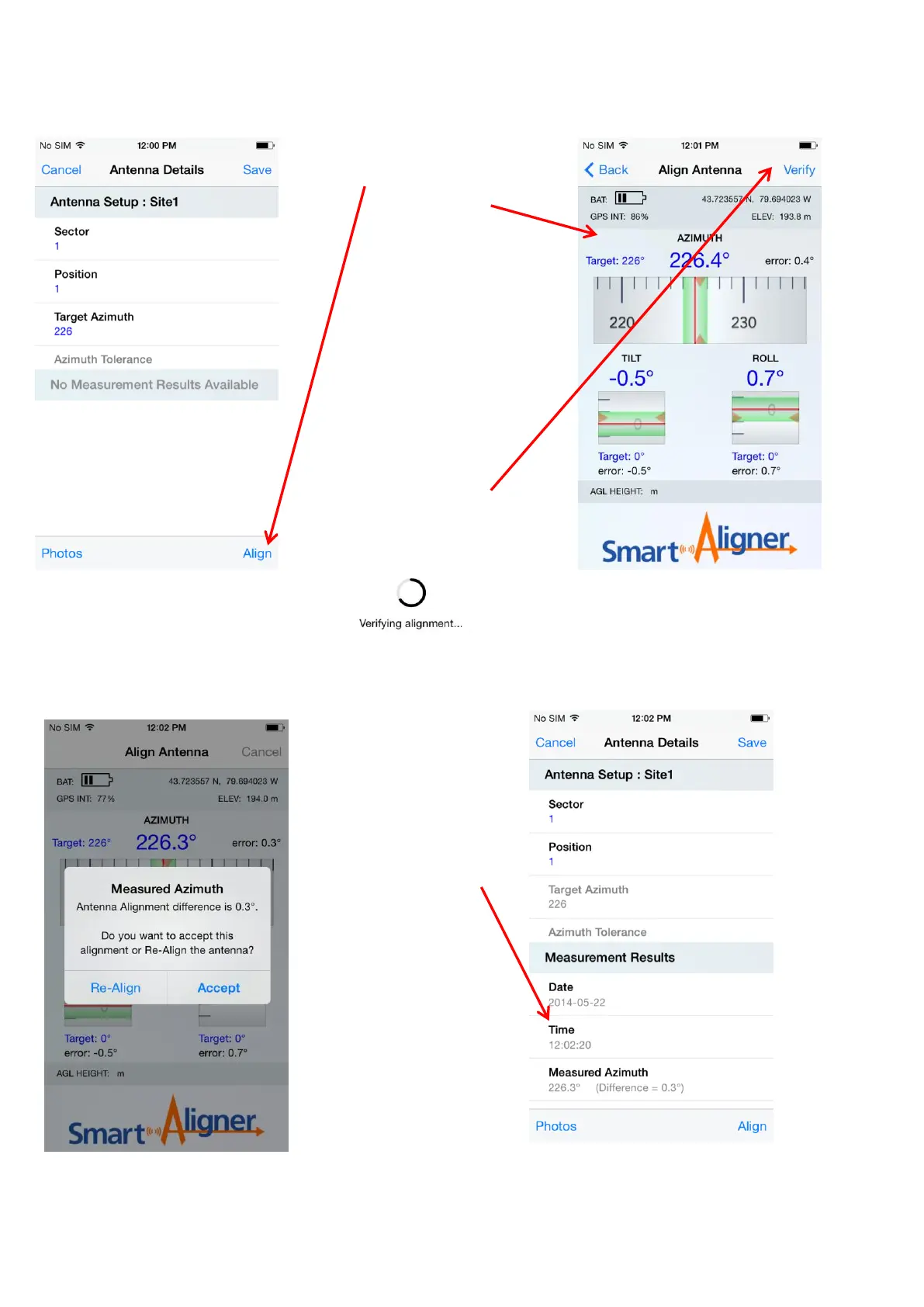
Press “Align”
The “Align Antenna”
screen will be
displayed. The user
aligns the antenna
based on the target
information entered.
Once the user has
aligned the antenna to
the Carrier accuracy
required the user is
now ready for
verification.
Press “Verify”
During verification
the Tool is
calculating the
average Azimuth.
The following
message will be
displayed while
calculating
Screen 5
After Pressing the sec:1 pos:1 Antenna
Screen 6
After Pressing “Align” in Screen 5
Screen 7
After “Verifying alignment” is completed
Screen 8
After pressing “Accept”
“Measurement Results”
are saved and displayed
after accepting the
alignment. You can
scroll down to see all
the results.
16

Other manuals for MultiWave Sensors Smart Aligner