EasyManua.ls Logo

MultiWave Sensors Smart Aligner - Page 17

MultiWave Sensors Smart Aligner
34 pages
Print Icon
To Next Page IconTo Next Page
To Previous Page IconTo Previous Page
Loading...
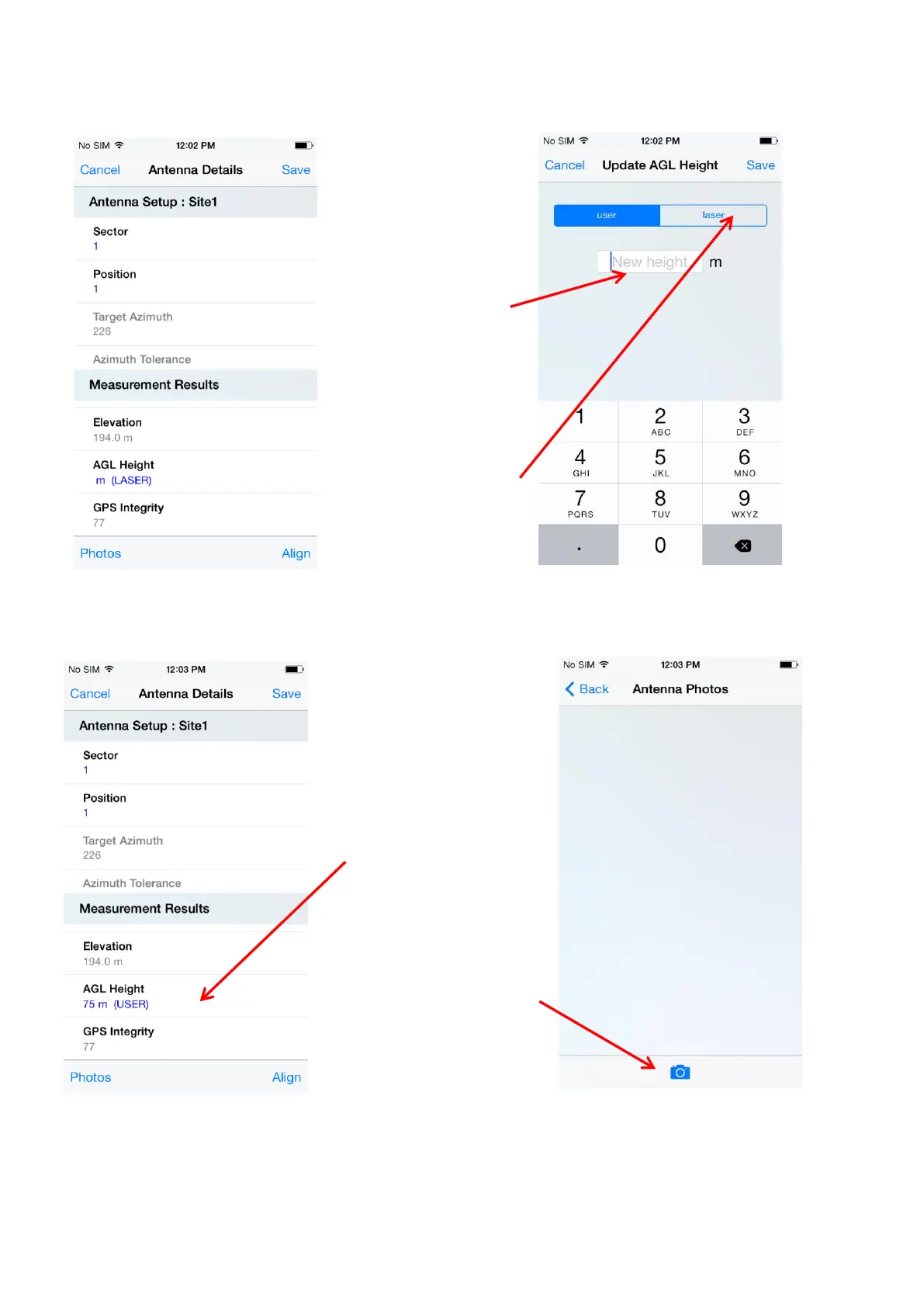
Screen 8-Scroll Down
Screen 9
After tapping “AGL Height”
The ”AGL Height” can
be entered manually
here.
If using the optional
Laser Rangefinder then
tap “Laser” . The
keyboard will disappear.
Connect the Laser
Rangefinder, aim to the
ground and take a shot.
The Tool will
automatically calculate
the AGL and will be
displayed.
Screen 10
After entering an “AGL” from Screen 9
“AGL Height” displayed
here. In this example it
was a manual entry and
therefore it is shown as
“USER”. If a “Laser”
shot was taken it would
display “LASER”
Screen 11
After tapping “Photo” in Screen 10
Tap the camera icon
and the phone camera
will be activated to take
an image
17

Other manuals for MultiWave Sensors Smart Aligner