Page9of41
IMC01 Banknote Counter User Manual
Version 1.06
3.0. Display and Operation Interface
3.1. Display Appearance
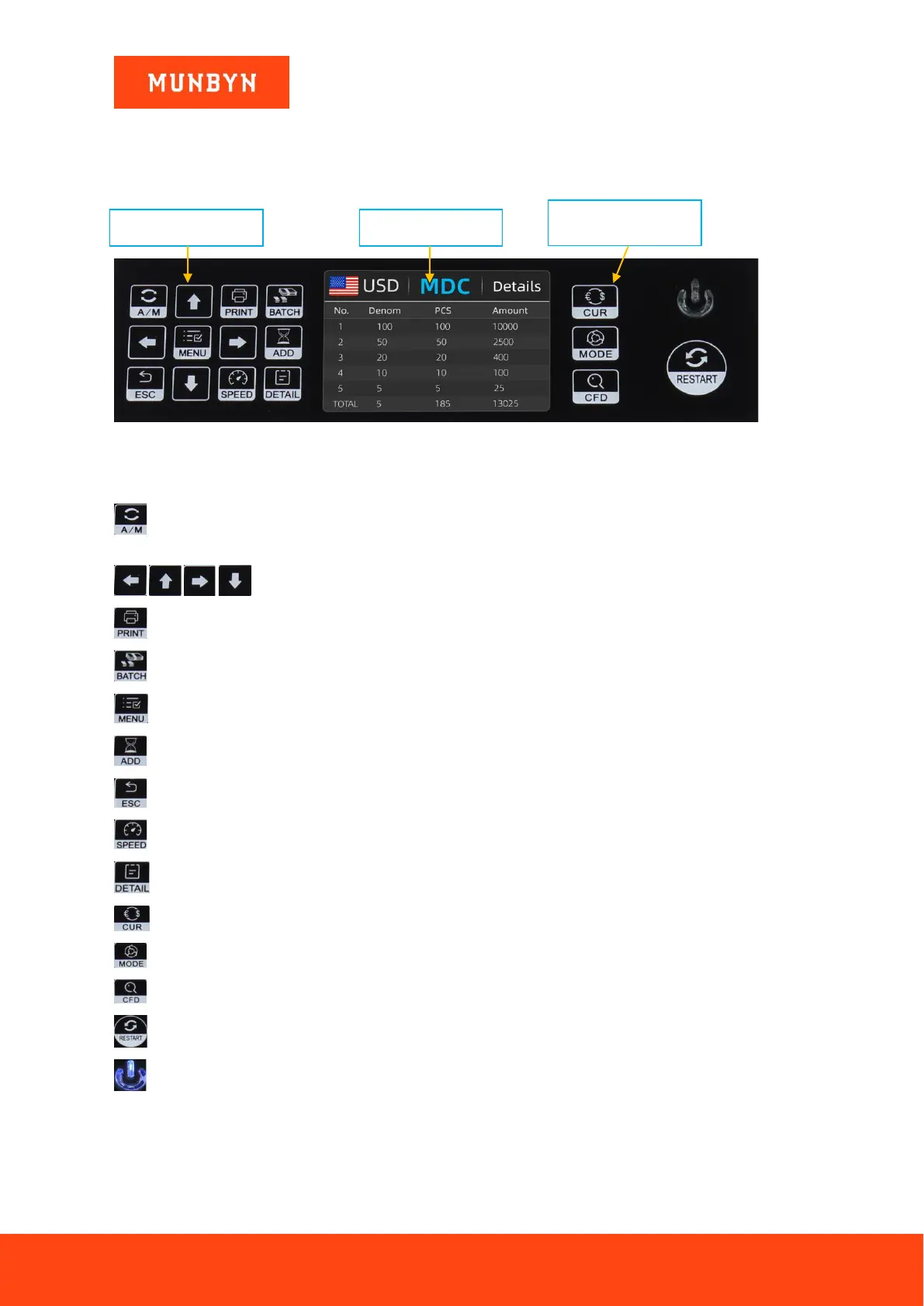
Figure 3-1 Display Appearance
3.2. Operational Instructions for Function Keys
Auto on key, to switch on/off the automatic operation. Auto: automatically counting as long as there is
banknote on the hopper. Manual: manually counting by press the restart key.
Direction keys.
Print key, to print the counted banknotes information.
Batch key, to select the batch number.
Menu key, to enter the menu interface by long pressing the key until a beep sound.
Add key, to switch on/off the accumulation function.
Return key, to return to the previous interface.
Speed key, to select the different available counting speeds.
Detail key, to check the detail counted information.
Currency key, to select the one of currency, auto recognition or multi-currency mode for counting.
Mode key, to select CNT mode, SDC mode or MDC mode for counting.
CFD level key, to select the Counterfeit Detection Sensitivity level.
Restart key, to start counting, or to start other operations.
Power key, long press to enter the standby mode, or press to resume to the working mode



 To Next Page