48 White maintenance settings
Sets up maintenance operation for metallic ink and white ink.
If you do not usually use metallic ink and white ink for regular printing, set to “Little” to curb metallic ink and white ink
consumption in standby status.
This menu is only available for 7 colors and 8 colors settings.
[White Maintenance] includes the following modes.
White maintenance settings
Procedure
[1]
Launch remote panel for the MSM.
"Launching/Displaying/Exiting MUTOH Status Monitor (MSM)" on page 11
[2]
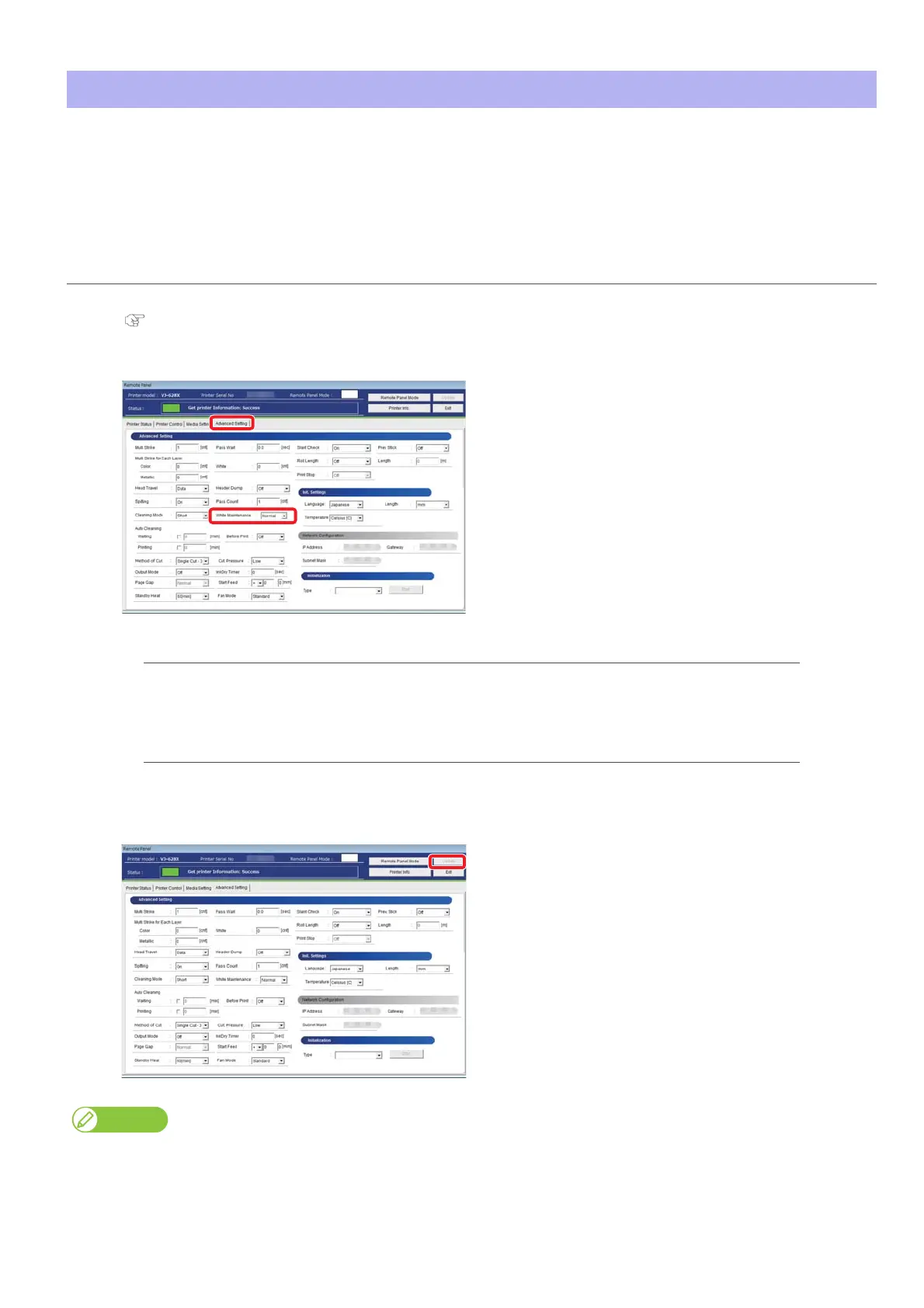
Select the maintenance operation from [White Maintenance] menu on the [Advanced Setting] tab.
Normal: The printer performs metallic ink and white ink's maintenance operations at a regular
frequency. This is the default setting.
Little The printer performs fewer maintenance operations for the minimum metallic ink and
white ink.
[3]
Click “Update”.
• The setting value is applied to the printer.
Metallic ink and white ink tend to settle or coagulate inside the print head or ink tubes.Therefore, the printer regularly discharges a small
amount of metallic ink and white ink to maintain the performance, even in standby status.















 To Next Page