7
Tools Needed
• PH2 Phillips Screwdriver
• Precision 1/8" Flat or PH0 Phillips Screwdriver
• 1/4" Nut Driver
• Drill/Driver
• 7/64" Drill Bit
• Hammer Drill Bits for Drill/Driver
• RJ45 Crimping Pliers
• Multimeter
• Measuring tape
• Conduit Bender
• Conduit Cutter/Reamer
• Hack Saw
• Center Punch Tool
• Hammer
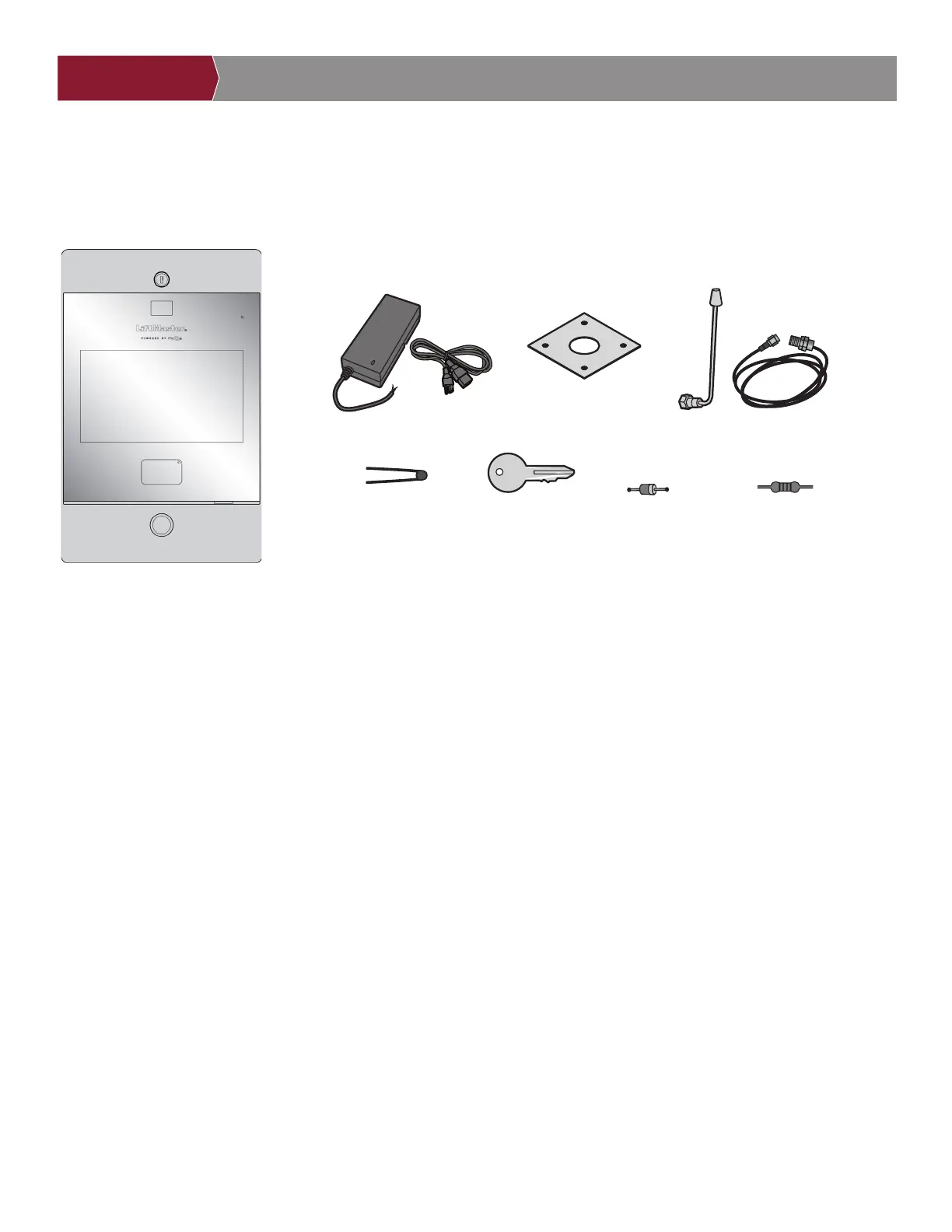
Carton Inventory
ACCOUNT SETUP NETWORK/MOUNTINGPOWER ACCESS CONTROLINTRODUCTION
INTRODUCTION
ACCOUNT SETUP NETWORK/MOUNTINGPOWER ACCESS CONTROL
INTRODUCTION ACCESS CONTROL
ACCOUNT SETUP NETWORK/MOUNTINGPOWER
INTRODUCTION
ACCOUNT SETUP NETWORK/MOUNTINGPOWER ACCESS CONTROL
INTRODUCTION ACCOUNT SETUP NETWORK/MOUNTINGPOWER ACCESS CONTROL
ADDITIONAL TOOLS
RECOMMENDED
• Network LAN Cable Tester
• Wi-Fi Analyzer App (smartphone app)
• Network Analyzer software
• Computer with Ethernet port
• Flat Head Screws for Mounting
Prepare for Installation from CAPXLV2
Be prepared by downloading and completing our Installation Readiness Survey. Assess current Internet connection details of the
community site prior to new unit or upgrade of an installation, and identify action items needed to proceed. You can find this helpful tool
at the following link: https://p.widencdn.net/oyeejd/114a4574.
Power Supply
Goose-neck Gasket
Keys (2)
S10K30MOV
(Metal Oxide Varistor)(4)
1N4005 Diode Kit (4) 100 Ohm 1/4 Watt
Resistor (4)
Radio Antenna (Security+ 2.0
®
)
and Cable


 To Next Page