NAVMAN TRACKER 5507/5607 Installation and Operation Manual
11
2 Basic Operation
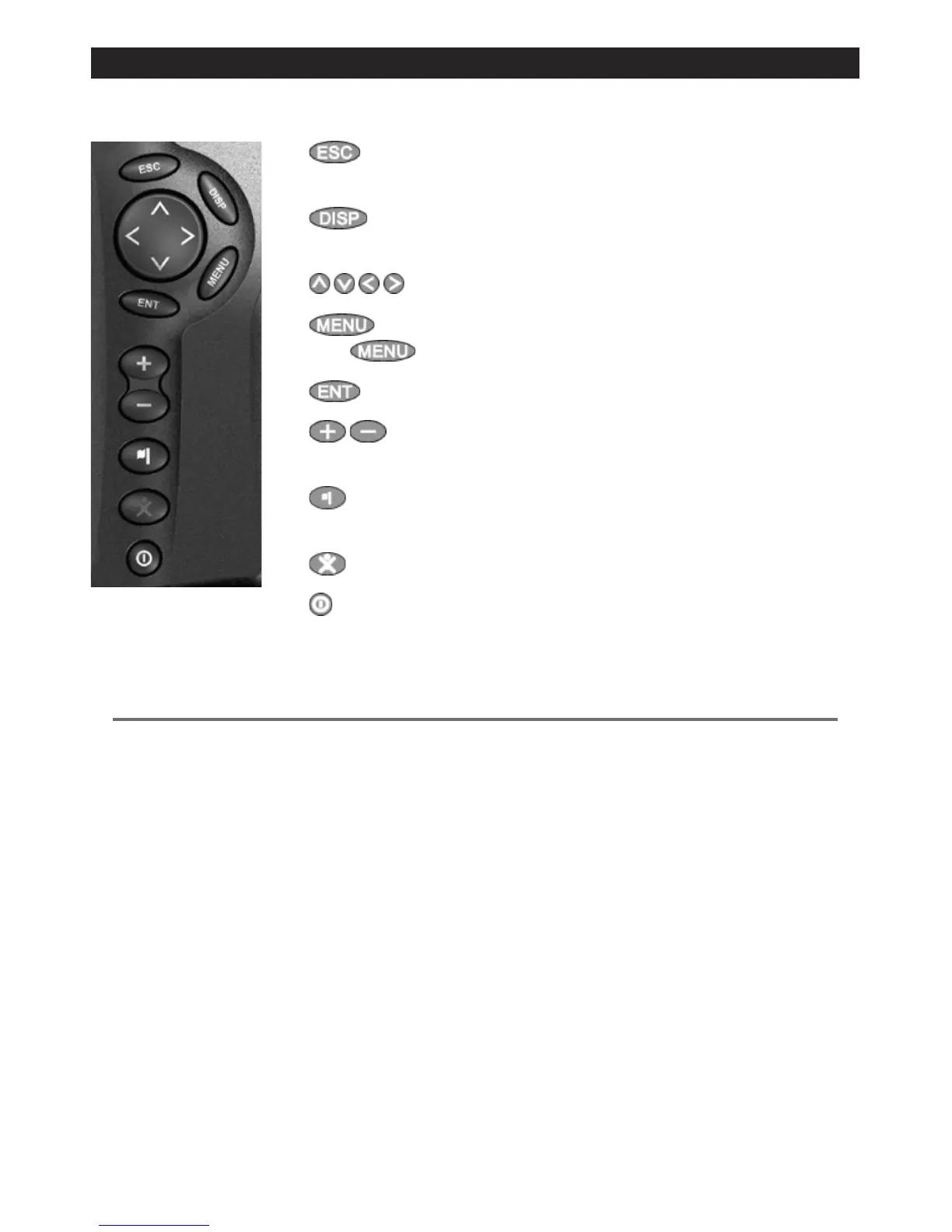
Overview of the keys
ESCAPE - Go back to an earlier menu or display. In chart mode,
centres chart at boat’s position.
DISPLAY - Show a menu of the main displays. To go to a display,
select it from the menu (see section 2-8).
CURSOR KEYS - to move the cursor or the selection highlight.
MENU - Show a menu of the options for the current window.
Press
again to display the Setup menu (see section 15).
ENTER - Start an action or accept a change.
ZOOM - Zoom in or out to display different areas and detail on
the chart.
WAYPOINT - Create an instant waypoint at the boat position
(see section 5-2-1).
MOB - (Man Overboard, see section 2-5).
POWER - Turn 5507/5607 on and off (see section 2-3); adjust the
backlighting (see section 2-4).
2-1 Using the keys
In this manual:
Press means to push the key for less than a second.
Hold means to hold the key down.
The internal beeper beeps when a key is pressed (to disable or enable the beep, see section 15-1).











 To Next Page