NAVMAN TRACKER 5507/5607 Installation and Operation Manual
25
4 Navigation: Highway window
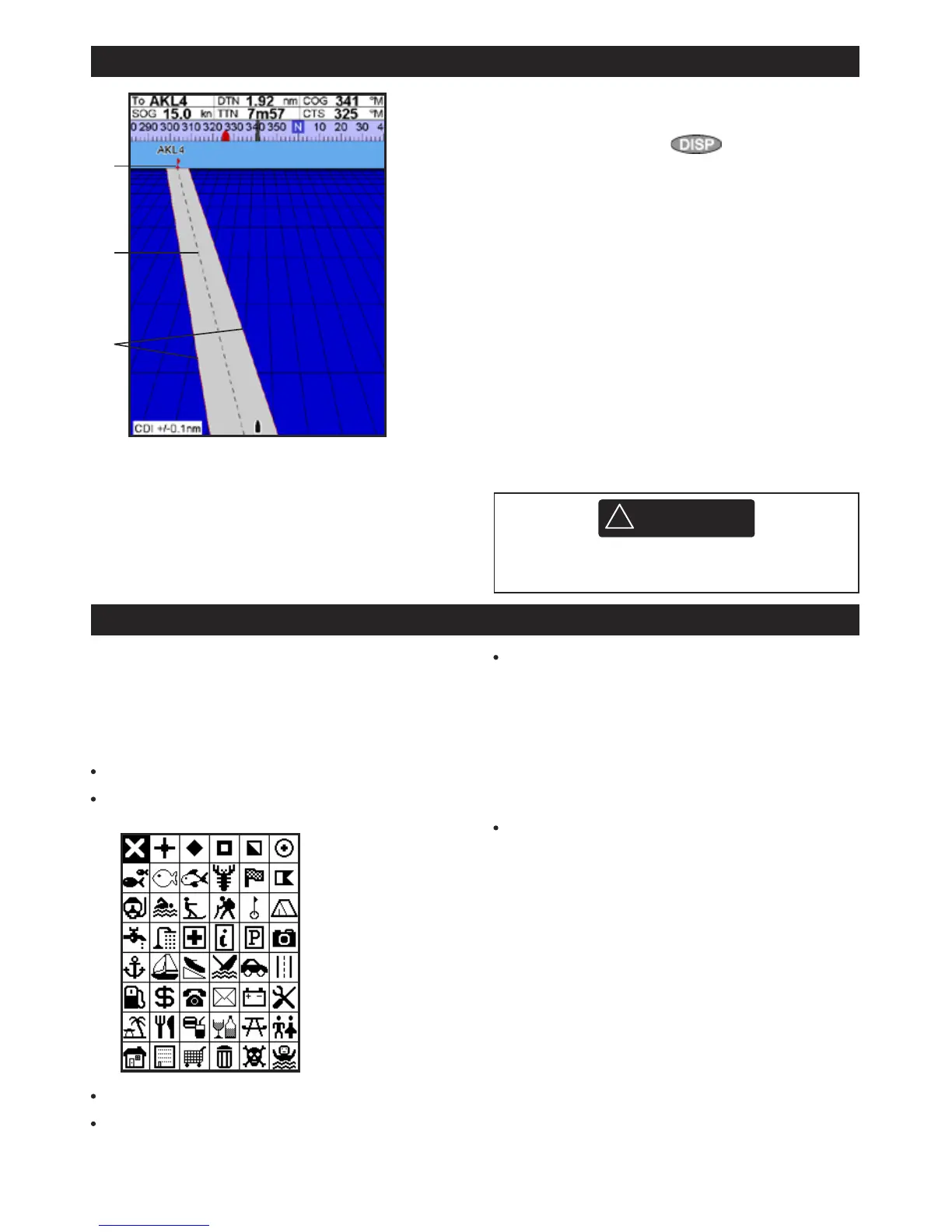
The highway window has a bird’s eye view of
the boat’s course to a destination. To go to the
Highway window, press
, select Other,
then select
Highway.
The highway window shows:
A Optional data header (see section 2-8-3)
B Optional compass (see section 2-8-4)
C Destination waypoint
D Boat’s plotted course to destination
E CDI lines, parallel to the boat’s plotted course
(see Appendix C, CDI). The CDI lines are like a
highway over the water where the boat will
move.
F CDI scale
G The boat position is at the bottom, centre of
the display.
A
B
5 Navigation: Waypoints
A waypoint is a position that you can set on the
5507/5607 chart for example a fishing spot or
a point on a route. The 5507/5607 can have up
to 3000 waypoints. A waypoint can be created,
changed or deleted. A waypoint has:
A name (up to eight characters).
An icon showing what kind of waypoint it is.
The available icons are:
A position.
A color for the waypoint symbol and name
on the chart.
A type:
Normal: A normal waypoint can be
navigated to or included in a route.
Danger: A danger waypoint is a point to
avoid. If the boat comes within the danger
radius of a danger waypoint the unit can
sound an alarm (see section 15-8).
A display option:
Controls how the waypoint is displayed
when the
Waypoints setup option is set to
Selected (see section 15-2):
Off: The waypoint is not displayed.
Icon: The waypoint icon is displayed.
I+N (Icon and Name): The waypoint
icon and name are displayed.
If there are many waypoints, use this feature
to select which waypoints are displayed on
the chart.
Note: The other choices for Waypoints are Hide
all and Show all (see section 15-2).











 To Next Page