NAVMAN TRACKER 5507/5607 Installation and Operation Manual
61
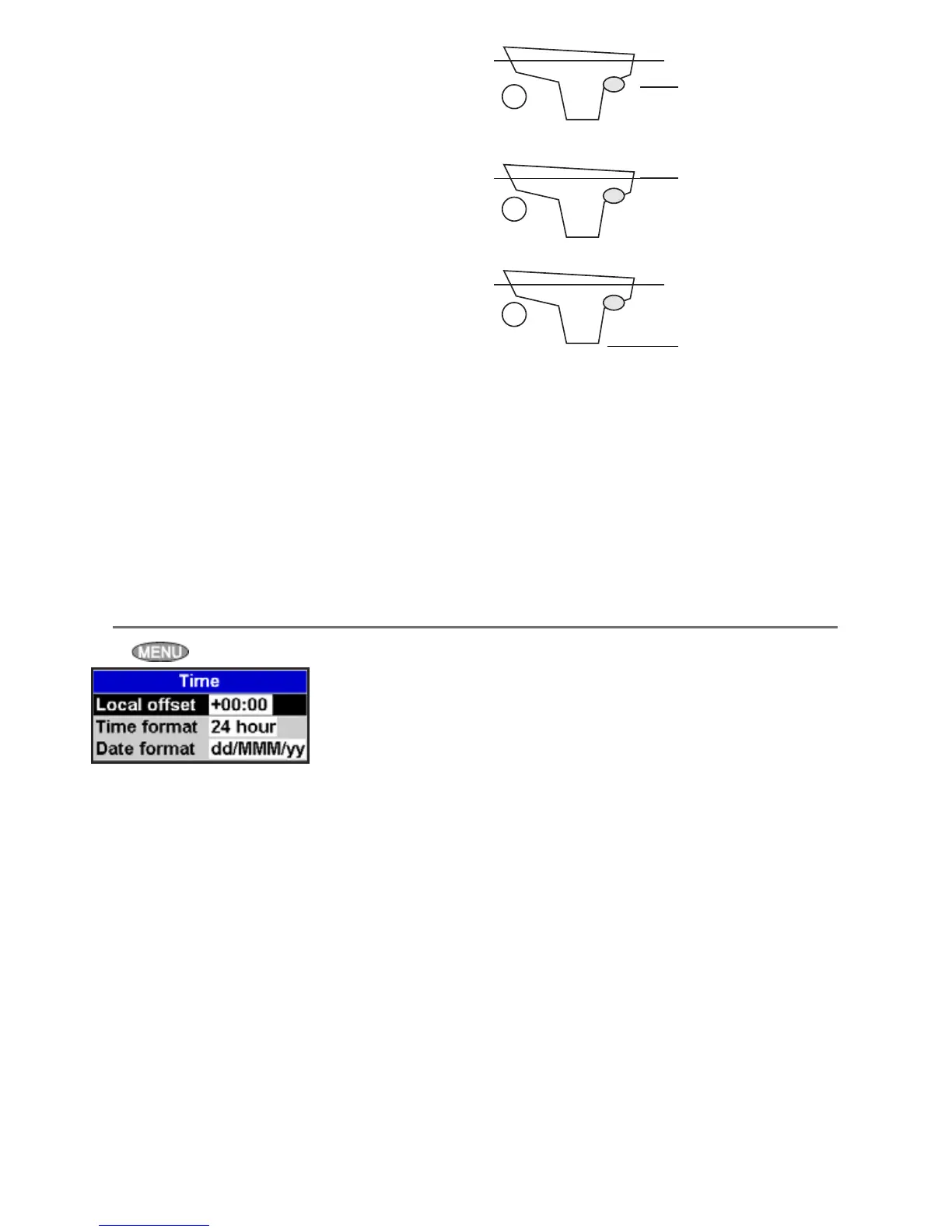
Press twice, then select Time:
Local offset
The difference between local time and UTC
(GMT). Change local offset when daylight saving
time starts and ends. The range is 0 to ± 13 hours,
in 30 minute steps.
Time format
The options are 24 hour or 12 hour.
Date format
The options are dd/MMM/yy, MMM/dd/yy,
dd/MM/yy or MM/dd/yy.
15-12 Setup > Time
Keel Offset
A depth transducer measures depths below where
the transducer is mounted on the boat, usually the
bottom of the boat. The Instrument calculates the
depths to display by adding the keel offset to all
measured depths.
A Have a zero keel offset to display depths
below the transducer.
B Enter a positive keel offset to increase the
displayed depth. For example to display the
total depths below the surface, enter the
depth of the transducer below the surface.
C Enter a negative keel offset to decrease the
displayed depth. For example, to display the
depths of clear water below the boat, enter
minus the depth of the deepest part of the
boat below the transducer.
Transducer;
depths measured
below here
A
B
C
Depths measured
below here
Depths measured
below here
Speed range
The maximum reading to display on an analog
boat speed gauge (see section 10-7). Choose a
range suitable for your boat.
Fuel
See section 10-7, Calibration











 To Next Page