NAVMAN TRACKER 5507/5607 Installation and Operation Manual
41
11 Tides window
The tides window is available on C-MAP charts.
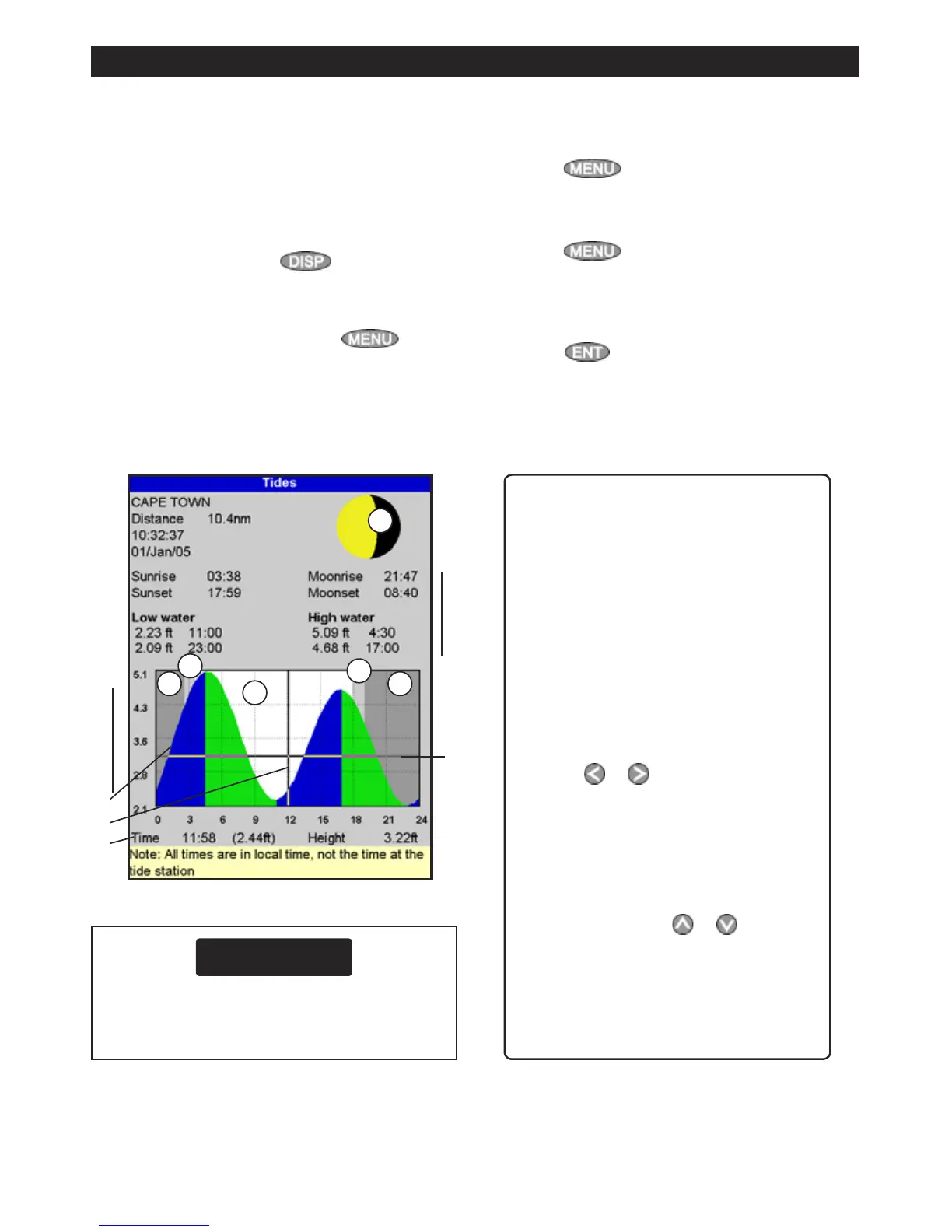
The tides window shows tide information at a
tide station for the selected date.
Note: The tides window requires the local
time offset to be set to work correctly (see
section 15-12)
To show the tides window for the tide station
nearest to the boat, press
, select More,
then select
Tides.
To go to the tides window for any tide station:
1 From the chart window, press
and
select
Find.
2 Select Tide stations.
3 A list of tide stations are displayed. Select the
tide station to display. The chart redraws with
the tide station centred.
4 Press
and select Chart info.
5 Select Tide height.
Choosing the date of the tide chart
1 Press
.
2 Select
Today, Next day or Prev day.
To choose a different date from these, select
Set date, edit the date,
press
.
A Tide station name and distance from
boat
B Current time and chosen date for
display
C Tide chart
D Night
E Dawn
F Day
G Dusk
H Tide height
I Time cursor, a vertical dotted line.
Press
or to move cursor
sideways
J Time of cursor and tide height at that
time
K Data for the chosen date
L Tide height cursor, a horizontal
dotted line. Press
or to move
cursor up and down.
M Height of cursor on the tide chart
N Moon phase for moon at the current
time on the chosen date
The tides window shows data for the chosen date











 To Next Page